Join us at FabCon Atlanta from March 16 - 20, 2026, for the ultimate Fabric, Power BI, AI and SQL community-led event. Save $200 with code FABCOMM.
Register now!The Power BI Data Visualization World Championships is back! Get ahead of the game and start preparing now! Learn more
Hi,
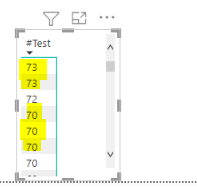
I created a column whereby I subtracted 2 date columns. it works but when I display it in a table or matrix, it duplicates the values.
Hi @Akesh
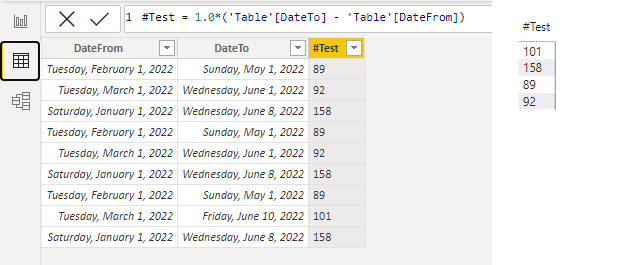
A newer PBI Desktop August version (v. 2.108.825.0) was released on 8/17/2022, which has several fixes on issues in the previous version. You could try the latest version and test it again.
In my test with the latest version, I cannot reproduce the problem. If I only add #Test column to a table or a matrix visual, it doesn't have duplicated values there.
Best Regards,
Community Support Team _ Jing
If this post helps, please Accept it as Solution to help other members find it.
@Akesh , Try like
#Test = int('BI rpt_TelkomOrderStatus'[DeliveryStatusDate] - 'BI rpt_TelkomOrderStatus'[SaleDateTo])
or
#Test = datediff('BI rpt_TelkomOrderStatus'[SaleDateTo], 'BI rpt_TelkomOrderStatus'[DeliveryStatusDate] , day)
Tried both options doesn't work
Try this approach
DATEDIFF(<Date1>, <Date2>, <Interval>)
Did I answer your question? If so, please mark my post as a solution!
Proud to be a Super User!
Tried this, Doesnt work
The Power BI Data Visualization World Championships is back! Get ahead of the game and start preparing now!
| User | Count |
|---|---|
| 37 | |
| 37 | |
| 33 | |
| 32 | |
| 29 |
| User | Count |
|---|---|
| 130 | |
| 88 | |
| 82 | |
| 68 | |
| 64 |