cancel
Showing results for 
Search instead for 
Did you mean: 

The Power BI Data Visualization World Championships is back! Get ahead of the game and start preparing now! Learn more

Reply
Syndicate_Admin
Administrator
Administrator

Subtract Values per week

Hello!

CLCastroEn_0-1633030830615.png

I have a chart that has the x-axis the weeks and as a value the safety stock. I need you to see in the graph the difference between one week and another.

For example. Week 30 there are 399 and week 31 there are 398. So, I need to see in week 31 the value of the difference, that is: -1. So on.

Thanks a lot!

1 ACCEPTED SOLUTION
Anonymous
Not applicable

Hi @Syndicate_Admin 

At first, try my code to build a date table. If you use weeknum, you will get confused at the begining of next year.

For example, 2020/12/31 and 2021/01/01 are in the same week, but weeknum will show you 53 and 1. That's incorrect and will make our calculate difficult. 

Date table:

Date =
ADDCOLUMNS (
    CALENDARAUTO (),
    "Year", YEAR ( [Date] ),
    "Month", MONTH ( [Date] ),
    "Weeknum", WEEKNUM ( [Date], 2 ),
    "YearMonth",
        YEAR ( [Date] ) * 100
            + MONTH ( [Date] )
)

Add calculated columns:

ISO 8601 WeekNum = 
VAR _COUNT0 =
    CALCULATE (
        COUNTROWS ( 'Date' ),
        FILTER (
            'Date',
            'Date'[Year] = EARLIER ( 'Date'[Year] )
                && 'Date'[WeekNum] - 1 = 0
        )
    )
VAR _BASENUM1 =
    IF ( _COUNT0 < 7, 'Date'[WeekNum] - 1, 'Date'[WeekNum] )
VAR _ISO_8601_WeekNum =
    IF (
        WEEKDAY ( DATE ( 'Date'[Year] - 1, 01, 01 ) ) <> 1
            && 'Date'[Year] = 'Date'[Year]
            && _BASENUM1 = 0,
        WEEKNUM ( DATE ( MIN ( 'Date'[Year] ), 12, 31 ), 1 ) - 1,
        _BASENUM1
    )
RETURN
    _ISO_8601_WeekNum
ISO_Year = 
VAR _COUNT0 =
    CALCULATE (
        COUNTROWS ( 'Date' ),
        FILTER (
            'Date',
            'Date'[Year] = EARLIER ( 'Date'[Year] )
                && 'Date'[WeekNum] - 1 = 0
        )
    )
VAR _BASENUM1 =
    IF ( _COUNT0 < 7, 'Date'[WeekNum] - 1, 'Date'[WeekNum] )
RETURN
IF(_BASENUM1 = 0,'Date'[Year] -1,'Date'[Year])
ISO YearWeekNum = 'Date'[ISO_Year]*100+'Date'[ISO 8601 WeekNum]

Build a relationship between your data table and this calendar date table by date column.

Create a measure as below.

Diff =
VAR _CurValue =
    CALCULATE ( SUM ( 'Sample'[Value] ) )
VAR _LastISOYearWeekNum =
    MAXX (
        FILTER (
            ALL ( 'Date' ),
            'Date'[ISO YearWeekNum] < MAX ( 'Date'[ISO YearWeekNum] )
        ),
        'Date'[ISO YearWeekNum]
    )
VAR _LastValue =
    CALCULATE (
        SUM ( 'Sample'[Value] ),
        FILTER ( ALL ( 'Date' ), 'Date'[ISO YearWeekNum] = _LastISOYearWeekNum )
    )
RETURN
    _CurValue - _LastValue

Result is as below.
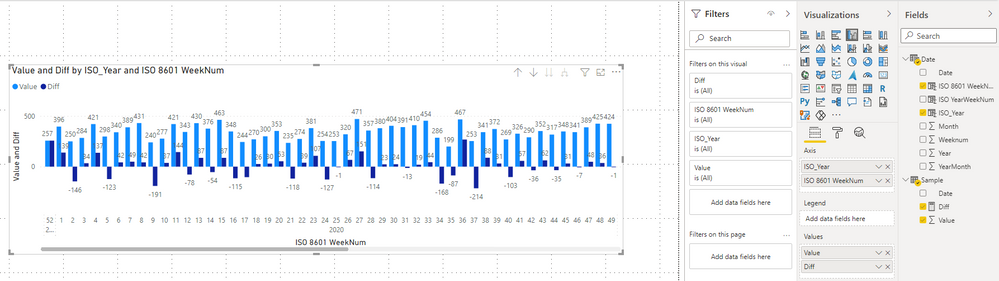
1.png

Best Regards,
Rico Zhou


If this post helps, then please consider Accept it as the solution to help the other members find it more quickly.


View solution in original post

2 REPLIES 2
Anonymous
Not applicable

Hi @Syndicate_Admin 

At first, try my code to build a date table. If you use weeknum, you will get confused at the begining of next year.

For example, 2020/12/31 and 2021/01/01 are in the same week, but weeknum will show you 53 and 1. That's incorrect and will make our calculate difficult. 

Date table:

Date =
ADDCOLUMNS (
    CALENDARAUTO (),
    "Year", YEAR ( [Date] ),
    "Month", MONTH ( [Date] ),
    "Weeknum", WEEKNUM ( [Date], 2 ),
    "YearMonth",
        YEAR ( [Date] ) * 100
            + MONTH ( [Date] )
)

Add calculated columns:

ISO 8601 WeekNum = 
VAR _COUNT0 =
    CALCULATE (
        COUNTROWS ( 'Date' ),
        FILTER (
            'Date',
            'Date'[Year] = EARLIER ( 'Date'[Year] )
                && 'Date'[WeekNum] - 1 = 0
        )
    )
VAR _BASENUM1 =
    IF ( _COUNT0 < 7, 'Date'[WeekNum] - 1, 'Date'[WeekNum] )
VAR _ISO_8601_WeekNum =
    IF (
        WEEKDAY ( DATE ( 'Date'[Year] - 1, 01, 01 ) ) <> 1
            && 'Date'[Year] = 'Date'[Year]
            && _BASENUM1 = 0,
        WEEKNUM ( DATE ( MIN ( 'Date'[Year] ), 12, 31 ), 1 ) - 1,
        _BASENUM1
    )
RETURN
    _ISO_8601_WeekNum
ISO_Year = 
VAR _COUNT0 =
    CALCULATE (
        COUNTROWS ( 'Date' ),
        FILTER (
            'Date',
            'Date'[Year] = EARLIER ( 'Date'[Year] )
                && 'Date'[WeekNum] - 1 = 0
        )
    )
VAR _BASENUM1 =
    IF ( _COUNT0 < 7, 'Date'[WeekNum] - 1, 'Date'[WeekNum] )
RETURN
IF(_BASENUM1 = 0,'Date'[Year] -1,'Date'[Year])
ISO YearWeekNum = 'Date'[ISO_Year]*100+'Date'[ISO 8601 WeekNum]

Build a relationship between your data table and this calendar date table by date column.

Create a measure as below.

Diff =
VAR _CurValue =
    CALCULATE ( SUM ( 'Sample'[Value] ) )
VAR _LastISOYearWeekNum =
    MAXX (
        FILTER (
            ALL ( 'Date' ),
            'Date'[ISO YearWeekNum] < MAX ( 'Date'[ISO YearWeekNum] )
        ),
        'Date'[ISO YearWeekNum]
    )
VAR _LastValue =
    CALCULATE (
        SUM ( 'Sample'[Value] ),
        FILTER ( ALL ( 'Date' ), 'Date'[ISO YearWeekNum] = _LastISOYearWeekNum )
    )
RETURN
    _CurValue - _LastValue

Result is as below.

1.png

Best Regards,
Rico Zhou


If this post helps, then please consider Accept it as the solution to help the other members find it more quickly.


amitchandak
Super User
Super User

@Syndicate_Admin , You need an independent week or year week table, with Rank on Year week.

New column in Date or Ywar week column


new columns
Week Start date = 'Date'[Date]+-1*WEEKDAY('Date'[Date],2)+1
Week End date = 'Date'[Date]+ 7-1*WEEKDAY('Date'[Date],2)
Week Rank = RANKX(all('Date'),'Date'[Week Start date],,ASC,Dense)
OR
Week Rank = RANKX(all('Date'),'Date'[Year Week],,ASC,Dense) //YYYYWW format


measures
This Week = CALCULATE(sum('Table'[Qty]), FILTER(ALL('Date'),'Date'[Week Rank]=max('Date'[Week Rank])))
Last Week = CALCULATE(sum('Table'[Qty]), FILTER(ALL('Date'),'Date'[Week Rank]=max('Date'[Week Rank])-1))

Share with Power BI Enthusiasts: Full Power BI Video (20 Hours) YouTube
Microsoft Fabric Series 60+ Videos YouTube
Microsoft Fabric Hindi End to End YouTube

Helpful resources

Announcements
Power BI DataViz World Championships

Power BI Dataviz World Championships

The Power BI Data Visualization World Championships is back! Get ahead of the game and start preparing now!

December 2025 Power BI Update Carousel

Power BI Monthly Update - December 2025

Check out the December 2025 Power BI Holiday Recap!

FabCon Atlanta 2026 carousel

FabCon Atlanta 2026

Join us at FabCon Atlanta, March 16-20, for the ultimate Fabric, Power BI, AI and SQL community-led event. Save $200 with code FABCOMM.