Get Fabric or SQL Certified for Free.
Get certified for free when you join Fabric Data Days 2026 and dive into Fabric, Power BI, SQL, AI, and other essential data skills.
Join now- Power BI forums
- Get Help with Power BI
- Desktop
- Service
- Report Server
- Power Query
- Mobile Apps
- Developer
- DAX Commands and Tips
- Custom Visuals Development Discussion
- Health and Life Sciences
- Power BI Spanish forums
- Translated Spanish Desktop
- Training and Consulting
- Instructor Led Training
- Dashboard in a Day for Women, by Women
- Galleries
- Data Stories Gallery
- Themes Gallery
- Contests Gallery
- QuickViz Gallery
- Quick Measures Gallery
- Visual Calculations Gallery
- Fabric Apps Gallery
- Notebook Gallery
- Translytical Task Flow Gallery
- TMDL Gallery
- R Script Showcase
- Webinars and Video Gallery
- Ideas
- Custom Visuals Ideas (read-only)
- Issues
- Issues
- Events
- Upcoming Events
July 28 - August 9 | Final Round of the Power BI Dataviz World Championships. This is your chance. Learn more
- Power BI forums
- Forums
- Get Help with Power BI
- Desktop
- Re: Substring and Approximative Match
- Subscribe to RSS Feed
- Mark Topic as New
- Mark Topic as Read
- Float this Topic for Current User
- Bookmark
- Subscribe
- Printer Friendly Page


- Mark as New
- Bookmark
- Subscribe
- Mute
- Subscribe to RSS Feed
- Permalink
- Report Inappropriate Content
Substring and Approximative Match
Hi,
I have an issue and I am really stuck here, let me explain it:
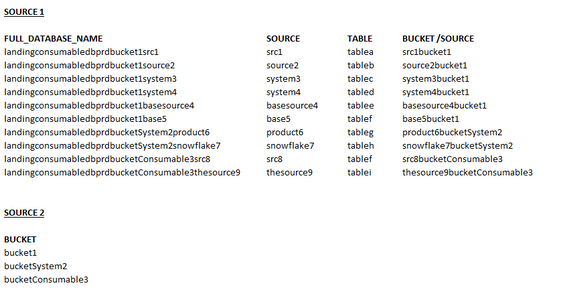
Currently I have 2 sources and no exact matching.
What do I want to achieve?
I want to match SOURCE1.bucket/source with SOURCE2.bucket because at the end I want to have all the information separatly.
database > source> table> bucket
let me know if I can just "split" this column SOURCE1.bucket/source but I there is no logic...
Many thanks,
Naïma
Solved! Go to Solution.


- Mark as New
- Bookmark
- Subscribe
- Mute
- Subscribe to RSS Feed
- Permalink
- Report Inappropriate Content
Hi,
This calculated column formula works
Column = FIRSTNONBLANK(FILTER(VALUES(Buckets[BUCKET]),SEARCH(Buckets[BUCKET],Data[FULL_DATABASE_NAME],1,0)),1)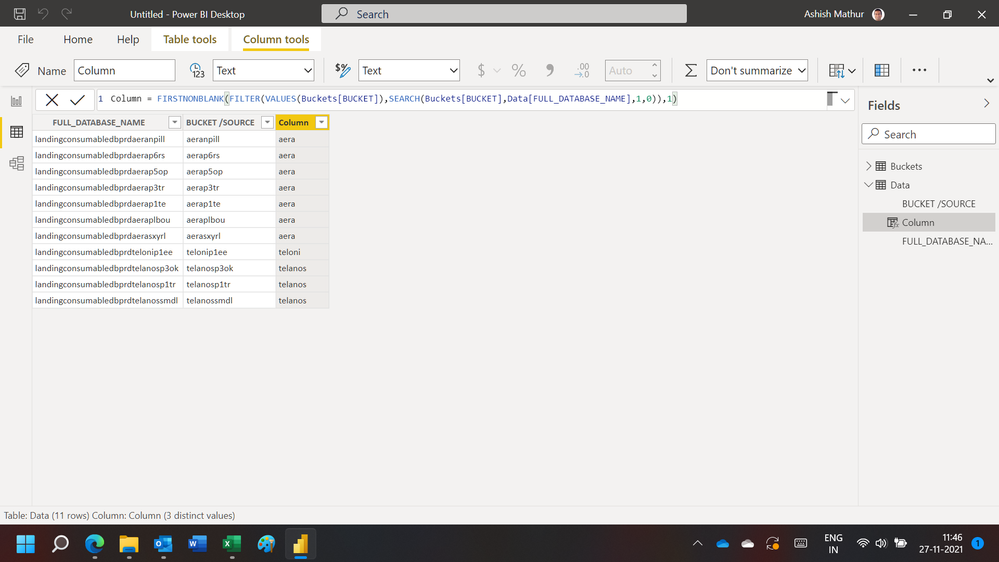
Regards,
Ashish Mathur
http://www.ashishmathur.com
https://www.linkedin.com/in/excelenthusiasts/

- Mark as New
- Bookmark
- Subscribe
- Mute
- Subscribe to RSS Feed
- Permalink
- Report Inappropriate Content
I'd probably do this in Power Query:
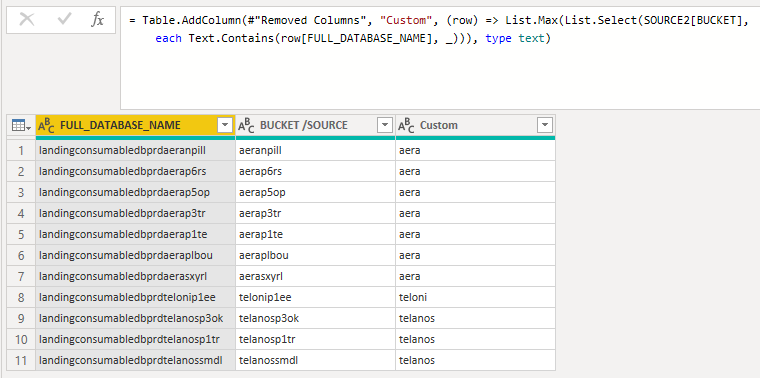
This is the code for the custom column:
(row) =>
    List.Max(
        List.Select(
            SOURCE2[BUCKET],
            each Text.Contains(row[FULL_DATABASE_NAME], _)
        )
    )

- Mark as New
- Bookmark
- Subscribe
- Mute
- Subscribe to RSS Feed
- Permalink
- Report Inappropriate Content
What about using Text.Range with Text.Length from the Source column to get the bucket from the last column?
Post some more realistic data (not a picture) if you want more help, please.
- Mark as New
- Bookmark
- Subscribe
- Mute
- Subscribe to RSS Feed
- Permalink
- Report Inappropriate Content
Below what I could give as data, I hope it will be useful.
Thanks,
SOURCE 1
| FULL_DATABASE_NAME | BUCKET /SOURCE | WHAT I WANT (and I don't have) |
| landingconsumabledbprdaeranpill | aeranpill | aera |
| landingconsumabledbprdaerap6rs | aerap6rs | aera |
| landingconsumabledbprdaerap5op | aerap5op | aera |
| landingconsumabledbprdaerap3tr | aerap3tr | aera |
| landingconsumabledbprdaerap1te | aerap1te | aera |
| landingconsumabledbprdaeraplbou | aeraplbou | aera |
| landingconsumabledbprdaerasxyrl | aerasxyrl | aera |
| landingconsumabledbprdtelonip1ee | telonip1ee | teloni |
| landingconsumabledbprdtelanosp3ok | telanosp3ok | telanos |
| landingconsumabledbprdtelanosp1tr | telanosp1tr | telanos |
| landingconsumabledbprdtelanossmdl | telanossmdl | telanos |
SOURCE 2
| BUCKET |
| aera |
| telanos |
| teloni |
- Mark as New
- Bookmark
- Subscribe
- Mute
- Subscribe to RSS Feed
- Permalink
- Report Inappropriate Content
Hi,
This calculated column formula works
Column = FIRSTNONBLANK(FILTER(VALUES(Buckets[BUCKET]),SEARCH(Buckets[BUCKET],Data[FULL_DATABASE_NAME],1,0)),1)Regards,
Ashish Mathur
http://www.ashishmathur.com
https://www.linkedin.com/in/excelenthusiasts/
- Mark as New
- Bookmark
- Subscribe
- Mute
- Subscribe to RSS Feed
- Permalink
- Report Inappropriate Content
thanks a lot Ashish, your solution works!!
Many thanks to all of you 😗!!!
- Mark as New
- Bookmark
- Subscribe
- Mute
- Subscribe to RSS Feed
- Permalink
- Report Inappropriate Content
You are welcome.
Regards,
Ashish Mathur
http://www.ashishmathur.com
https://www.linkedin.com/in/excelenthusiasts/

- Mark as New
- Bookmark
- Subscribe
- Mute
- Subscribe to RSS Feed
- Permalink
- Report Inappropriate Content
@Kasiop Measure
Measure =
MAXX (
    FILTER (
        CROSSJOIN ( tbl1, tbl2 ),
        CONTAINSSTRING ( tbl1[BUCKET /SOURCE], tbl2[BUCKET] ) = TRUE ()
    ),
    [BUCKET]
)
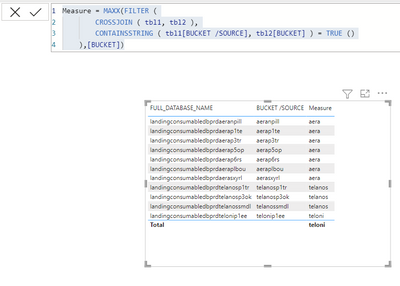
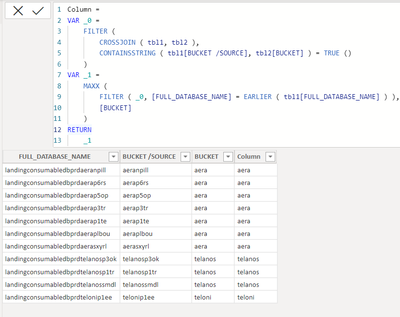
Calculated Column
Column =
VAR _0 =
    FILTER (
        CROSSJOIN ( tbl1, tbl2 ),
        CONTAINSSTRING ( tbl1[BUCKET /SOURCE], tbl2[BUCKET] ) = TRUE ()
    )
VAR _1 =
    MAXX (
        FILTER ( _0, [FULL_DATABASE_NAME] = EARLIER ( tbl1[FULL_DATABASE_NAME] ) ),
        [BUCKET]
    )
RETURN
    _1
========================
Did I answer your question? Mark my post as a solution!
Proud to be a Super User
My Custom Visualization Projects
• Plotting Live Sound: Live Sound
• Beautiful News: Women in Parliament, Energy Mix, Shrinking Armies
• Visual Capitalist: Working Hrs
• Others: Easing Graph, Animated Calendar
MayViz Submissions
• Week 1: View
• Week 2: View
• Week 3: View
• Week 4: View
========================
- Mark as New
- Bookmark
- Subscribe
- Mute
- Subscribe to RSS Feed
- Permalink
- Report Inappropriate Content
Sorry @HotChilli , but I am using dummy data, in reallity I dont have any number on the middle.
- Mark as New
- Bookmark
- Subscribe
- Mute
- Subscribe to RSS Feed
- Permalink
- Report Inappropriate Content
Power Query. Split column by delimiter has ''from digit to non-digit" as an option.
That might do it

Helpful resources

FabCon & SQLCon – Barcelona 2026
Join us in Barcelona for FabCon and SQLCon, the Fabric, Power BI, SQL, and AI community event. Save €200 with code FABCMTY200.

Fabric Community Sticker Challenge - Barcelona 2026
If you love stickers, then you will definitely want to check out our community sticker challenge, Barcelona edition!

Power BI Monthly Update - July 2026
Check out the July 2026 Power BI update to learn about new features.

Power BI DataViz World Championships - June 2026
A new Power BI DataViz World Championship is coming this June! Don't miss out on submitting your entry.

| User | Count |
|---|---|
| 31 | |
| 28 | |
| 24 | |
| 24 | |
| 19 |


| User | Count |
|---|---|
| 44 | |
| 32 | |
| 18 | |
| 17 | |
| 16 |


