cancel
Showing results for 
Search instead for 
Did you mean: 

The Power BI Data Visualization World Championships is back! Get ahead of the game and start preparing now! Learn more

Reply
Anonymous
Not applicable

SubProcess Multpile Instances causing Program Crash

Hello,

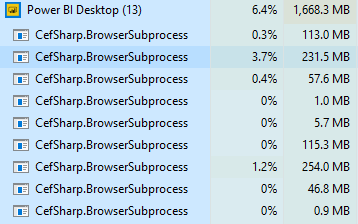
Whenever I access the modeling tab in my model file, it starts lagging terribly and eventually just stalls. I don't know why but a bunch of BroswerSubProcesses start iterating. The image below is what I'm seeing in my task manager. has anyone else experienced this? Any tips on how to fix this?

Capture.PNG

1 ACCEPTED SOLUTION
v-piga-msft
Resident Rockstar
Resident Rockstar

Hi @Anonymous,


Firstly, please check if you have installed the latest version of Power BI Desktop  Version 2.65.5313.841.


I'm afraid that the issue may caused by the complex measures or large data source. Will you have this issue for the simple pbix file?


If it is convenient, please share a dummy pbix file which can reproduce the issue, so that I can have a test in my site? You can upload it to OneDrive or Dropbox and post the link here. Do mask sensitive data before uploading.)


In addition, you also could have a test with the attach pbix to check if you will have that issue with the attachement.


Best Regards,

Cherry

Community Support Team _ Cherry Gao
If this post helps, then please consider Accept it as the solution to help the other members find it more quickly.

View solution in original post

2 REPLIES 2
v-piga-msft
Resident Rockstar
Resident Rockstar

Hi @Anonymous,


Firstly, please check if you have installed the latest version of Power BI Desktop  Version 2.65.5313.841.


I'm afraid that the issue may caused by the complex measures or large data source. Will you have this issue for the simple pbix file?


If it is convenient, please share a dummy pbix file which can reproduce the issue, so that I can have a test in my site? You can upload it to OneDrive or Dropbox and post the link here. Do mask sensitive data before uploading.)


In addition, you also could have a test with the attach pbix to check if you will have that issue with the attachement.


Best Regards,

Cherry

Community Support Team _ Cherry Gao
If this post helps, then please consider Accept it as the solution to help the other members find it more quickly.
Anonymous
Not applicable

Hello,


I'm not having the issue anymore, I believe it was because I was trying to refresh my local front end file while my model was simultaneously refreshing. I also have a large data source so I'm sure that wasn't helping either. Since then, I haven't had this issue again. Thanks for you help!

Helpful resources

Announcements
Power BI DataViz World Championships

Power BI Dataviz World Championships

The Power BI Data Visualization World Championships is back! Get ahead of the game and start preparing now!

December 2025 Power BI Update Carousel

Power BI Monthly Update - December 2025

Check out the December 2025 Power BI Holiday Recap!

FabCon Atlanta 2026 carousel

FabCon Atlanta 2026

Join us at FabCon Atlanta, March 16-20, for the ultimate Fabric, Power BI, AI and SQL community-led event. Save $200 with code FABCOMM.