cancel
Showing results for 
Search instead for 
Did you mean: 

Vote for your favorite vizzies from the Power BI Dataviz World Championship submissions. Vote now!

Reply
Jack09
Frequent Visitor

Sub Total is Not Displaying Correctly When Using Negative Value against particular Value

Hello,


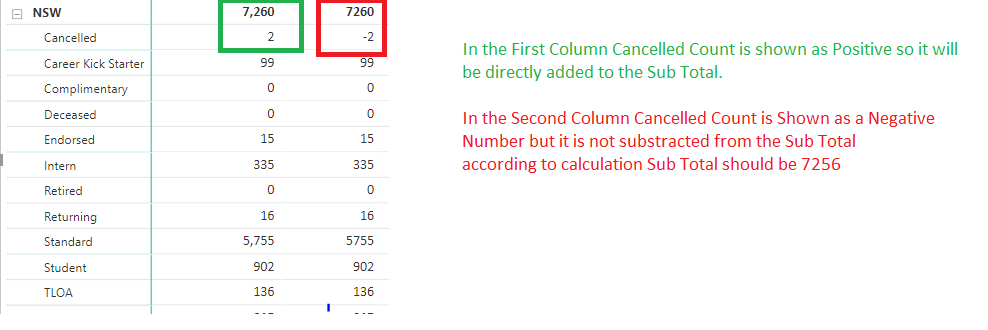
I have the following scenario which is not working in DAX Calculations

 I have also mentioned the used Measure  below the following image.


Calculation Issue.png


Cancelled Counts =
VAR Total =
CALCULATE(
DISTINCTCOUNT('FinancialSummary'[ContactId]),
FILTER('FinancialSummary', 'FinancialSummary'[Membership Type] = 4)
) RETURN

IF(Total = BLANK(), 0, Total * -1)


General Counts =
VAR Total =
CALCULATE(
DISTINCTCOUNT('FinancialSummary'[ContactId]),
FILTER('FinancialSummary', 'FinancialSummary'[Membership Type] <> 4)
) RETURN

IF(Total = BLANK(), 0, Total)

Calculated Counts =
IF(SELECTEDVALUE('FinancialSummary'[Membership Type]) = 4, [Cancelled Counts], [General Counts])


Please provide the solution for this issue.


Thanks in Advance!

1 ACCEPTED SOLUTION
v-xuding-msft
Community Support
Community Support

Hi @Jack09 ,


I suggest  you to create a new measure using the function of SUMX. Then the sub total will be calculated correctly.

Measure = SUMX(FinancialSummary, FinancialSummary[Cancelled Counts])

The following is my sample. You can reference to modify yours.

Measure = VAR a = SUM(Table1[Values])
return
IF(MAX(Table1[NSW]) = "Cancelled",a*-1,a)

Measure 2 = SUMX(Table1,Table1[Measure])

1.jpg


Best Regards,

Xue Ding

If this post helps, then please consider Accept it as the solution to help the other members find it more quickly.

Best Regards,
Xue Ding
If this post helps, then please consider Accept it as the solution to help the other members find it more quickly.

View solution in original post

1 REPLY 1
v-xuding-msft
Community Support
Community Support

Hi @Jack09 ,


I suggest  you to create a new measure using the function of SUMX. Then the sub total will be calculated correctly.

Measure = SUMX(FinancialSummary, FinancialSummary[Cancelled Counts])

The following is my sample. You can reference to modify yours.

Measure = VAR a = SUM(Table1[Values])
return
IF(MAX(Table1[NSW]) = "Cancelled",a*-1,a)

Measure 2 = SUMX(Table1,Table1[Measure])

1.jpg


Best Regards,

Xue Ding

If this post helps, then please consider Accept it as the solution to help the other members find it more quickly.

Best Regards,
Xue Ding
If this post helps, then please consider Accept it as the solution to help the other members find it more quickly.

Helpful resources

Announcements
Power BI DataViz World Championships

Power BI Dataviz World Championships

Vote for your favorite vizzies from the Power BI World Championship submissions!

Sticker Challenge 2026 Carousel

Join our Community Sticker Challenge 2026

If you love stickers, then you will definitely want to check out our Community Sticker Challenge!

January Power BI Update Carousel

Power BI Monthly Update - January 2026

Check out the January 2026 Power BI update to learn about new features.

FabCon Atlanta 2026 carousel

FabCon Atlanta 2026

Join us at FabCon Atlanta, March 16-20, for the ultimate Fabric, Power BI, AI and SQL community-led event. Save $200 with code FABCOMM.