Don't miss your chance to take the Fabric Data Engineer (DP-600) exam for FREE! Find out how by attending the DP-600 session on April 23rd (pacific time), live or on-demand.
Learn moreNext up in the FabCon + SQLCon recap series: The roadmap for Microsoft SQL and Maximizing Developer experiences in Fabric. All sessions are available on-demand after the live show. Register now
Hi ,
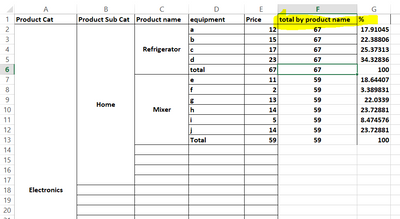
I have a simple requiremet to add a measure as row subtotal.
I am creating a matrix in Power Bi, where I need a measure.
In product name the first one is refrigerator whose sum of all equipments is 67,
so new measure total by product name should display only 67.
Moreover if I filter any equipment like removing a for refrigerator the measure should
display 67-12=55 value.
I tried to use calculate( sum(table[price]), removefilters(table[equipment]) and
calculate( sum(table[price]), allexcept(table[equipment]) but didn;t work.
Thanks for Help
Nobie.
thanks, i got the solution we can normaly do with dax
calculate( sum(table[price]), allselect(table[equipment]))
Please let me know whether you want this result as per the file attached
Proud to be a Super User!
thanks, i got the solution we can normaly do with dax
calculate( sum(table[price]), allselect(table[equipment]))
Power BI does this implicitly, I don't think you would need to add any extra DAX functions here.
You can just use SUM and you would be able to get the required value in MATRIX in Power BI
Please let me know if this is not working. You can provide the screenshot or sample data.
If you have recently started exploring Fabric, we'd love to hear how it's going. Your feedback can help with product improvements.
A new Power BI DataViz World Championship is coming this June! Don't miss out on submitting your entry.
Experience the highlights from FabCon & SQLCon, available live and on-demand starting April 14th.
| User | Count |
|---|---|
| 47 | |
| 44 | |
| 40 | |
| 20 | |
| 15 |
| User | Count |
|---|---|
| 70 | |
| 68 | |
| 32 | |
| 27 | |
| 25 |