cancel
Showing results for 
Search instead for 
Did you mean: 

The Power BI Data Visualization World Championships is back! Get ahead of the game and start preparing now! Learn more

Reply
Confusedpbi
New Member

Stuck trying to figure out how to count the number of items per column. Seems so simple.

My report needs to count the number of items in each category in a column. 


Here is an example of my data. I need to count the number of times an item shows up under Source. I tried count, but it goves me the total, I tried count disctinct but nothing seems to give me the accurate number. 


What do I need to do to count the number of times Google shows up as a source, the number of times Bing shows up, etc? 


Thank you


DateNameSource
3.1.23JoeGoogle
3.5.23MaryBing
3.7.23TomYahoo
3.1.23JoeGoogle
3.5.23MaryBing
3.7.23TomYahoo


1 ACCEPTED SOLUTION
Anonymous
Not applicable

Hi  @Confusedpbi ,


Here are the steps you can follow:

1. Create measure.

Measure =
COUNTX(
    FILTER(ALL('Table'),
    YEAR('Table'[Date])=YEAR(MAX('Table'[Date]))&&
    MONTH('Table'[Date])=MONTH(MAX('Table'[Date]))&&
    'Table'[Name]=MAX('Table'[Name])&&'Table'[Source]=MAX('Table'[Source])),
    [Source])

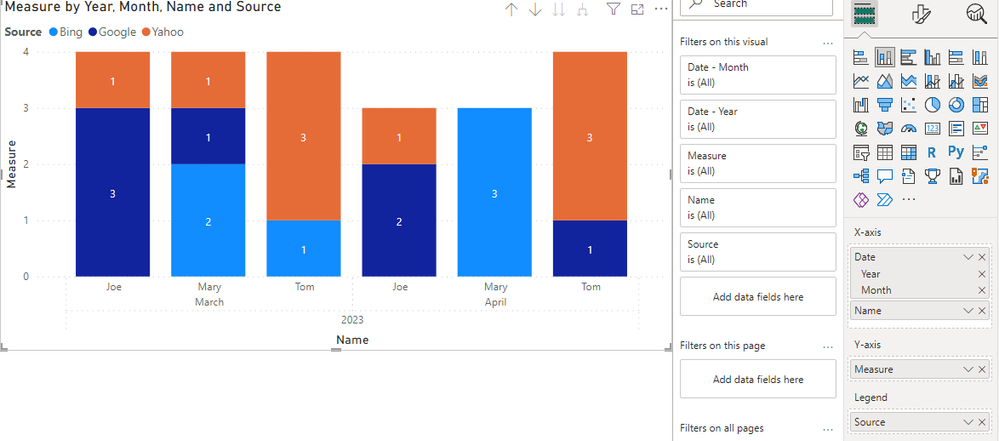
2. Result:

vyangliumsft_0-1680663243656.png

Best Regards,

Liu Yang

If this post helps, then please consider Accept it as the solution to help the other members find it more quickly

View solution in original post

3 REPLIES 3
Anonymous
Not applicable

Hi  @Confusedpbi ,


Here are the steps you can follow:

1. Create measure.

Measure =
COUNTX(
    FILTER(ALL('Table'),
    YEAR('Table'[Date])=YEAR(MAX('Table'[Date]))&&
    MONTH('Table'[Date])=MONTH(MAX('Table'[Date]))&&
    'Table'[Name]=MAX('Table'[Name])&&'Table'[Source]=MAX('Table'[Source])),
    [Source])

2. Result:

vyangliumsft_0-1680663243656.png

Best Regards,

Liu Yang

If this post helps, then please consider Accept it as the solution to help the other members find it more quickly

amitchandak
Super User
Super User

@Confusedpbi , Create a visual with Source as Not Sumamrized field/Axis/Row and use a measure below with that


Count = countrows(Table)


what is the expected output you are not getting


or do you need dynamic segmentation

Dynamic segmentation -Measure to Dimension conversion: https://youtu.be/gzY40NWJpWQ

Share with Power BI Enthusiasts: Full Power BI Video (20 Hours) YouTube
Microsoft Fabric Series 60+ Videos YouTube
Microsoft Fabric Hindi End to End YouTube

@amitchandak I am trying to see how many leads from each lead source my salesperson received. 

As an example: In March, each salesperson received 20 leads from Google, 10 leads from Bing and 15 leads from Yahoo. 


I want Power BI to show me how many leads each person received from each lead source each month. 


Thank you

Helpful resources

Announcements
Power BI DataViz World Championships

Power BI Dataviz World Championships

The Power BI Data Visualization World Championships is back! Get ahead of the game and start preparing now!

November Power BI Update Carousel

Power BI Monthly Update - November 2025

Check out the November 2025 Power BI update to learn about new features.

FabCon Atlanta 2026 carousel

FabCon Atlanta 2026

Join us at FabCon Atlanta, March 16-20, for the ultimate Fabric, Power BI, AI and SQL community-led event. Save $200 with code FABCOMM.