cancel
Showing results for 
Search instead for 
Did you mean: 

The Power BI Data Visualization World Championships is back! Get ahead of the game and start preparing now! Learn more

Reply
slackerhx
Helper II
Helper II

Structuring data for radar chart

Hi All, this forum has been super useful in my PowerBI learning journey as I'm able to solve 80% of the questions just from reading this forum alone !


However, recently I've encountered some issues to produce the following visual with Radar Chart, where i would like to overlay each City (represented by different coloured lines) as I toggle the City Name in the slicer: 
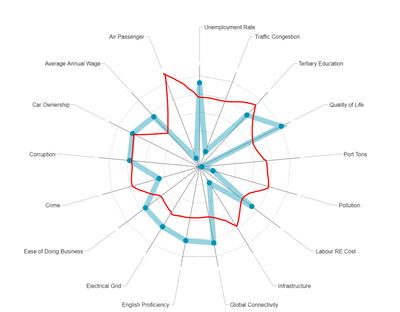
 

Radar query.PNG


My sample data set used to generate the above radar chart is as follows: 


City

Attributes

Rank

Adelaide

Crime Rate

1

Adelaide

Unemployment Rate

3

Adelaide

English Proficiency

1

Adelaide

GDP

2

Adelaide

Air Passenger

3

Beijing

Crime Rate

2

Beijing

Unemployment Rate

1

Beijing

English Proficiency

2

Beijing

GDP

1

Beijing

Air Passenger

1

Pune

Crime Rate

3

Pune

Unemployment Rate

2

Pune

English Proficiency

3

Pune

GDP

3

Pune

Air Passenger

3


Currently, i've placed "Attributes" under Category and "Rank" under Y-Axis. I can't pivot the City column as it is the main link in the relationship to my other data sets. 


Appreciate if anyone has a good suggestion to the above visual. 


Thank you !

7 REPLIES 7
alururavi
New Member

How to fill custom colors for each circle of this radar chart as similar to Excel filled radar chart. 

Anonymous
Not applicable

HI @slackerhx,


I'd like to suggest you to take a look at following link to know how to achieve multiple axis.

Power BI Custom Visuals - Radar Chart


Regards,

Xiaoxin Sheng

Hi Xiaoxin, 


Thanks for the suggestion, unfortunately, it doesn't achieve my intended visuals as the Category section only accepts one field instead of two (which for my case is "City" and "Attributes"). 


I've also tried pivoting the respective attributes to form column names with the values filled by the respective ranks of each city but it still doesn't achieve the desired outcome. 

Anonymous
Not applicable

HI @slackerhx,


For this requirem, you can submit an idea or contact custom visual team to get more support.

In my opinion, I think current it impossible to achieve your requirement on radar visual.


BTW, you can also try to use R visual to draw these graph.

Radar Charts in R


Regards,
Xiaoxin Sheng

Hi Xiaoxin @Anonymous, 


Does plotly requires one to be well-verse in R script as I don't have any knowledge of it? Are there any other alternatives that can be used?


Thank you.

Anonymous
Not applicable

HI @slackerhx,


Nope, I haven't found any other custom visual can achieve this, maybe you can contact to custom visual team to submit this requirement.


Regards,

Xiaoxin Sheng

Helpful resources

Announcements
Power BI DataViz World Championships

Power BI Dataviz World Championships

The Power BI Data Visualization World Championships is back! Get ahead of the game and start preparing now!

December 2025 Power BI Update Carousel

Power BI Monthly Update - December 2025

Check out the December 2025 Power BI Holiday Recap!

FabCon Atlanta 2026 carousel

FabCon Atlanta 2026

Join us at FabCon Atlanta, March 16-20, for the ultimate Fabric, Power BI, AI and SQL community-led event. Save $200 with code FABCOMM.