Join us at FabCon Atlanta from March 16 - 20, 2026, for the ultimate Fabric, Power BI, AI and SQL community-led event. Save $200 with code FABCOMM.
Register now!The Power BI Data Visualization World Championships is back! Get ahead of the game and start preparing now! Learn more
Hi all
This is likely simple and i'm over doing it - But please help.
I have a dataset, there's 1 row per application.
There is a text string column for 'Region' which is annoyingly grouped whatever region the end user has selected, deliminated by a comma.
I need to be able to present the data by region with a sum of applications and costs.
I have used search to identify if a string like "region 1" exists in a row and then gone onto use Switch true to identify where the search result is greater than 0.
This works but only for the rows where the region is the first in the string value. e.g.
Region String = "Region 1, Region 2"
Switch Result = "Region 1"
This is really frustrating. I have a look up table i can use, but given rows can have more than 1 region selected - I'm hitting my head against the wall.
Solved! Go to Solution.
Hi @Anonymous ,
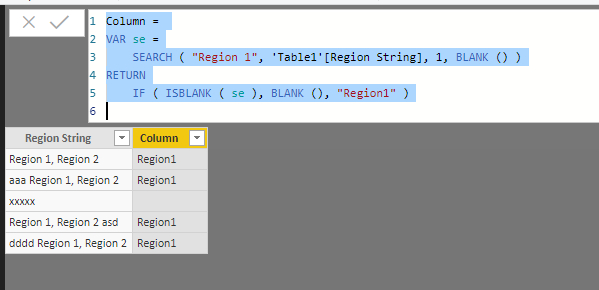
To create a calculated column as below.
Column =
VAR se =
SEARCH ( "Region 1", 'Table1'[Region String], 1, BLANK () )
RETURN
IF ( ISBLANK ( se ), BLANK (), "Region1" )
Hi,
Share a dataset and show the expected result.
Hi @Anonymous ,
To create a calculated column as below.
Column =
VAR se =
SEARCH ( "Region 1", 'Table1'[Region String], 1, BLANK () )
RETURN
IF ( ISBLANK ( se ), BLANK (), "Region1" )
Hi @Anonymous ,
Does that make sense? If so kindly mark my answer as a solution to close the case. Thanks in advance.
The Power BI Data Visualization World Championships is back! Get ahead of the game and start preparing now!
| User | Count |
|---|---|
| 40 | |
| 35 | |
| 34 | |
| 31 | |
| 28 |
| User | Count |
|---|---|
| 137 | |
| 102 | |
| 71 | |
| 67 | |
| 65 |