Join us at FabCon Atlanta from March 16 - 20, 2026, for the ultimate Fabric, Power BI, AI and SQL community-led event. Save $200 with code FABCOMM.
Register now!The Power BI Data Visualization World Championships is back! Get ahead of the game and start preparing now! Learn more
I have a date column in SharePoint list which a query is retrieving. I have created a calculated column -
Solved! Go to Solution.
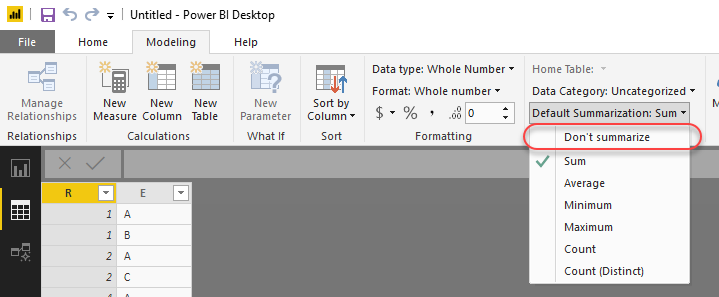
Year() will produce a numeric column. The default summarize by behaviour for a numeric column is to sum it. So 14133 is probably 2019 * the number of rows in your table. You can change this behaviour by clicking on the column then changing the "Default Summarization" property in the modelling ribbon in Power BI.
If you change it to "Do not summarize" Power BI will effectively do a "group by" and just show the distinct values for the year.
Year() will produce a numeric column. The default summarize by behaviour for a numeric column is to sum it. So 14133 is probably 2019 * the number of rows in your table. You can change this behaviour by clicking on the column then changing the "Default Summarization" property in the modelling ribbon in Power BI.
If you change it to "Do not summarize" Power BI will effectively do a "group by" and just show the distinct values for the year.
The Power BI Data Visualization World Championships is back! Get ahead of the game and start preparing now!
| User | Count |
|---|---|
| 38 | |
| 38 | |
| 37 | |
| 28 | |
| 28 |
| User | Count |
|---|---|
| 124 | |
| 89 | |
| 73 | |
| 66 | |
| 65 |