cancel
Showing results for 
Search instead for 
Did you mean: 

July 7 - July 17 | Round 2 of the Power BI Dataviz World Championships. Don't miss your chance! Learn more

Reply
MWilliams
Frequent Visitor

Stop Values from Aggregating

Hi, I am trying to create a matrix in which employee hours are tracked by work category.  There is a value that shows percentage of hours per work category out of employees total hours.  I would then like to multiple the employees salary, 401k, and tax values by this percentage in order to get salary/401k/tax per work category for each employee.  See below image for an example of what I want:  


What I keep ending up with is the below screenshot:


I have the salary, 401k, and tax information for each employee in a seperate excel file, see screenshot below (Forgot column headers but the order is: Employee Name, Work Category, Salary, Tax, 401k).  


Does anyone have any advice on how to achieve my desired result?  


Thank you!


Edit:  I should add that I have already played around with the summarization settings.  Don't summarize is not an option.


4 REPLIES 4
v-danhe-msft
Microsoft Employee
Microsoft Employee

Hi @MWilliams,

From your data and description, it could work normally on my side:

1.PNG

Could you please share your pbix file to have a test if possible?


Regards,

Daniel He


Community Support Team _ Daniel He
If this post helps, then please consider Accept it as the solution to help the other members find it more quickly.

Thank you so much for trying to help @v-danhe-msft!  My PBIX is in the following link: https://drive.google.com/file/d/17WvTpS29TK6dMo3gdKd-lIhGY4-JW_7K/view?usp=sharing

Hi @MWilliams,

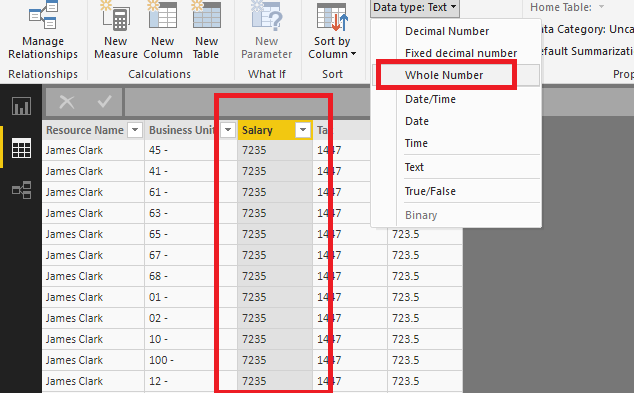
It seemed the format of your [Salary], [Tax] and [401k] showed as text, you need to switch them to number:

1.PNG

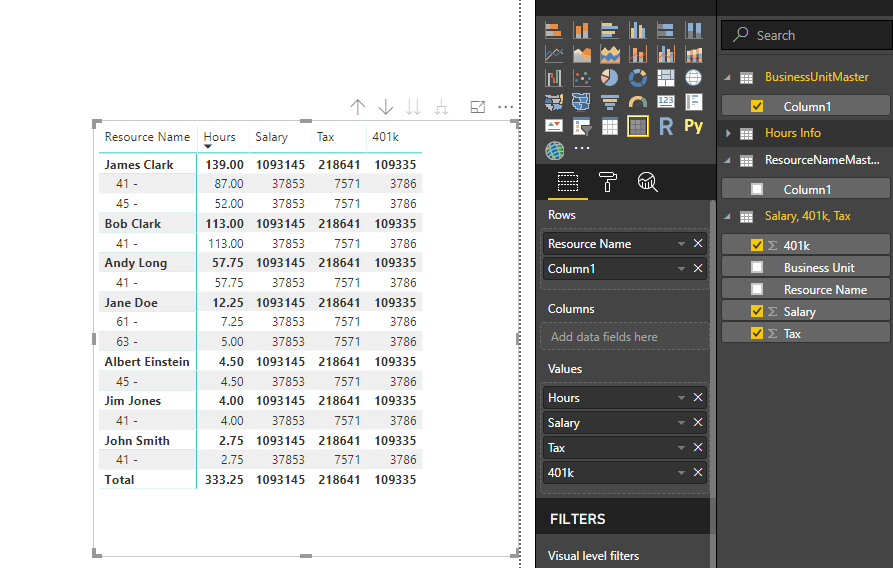
Then I could not figure out the relationships you have created in your pbix, I used the 'Business Unit Master' [Column1] to show the subcolumn:

1.PNG

Hope it could help you.


Regards,

Daniel He

Community Support Team _ Daniel He
If this post helps, then please consider Accept it as the solution to help the other members find it more quickly.

@v-danhe-msft Your output has the same problem mine has.  


The 4090 should be split up proportionally to the hours.  I.E. for Category 41 Salary should be roughly 2550 and for Category 45 roughly 1540.  


As for my relationships, all I did was create separate sheets as masters of ResourceName and Categories because they were not unique within any other data sources.  


Edit: to be clear, my problem is two fold.  The first is getting salary, tax, and 401k to show up proportionally per category.  The second is to fix summarization.  4090 is the entirely wrong number, the values are summarizing as first and don't summarize is not an option.  

Helpful resources

Announcements
FabCon and SQLCon Barcelona 2026

FabCon & SQLCon – Barcelona 2026

Join us in Barcelona for FabCon and SQLCon, the Fabric, Power BI, SQL, and AI community event. Save €200 with code FABCMTY200.

60 days of Data Days Carousel

Data Days 2026

Join Fabric Data Days 2026: 60 days of free live/on-demand sessions, challenges, study groups, and certification opportunities.

Power BI DataViz World Championships carousel

Power BI DataViz World Championships - June 2026

A new Power BI DataViz World Championship is coming this June! Don't miss out on submitting your entry.