cancel
Showing results for 
Search instead for 
Did you mean: 

The Power BI Data Visualization World Championships is back! Get ahead of the game and start preparing now! Learn more

Reply
Ivolution93
Frequent Visitor

Stock At Point In Time

Hello

I am trying to get PowerBI to show the stock at a certian point in time.


I have managed to achieve this in SQL but when i put the SQL script into power it doesnt like the where clause on the date. However when i take this where clause out the SQL finds the stock from the last transaction date. So if i then want to know what the stock was on a certian date, but there has been transactions on a product after that date the stock for this product doesnt show as the MAX transactionID is after this date.

Please see SQL below


SELECT
  stocktransactions.partid,
  stocktransactions.physicalstockquantity,
  stocktransactions.referencedate
FROM
  stocktransactions
  INNER JOIN(SELECT
      stocktransactions.partid,
      Max(stocktransactions.transactionid) AS MaxTransactionID
    FROM
      stocktransactions
    WHERE
      CAST(estocktransactions.referencedate AS DATE) <= ?
    GROUP BY
      stocktransactions.partid) groupedtt ON stocktransactions.partid = groupedtt.partid
    AND stocktransactions.transactionid = groupedtt.MaxTransactionID


The part that BI doesnt like is in bold and larger font.


Can anybody help me?

I want the following to happen.

If a product has a transaction after the date which at the moment i have as a slicer set as before, then i want it to show the maximum latest transaction before that date. However at the moment due to having to take out the BOLD line it just isnt showing as the max transaction date is after the date on the slicer

4 REPLIES 4
v-lili6-msft
Community Support
Community Support

hi, @Ivolution93 

You could try this way as below:

What is the date slicer? Does it create a relationship with "referencedate" or is "referencedate" field?

If so just create a measure like this in visual

Measure =
CALCULATE (
    SUM ( stocktransactions[physicalstockquantity] ),
    FILTER (
        stocktransactions,
        stocktransactions[transactionid ]
            = CALCULATE (
                MAX ( stocktransactions[transactionid ] ),
                ALLEXCEPT ( stocktransactions, stocktransactions[partid] )
            )
    )
)

Then drag stocktransactions.partid, stocktransactions.referencedate and the measure into a table visual.


Best Regards,

Lin

Community Support Team _ Lin
If this post helps, then please consider Accept it as the solution to help the other members find it more quickly.

Hi

the slicer is REFERENCEDATE yes.


i will give this a try thank you

Hello

Thank you for the measure code

I tweaked it slightly to get the correct results, i am wondering if you know how to do one last tweak to get me the table displaying in the way i need.

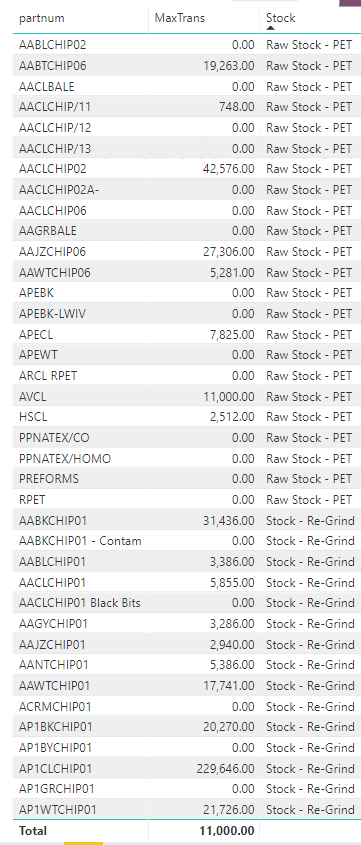
As you can see from the table below i have 2 "STOCK" types

is there a way of getting the sum of all the maxtrans per STOCK type.

When i get rid of part number and just put STOCK as the main heading of the table it just shows the MAX transaction of that stock type before the date on the slicer, but what i need is the total of each product in the stock group and then each stock group added up to give you a stock group total.

Does this make sense, let me know if you need to know anything else


power bi 001.PNG 

HI, @Ivolution93 

I think you need to use SUMX Function in your measure

http://radacad.com/sum-vs-sumx-what-is-the-difference-of-the-two-dax-functions-in-power-bi

Sample data and expected output would help tremendously.

Could you please share a simple pbix file and expected output.

https://community.powerbi.com/t5/Community-Blog/How-to-Get-Your-Question-Answered-Quickly/ba-p/38490


Best Regards,

Lin


Community Support Team _ Lin
If this post helps, then please consider Accept it as the solution to help the other members find it more quickly.

Helpful resources

Announcements
Power BI DataViz World Championships

Power BI Dataviz World Championships

The Power BI Data Visualization World Championships is back! Get ahead of the game and start preparing now!

December 2025 Power BI Update Carousel

Power BI Monthly Update - December 2025

Check out the December 2025 Power BI Holiday Recap!

FabCon Atlanta 2026 carousel

FabCon Atlanta 2026

Join us at FabCon Atlanta, March 16-20, for the ultimate Fabric, Power BI, AI and SQL community-led event. Save $200 with code FABCOMM.