Join us at FabCon Atlanta from March 16 - 20, 2026, for the ultimate Fabric, Power BI, AI and SQL community-led event. Save $200 with code FABCOMM.
Register now!The Power BI Data Visualization World Championships is back! Get ahead of the game and start preparing now! Learn more
Hi All,
I am creating a Health Check report on Power BI. I have various sections and each section has different guidelines and thresholds to be classified as "Healthy" or "Unhealthy". Now I am creating some custom measures in each section which gives a value of 0 or 1 based on the threshold being breached. Based on that I am highlighting the cells using conditional formatting to red/green.
I am looking to create a measure that shows the overall status of a section. Now I have used conditional formatting to highlight a cell in red if it breaches threshold but I wanted a measure which should show the overall status as well.
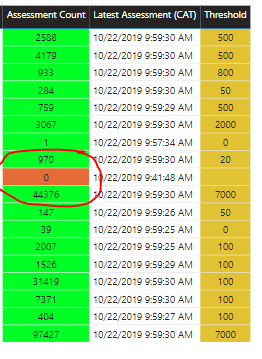
For e.g. In below image if you see one cell is red cause because the threshold is breached, so I want a overall status card to show as “Unhealthy” if any cell is red.
Please note I had posted the exact same problem in below post. But unfortunatelyI had to switch from import to direct query mode and somehow now that measure is not working.
https://community.powerbi.com/t5/Desktop/Health-Status-Card/m-p/831981#M399619
Solved! Go to Solution.
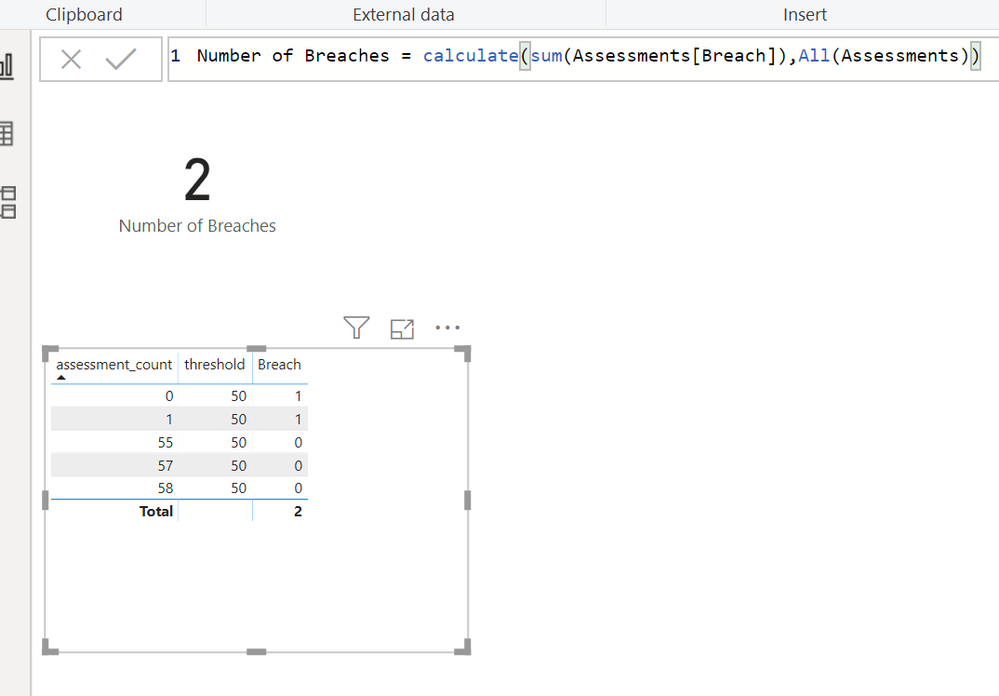
I built a dummy table and loaded it. Then I added a calculated column to tell if each line had breached the threshold
Then I wrote a measure to count all the 1's
I used 2 different tactics. One was to use a calculated column, because i needed access to a row context to easily calculated whether a row had exceeded or not.
The other was to use a measure, because i needed to use Calculate and All to reset the filter context so my count would count all the rows in the table, regardless of whether or not a user had clicked on one of the rows in the interface.
Help when you know. Ask when you don't!
I built a dummy table and loaded it. Then I added a calculated column to tell if each line had breached the threshold
Then I wrote a measure to count all the 1's
I used 2 different tactics. One was to use a calculated column, because i needed access to a row context to easily calculated whether a row had exceeded or not.
The other was to use a measure, because i needed to use Calculate and All to reset the filter context so my count would count all the rows in the table, regardless of whether or not a user had clicked on one of the rows in the interface.
Help when you know. Ask when you don't!
Hi,
So I was have 2 tables - Assessments (Direct Query) and Threshold (Custom created hence import). So I was not able to create your columns in the Assessment table but was able to use them in Threshold table.
Breach = IF(Threshold>Calculate(SUM(Assessment(Assessment Count)),1,0)
Status = IF(MAX(Breach)>0,1,0)
I actaully had the same formula as "Breach" formula above but instead of column I had used measure. So the measure might have caused the status to have measure to have incocorect value.
Hi @kentyler ,
I forgot to mention, the threshold values are actually getting picked from a diffrent table. So the measure is like -
IF(Assessments(latest assessment)<Threshold(Threshold),0,1).
So I am unable to create this calculated column.
I built a dummy table and loaded it. Then I added a calculated column to tell if each line had breached the threshold
Help when you know. Ask when you don't!
The Power BI Data Visualization World Championships is back! Get ahead of the game and start preparing now!
| User | Count |
|---|---|
| 39 | |
| 35 | |
| 33 | |
| 32 | |
| 29 |
| User | Count |
|---|---|
| 136 | |
| 96 | |
| 77 | |
| 67 | |
| 65 |