Join us at FabCon Atlanta from March 16 - 20, 2026, for the ultimate Fabric, Power BI, AI and SQL community-led event. Save $200 with code FABCOMM.
Register now!The Power BI Data Visualization World Championships is back! It's time to submit your entry. Live now!
Hi All,
I am creating a Health Check report on Power BI. I have various sections and each section has different guidelines and thresholds to be classified as "Healthy" or "Unhealthy". Now I am creating some custom measures in each section which gives a value of 0 or 1 based on the threshold being breached. Based on that I am highlighting the cells using conditional formatting to red/green.
I am looking to create a measure that shows the overall status of a section. Now I have used conditional formatting to highlight a cell in red if it breaches threshold but I wanted a measure which should show the overall status as well.
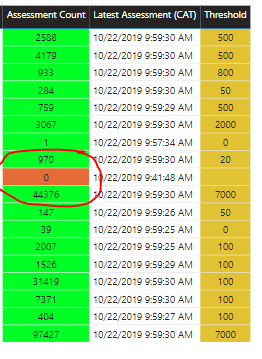
For e.g. In below image if you see one cell is red cause because the threshold is breached, so I want a overall status card to show as “Unhealthy” if any cell is red.
Please note I had posted the exact same problem in below post. But unfortunatelyI had to switch from import to direct query mode and somehow now that measure is not working.
https://community.powerbi.com/t5/Desktop/Health-Status-Card/m-p/831981#M399619
Solved! Go to Solution.
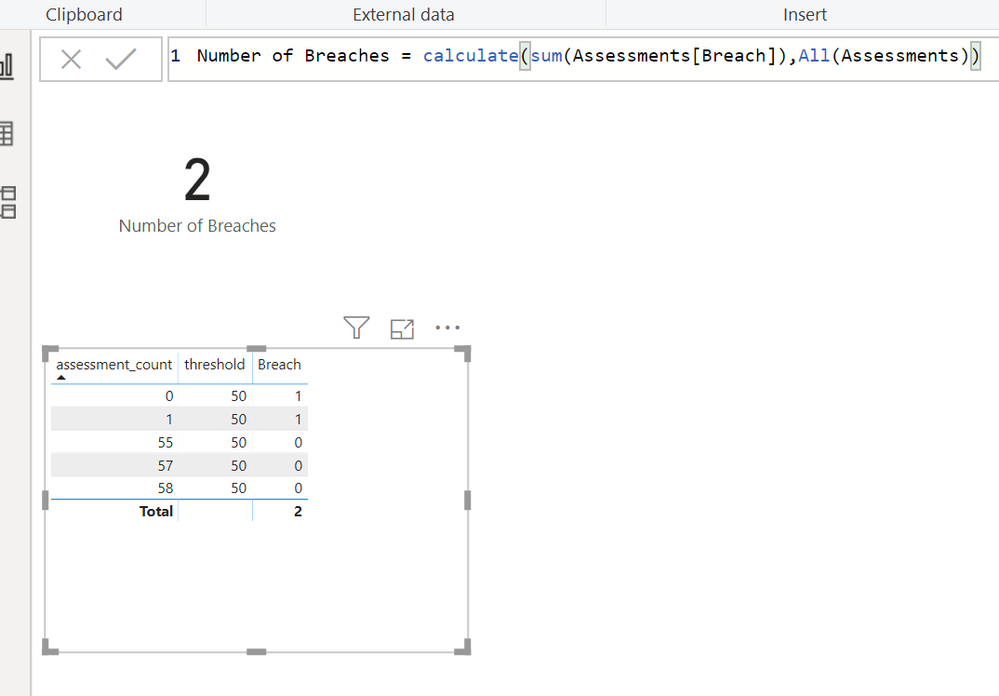
I built a dummy table and loaded it. Then I added a calculated column to tell if each line had breached the threshold
Then I wrote a measure to count all the 1's
I used 2 different tactics. One was to use a calculated column, because i needed access to a row context to easily calculated whether a row had exceeded or not.
The other was to use a measure, because i needed to use Calculate and All to reset the filter context so my count would count all the rows in the table, regardless of whether or not a user had clicked on one of the rows in the interface.
Help when you know. Ask when you don't!
I built a dummy table and loaded it. Then I added a calculated column to tell if each line had breached the threshold
Then I wrote a measure to count all the 1's
I used 2 different tactics. One was to use a calculated column, because i needed access to a row context to easily calculated whether a row had exceeded or not.
The other was to use a measure, because i needed to use Calculate and All to reset the filter context so my count would count all the rows in the table, regardless of whether or not a user had clicked on one of the rows in the interface.
Help when you know. Ask when you don't!
Hi,
So I was have 2 tables - Assessments (Direct Query) and Threshold (Custom created hence import). So I was not able to create your columns in the Assessment table but was able to use them in Threshold table.
Breach = IF(Threshold>Calculate(SUM(Assessment(Assessment Count)),1,0)
Status = IF(MAX(Breach)>0,1,0)
I actaully had the same formula as "Breach" formula above but instead of column I had used measure. So the measure might have caused the status to have measure to have incocorect value.
Hi @kentyler ,
I forgot to mention, the threshold values are actually getting picked from a diffrent table. So the measure is like -
IF(Assessments(latest assessment)<Threshold(Threshold),0,1).
So I am unable to create this calculated column.
I built a dummy table and loaded it. Then I added a calculated column to tell if each line had breached the threshold
Help when you know. Ask when you don't!
| User | Count |
|---|---|
| 49 | |
| 37 | |
| 33 | |
| 22 | |
| 18 |
| User | Count |
|---|---|
| 130 | |
| 100 | |
| 56 | |
| 37 | |
| 37 |