cancel
Showing results for 
Search instead for 
Did you mean: 

July 7 - July 17 | Round 2 of the Power BI Dataviz World Championships. Don't miss your chance! Learn more

Reply
Copycat
Frequent Visitor

Static tooltip value

Good day beautiful people,


Currently I have three columns:

DateScoreClass
1/1/2022 59% A
5/5/2022 99% B


And it goes down to x number of rows. I have a graph where I present a score for each class per each week / month.

What I would like to do is a static score value to be presented in tooltip as "Primary Score". By that I mean to get the very 1st value from Score column and show it in a tooltip for every other single value, even if Date filter won't include this date.


For example:

1/1/2022 45%
2/2/2022 56%
3/3/2022 88%
4/4/2022 14%
5/5/2022 38%
6/6/2022 44%
7/7/2022 36%

In this case, for values from 1/1/2022 to 7/7/2022 I would like to see 45% in a tooltip for every single one. Also, I would like to see this 45% even if slicer is on 4/4/2022 - 7/7/2022.


I would appriciate any help.

1 ACCEPTED SOLUTION
v-yanjiang-msft
Community Support
Community Support

Hi @Copycat ,

According to your description, here's my solution.

Measure =
VAR _MIN =
    MINX (
        FILTER ( ALL ( 'Table' ), 'Table'[Class] = MAX ( 'Table'[Class] ) ),
        'Table'[Date]
    )
RETURN
    MAXX ( FILTER ( ALL ( 'Table' ), 'Table'[Date] = _MIN ), 'Table'[Score] )

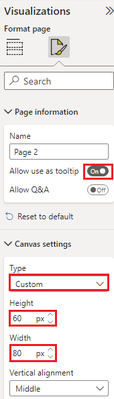
Then create a new page, in the page formatting pane, turn on "Allow use as tooltip", and select custom cavans, then set the suitable height and width.

vkalyjmsft_0-1669692493475.png

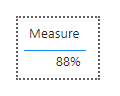
Then create a table visual in the page and put the measure in the visual.

vkalyjmsft_1-1669692618848.png

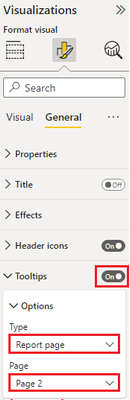
In the original page, turn on the Tooltips option and select Report page, select Page2.

vkalyjmsft_2-1669692671634.png

Get the correct result:

vkalyjmsft_3-1669692741642.png

I attach my sample below for your reference.


Best Regards,
Community Support Team _ kalyj

If this post helps, then please consider Accept it as the solution to help the other members find it more quickly.


View solution in original post

1 REPLY 1
v-yanjiang-msft
Community Support
Community Support

Hi @Copycat ,

According to your description, here's my solution.

Measure =
VAR _MIN =
    MINX (
        FILTER ( ALL ( 'Table' ), 'Table'[Class] = MAX ( 'Table'[Class] ) ),
        'Table'[Date]
    )
RETURN
    MAXX ( FILTER ( ALL ( 'Table' ), 'Table'[Date] = _MIN ), 'Table'[Score] )

Then create a new page, in the page formatting pane, turn on "Allow use as tooltip", and select custom cavans, then set the suitable height and width.

vkalyjmsft_0-1669692493475.png

Then create a table visual in the page and put the measure in the visual.

vkalyjmsft_1-1669692618848.png

In the original page, turn on the Tooltips option and select Report page, select Page2.

vkalyjmsft_2-1669692671634.png

Get the correct result:

vkalyjmsft_3-1669692741642.png

I attach my sample below for your reference.


Best Regards,
Community Support Team _ kalyj

If this post helps, then please consider Accept it as the solution to help the other members find it more quickly.


Helpful resources

Announcements
FabCon and SQLCon Barcelona 2026

FabCon & SQLCon – Barcelona 2026

Join us in Barcelona for FabCon and SQLCon, the Fabric, Power BI, SQL, and AI community event. Save €200 with code FABCMTY200.

60 days of Data Days Carousel

Data Days 2026

Join Fabric Data Days 2026: 60 days of free live/on-demand sessions, challenges, study groups, and certification opportunities.

Power BI DataViz World Championships carousel

Power BI DataViz World Championships - June 2026

A new Power BI DataViz World Championship is coming this June! Don't miss out on submitting your entry.