FabCon is coming to Atlanta
Join us at FabCon Atlanta from March 16 - 20, 2026, for the ultimate Fabric, Power BI, AI and SQL community-led event. Save $200 with code FABCOMM.
Register now!- Power BI forums
- Get Help with Power BI
- Desktop
- Service
- Report Server
- Power Query
- Mobile Apps
- Developer
- DAX Commands and Tips
- Custom Visuals Development Discussion
- Health and Life Sciences
- Power BI Spanish forums
- Translated Spanish Desktop
- Training and Consulting
- Instructor Led Training
- Dashboard in a Day for Women, by Women
- Galleries
- Data Stories Gallery
- Themes Gallery
- Contests Gallery
- QuickViz Gallery
- Quick Measures Gallery
- Visual Calculations Gallery
- Notebook Gallery
- Translytical Task Flow Gallery
- TMDL Gallery
- R Script Showcase
- Webinars and Video Gallery
- Ideas
- Custom Visuals Ideas (read-only)
- Issues
- Issues
- Events
- Upcoming Events
The Power BI Data Visualization World Championships is back! Get ahead of the game and start preparing now! Learn more
- Power BI forums
- Forums
- Get Help with Power BI
- Desktop
- Re: Static Median line in a line graph irrespectiv...
- Subscribe to RSS Feed
- Mark Topic as New
- Mark Topic as Read
- Float this Topic for Current User
- Bookmark
- Subscribe
- Printer Friendly Page

- Mark as New
- Bookmark
- Subscribe
- Mute
- Subscribe to RSS Feed
- Permalink
- Report Inappropriate Content
Static Median line in a line graph irrespective of slicers selection
Hi,
I have a line graph which shows percentage values over span of 4 months. We have customer name as filter/slicer, when specific customer is selected visual changes showing percentage values on line only for the customer. Default behaviour.
Now we need to show a static line - which will show the Median values for all the cutomers for four months by month. This Median line needs to be static all the time, irrespective of filter/slicer selection. Sample data given below.
| Date | Percentage | Customer |
| 3/31/2019 | 8.60% | A |
| 3/31/2019 | 8.34% | B |
| 3/31/2019 | 4.16% | C |
| 4/30/2019 | 3.82% | A |
| 4/30/2019 | 5.59% | B |
| 4/30/2019 | 10.47% | C |
| 5/31/2019 | 12.85% | A |
| 5/31/2019 | 4.86% | B |
| 5/31/2019 | 12.14% | C |
| 6/30/2019 | 7.69% | A |
| 6/30/2019 | 2.47% | B |
| 6/30/2019 | 3.72% | C |
I think, i will need a fourth column like below: ( only then my Median line can be static irresepctive of customer selection)
| Date | Percentage | Customer | Median |
| 3/31/2019 | 8.60% | A | 8.34% |
| 3/31/2019 | 8.34% | B | 8.34% |
| 3/31/2019 | 4.16% | C | 8.34% |
| 4/30/2019 | 3.82% | A | 5.59% |
| 4/30/2019 | 5.59% | B | 5.59% |
| 4/30/2019 | 10.47% | C | 5.59% |
| 5/31/2019 | 12.85% | A | 12.14% |
| 5/31/2019 | 4.86% | B | 12.14% |
| 5/31/2019 | 12.14% | C | 12.14% |
| 6/30/2019 | 7.69% | A | 3.72% |
| 6/30/2019 | 2.47% | B | 3.72% |
| 6/30/2019 | 3.72% | C | 3.72% |
Please help with any suggestions.
Thanks
Manoj
Solved! Go to Solution.


- Mark as New
- Bookmark
- Subscribe
- Mute
- Subscribe to RSS Feed
- Permalink
- Report Inappropriate Content
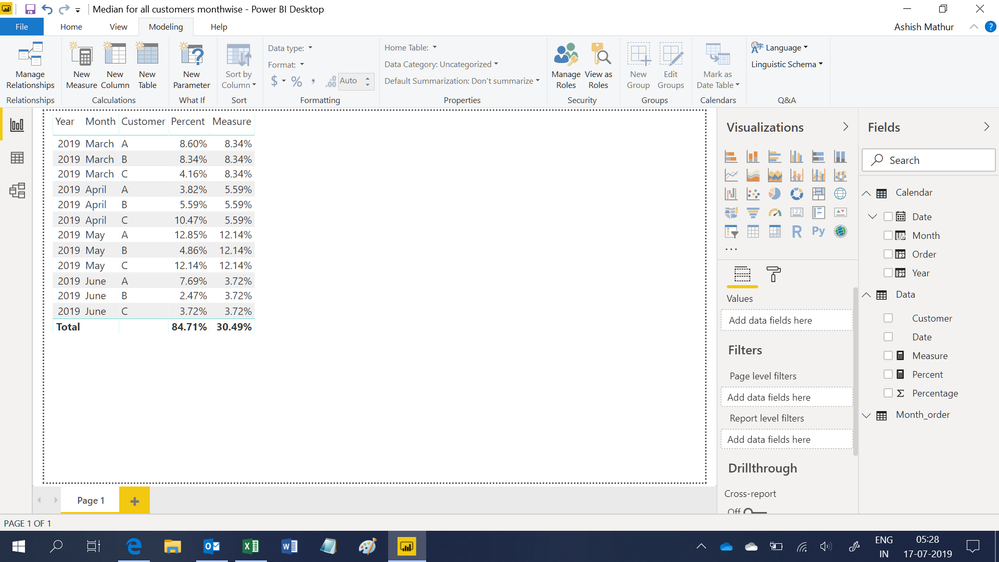
Hi,
You may download my PBI file from here.
Hope this helps.
Regards,
Ashish Mathur
http://www.ashishmathur.com
https://www.linkedin.com/in/excelenthusiasts/


- Mark as New
- Bookmark
- Subscribe
- Mute
- Subscribe to RSS Feed
- Permalink
- Report Inappropriate Content
Hey Mate,
I took the solution is a totally different direction with this solve but here we go.

To the achieve the output I split the medians out into separate tables using the DAX SUMMARIZE
DateMedian = SUMMARIZE(Data, Data[Date], "Median3", MEDIAN(Data[Percentage]))
CategoryMedian = SUMMARIZE(Data, Data[Customer Category], "Median4", MEDIAN(Data[Percentage]))
These two separate tables are now linked back to the Source table (Data) via the Data'Date' and Data'Customer Category' respectively.
**Please note the cross filter direction is set to both.

Now just combine them into one table and Bob's your uncle. Desired Output created and you can place a slicer for either Customer and or Customer Category and slice and dice to your liking :).
Hope this helps mate. It was a good challenge 🙂
- Mark as New
- Bookmark
- Subscribe
- Mute
- Subscribe to RSS Feed
- Permalink
- Report Inappropriate Content
Hi,
You may download my PBI file from here.
Hope this helps.
Regards,
Ashish Mathur
http://www.ashishmathur.com
https://www.linkedin.com/in/excelenthusiasts/
- Mark as New
- Bookmark
- Subscribe
- Mute
- Subscribe to RSS Feed
- Permalink
- Report Inappropriate Content
Hi @Ashish_Mathur ,
Thanks for the solution, it worked. There is an additonal ask for which i tried, but couldnt solve.
Adding an additional field to pevious scenario. Now user wants to see one more additional line on the graph which would show the Median of selected product's Category. With my understading i have put the expected dataset below:
Date | Percentage | Customer | Median | Customer Category | Category Median |
| 3/31/2019 | 8.60% | A | 6.81% | Bikes | 8.47% |
| 3/31/2019 | 8.34% | B | 6.81% | Bikes | 8.47% |
| 3/31/2019 | 4.16% | C | 6.81% | Scooter | 4.72% |
| 3/31/2019 | 5.27% | D | 6.81% | Scooter | 4.72% |
| 4/30/2019 | 3.82% | A | 7.10% | Bikes | 4.71% |
| 4/30/2019 | 5.59% | B | 7.10% | Bikes | 4.71% |
| 4/30/2019 | 10.47% | C | 7.10% | Scooter | 9.54% |
| 4/30/2019 | 8.60% | D | 7.10% | Scooter | 9.54% |
I have tried in similar lines based on your MedianX defintion and formula, but not able to acheive the rigth result.
Can you please help with this?
Thanks
Manoj
- Mark as New
- Bookmark
- Subscribe
- Mute
- Subscribe to RSS Feed
- Permalink
- Report Inappropriate Content
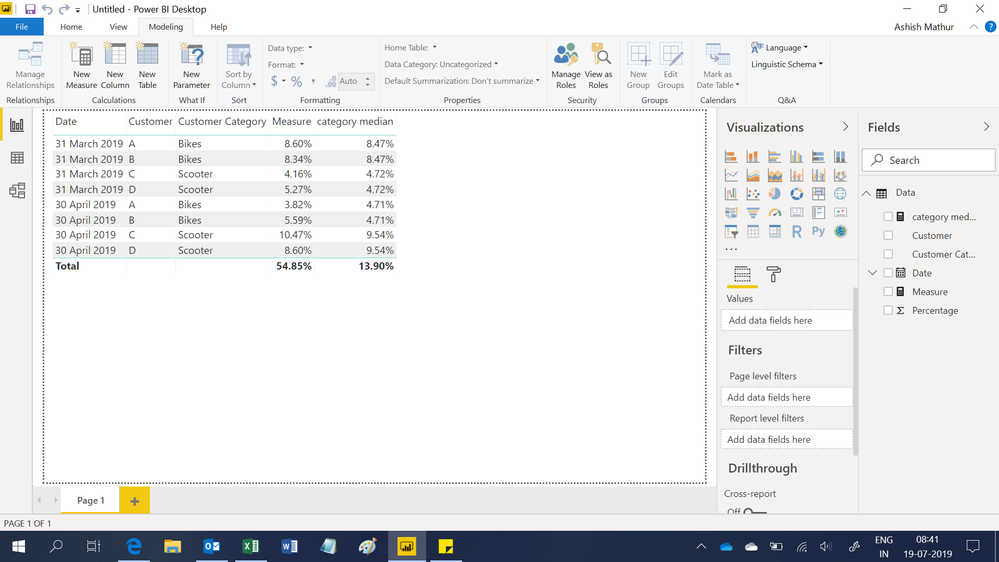
Hi,
I used these 2 measures
Measure = SUM(Data[Percentage])
category median = MEDIANX(CALCULATETABLE(VALUES(Data[Customer]),ALL(Data[Customer])),[Measure])
Hope this helps.
Regards,
Ashish Mathur
http://www.ashishmathur.com
https://www.linkedin.com/in/excelenthusiasts/
- Mark as New
- Bookmark
- Subscribe
- Mute
- Subscribe to RSS Feed
- Permalink
- Report Inappropriate Content
Hi All, any leads or help here?
Thanks
Manoj
- Mark as New
- Bookmark
- Subscribe
- Mute
- Subscribe to RSS Feed
- Permalink
- Report Inappropriate Content
Hey Mate,
I took the solution is a totally different direction with this solve but here we go.
To the achieve the output I split the medians out into separate tables using the DAX SUMMARIZE
DateMedian = SUMMARIZE(Data, Data[Date], "Median3", MEDIAN(Data[Percentage]))
CategoryMedian = SUMMARIZE(Data, Data[Customer Category], "Median4", MEDIAN(Data[Percentage]))
These two separate tables are now linked back to the Source table (Data) via the Data'Date' and Data'Customer Category' respectively.
**Please note the cross filter direction is set to both.
Now just combine them into one table and Bob's your uncle. Desired Output created and you can place a slicer for either Customer and or Customer Category and slice and dice to your liking :).
Hope this helps mate. It was a good challenge 🙂
- Mark as New
- Bookmark
- Subscribe
- Mute
- Subscribe to RSS Feed
- Permalink
- Report Inappropriate Content
Just an idea to caulate the median as a a measure using MEDIANX() but the table you are feeding it will be using the ALL().
This way no matter how the user changes the slicers the median will always be the median of the entire table and not a subset based on a slicer.
Helpful resources

Power BI Dataviz World Championships
The Power BI Data Visualization World Championships is back! Get ahead of the game and start preparing now!

Power BI Monthly Update - December 2025
Check out the December 2025 Power BI Holiday Recap!

FabCon Atlanta 2026
Join us at FabCon Atlanta, March 16-20, for the ultimate Fabric, Power BI, AI and SQL community-led event. Save $200 with code FABCOMM.

| User | Count |
|---|---|
| 38 | |
| 38 | |
| 37 | |
| 28 | |
| 28 |


| User | Count |
|---|---|
| 124 | |
| 89 | |
| 73 | |
| 66 | |
| 65 |


