This is best Fabric, Power BI, SQL and AI community event. How do we know? The last event sold out! Save €200 with code FABCMTY200.
Register nowA new Data Days event is coming soon! This time we’re going bigger than ever. Fabric, Power BI, SQL, AI and more. Don't miss out.
Hello,
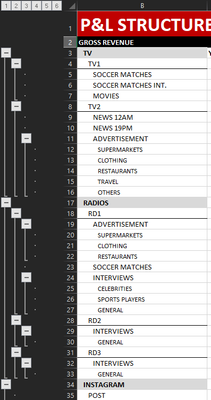
I'm migrating a P&L from Excel to Power Bi, but I found dificulties trying to organize rows not alphabetically (or other standard PBI possibilities), but in a static and custom sequence.
I know how to organize my first layer information as I want, but I have 6 Drill Down levels, and I want to make each level organized statically.
I want PBI organized like the excel above, regardless alphabetical order or values column.
I Have a DB of Financial Acounts like this:
Thank you very much.
Solved! Go to Solution.
@Anonymous
You could try adding an index column for each of your columns to use as "sort column by" (each column by its own index) in the table view.
Something like this:
and see if that maintains the sorting order.
Proud to be a Super User!
Paul on Linkedin.
Hi @Anonymous
take a look at the following link: https://exceleratorbi.com.au/build-a-pl-with-power-bi/
With kind regards from the town where the legend of the 'Pied Piper of Hamelin' is at home
FrankAT (Proud to be a Datanaut)
Thanks @FrankAT ,
I didn't try the solution he proposed on the video, but I watched it and it could work.
I'll reply as soon as I make the test.
Thanks again for your help.
@Anonymous
How about building the structure in Excel, creating the hierarchies by columns, and the importing into PBI to build the matrix from there?
Proud to be a Super User!
Paul on Linkedin.
Hi Paul, thanks for your answer.
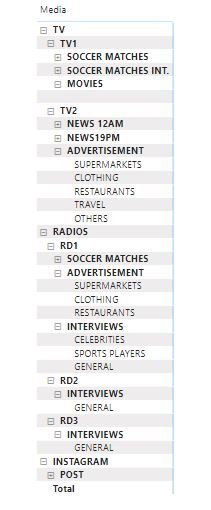
That's what I tried to do when I created the "DB of Financial Acounts", wich is organized exactly as you said. The problem is when I create a Matrix visual and drag my Drill down levels into it, then PBI organize each line alphabetically as default, and if I use any other column to ordinate by value, I'll get my 1st level accounts all mixed.
@Anonymous
You could try adding an index column for each of your columns to use as "sort column by" (each column by its own index) in the table view.
Something like this:
and see if that maintains the sorting order.
Proud to be a Super User!
Paul on Linkedin.
Hey Paul.
Sorry for taking that long to reply, I'm involved with other projects so I wasn´t able to work on this for a while.
Apparently your solution is working very well, I'm still not able to dedicate much time to this project, but as far as I tested, you solved it.
Thank you very much !!!
Check out the May 2026 Power BI update to learn about new features.
Sign up to receive a private message when registration opens and key events begin.
If you have recently started exploring Fabric, we'd love to hear how it's going. Your feedback can help with product improvements.
| User | Count |
|---|---|
| 32 | |
| 25 | |
| 23 | |
| 22 | |
| 13 |
| User | Count |
|---|---|
| 61 | |
| 47 | |
| 27 | |
| 24 | |
| 19 |