Join us at FabCon Atlanta from March 16 - 20, 2026, for the ultimate Fabric, Power BI, AI and SQL community-led event. Save $200 with code FABCOMM.
Register now!The Power BI Data Visualization World Championships is back! Get ahead of the game and start preparing now! Learn more
Hi, Since my skills about Power BI are in progress I have a lot of questions, currently I am writting a report that use a lot of business rules and there are some formulas(business rules) that need to be build, for instance: I have a datetime 20180615 10:13:00, do I need to do is to set up the date time to 20180615 07:00:00 and calculate the lapsed time between both datetimes, in this case the lapsed time will be 3:13 hours, well, I am wondering if I can create a Formula and add this formula during the calculation of a column, you can notice that this value will be like a constante, take the daily day and calculate the lapsed time.
Rigoleto
Solved! Go to Solution.
Hi @Rigoleto
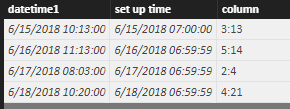
Let me show you an example
create a calculated column
column =
CONCATENATE (
CONCATENATE ( DATEDIFF ( [set up time], [datetime1], HOUR ), ":" ),
MOD ( DATEDIFF ( [set up time], [datetime1], MINUTE ), 60 )
)
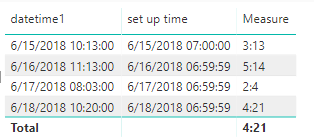
Or, you can create a measure
Measure =
CONCATENATE (
CONCATENATE (
DATEDIFF ( MAX ( [set up time] ), MAX ( [datetime1] ), HOUR ),
":"
),
MOD ( DATEDIFF ( MAX ( [set up time] ), MAX ( [datetime1] ), MINUTE ), 60 )
)
Best Regards
Maggie
Hi @Rigoleto
Let me show you an example
create a calculated column
column =
CONCATENATE (
CONCATENATE ( DATEDIFF ( [set up time], [datetime1], HOUR ), ":" ),
MOD ( DATEDIFF ( [set up time], [datetime1], MINUTE ), 60 )
)
Or, you can create a measure
Measure =
CONCATENATE (
CONCATENATE (
DATEDIFF ( MAX ( [set up time] ), MAX ( [datetime1] ), HOUR ),
":"
),
MOD ( DATEDIFF ( MAX ( [set up time] ), MAX ( [datetime1] ), MINUTE ), 60 )
)
Best Regards
Maggie
So, yes you could create a measure that does this calculation and then use this measure in other measures or column calculations.
The Power BI Data Visualization World Championships is back! Get ahead of the game and start preparing now!
| User | Count |
|---|---|
| 39 | |
| 37 | |
| 33 | |
| 32 | |
| 29 |
| User | Count |
|---|---|
| 132 | |
| 88 | |
| 82 | |
| 68 | |
| 64 |