Get certified for free when you join Fabric Data Days 2026 and dive into Fabric, Power BI, SQL, AI, and other essential data skills.
Join nowData Days is here! Join us now for 60+ days of learning, challenges, and connection. Learn more
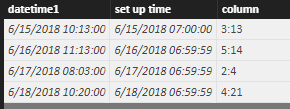
Hi, Since my skills about Power BI are in progress I have a lot of questions, currently I am writting a report that use a lot of business rules and there are some formulas(business rules) that need to be build, for instance: I have a datetime 20180615 10:13:00, do I need to do is to set up the date time to 20180615 07:00:00 and calculate the lapsed time between both datetimes, in this case the lapsed time will be 3:13 hours, well, I am wondering if I can create a Formula and add this formula during the calculation of a column, you can notice that this value will be like a constante, take the daily day and calculate the lapsed time.
Rigoleto
Solved! Go to Solution.
Hi @Rigoleto
Let me show you an example
create a calculated column
column =
CONCATENATE (
CONCATENATE ( DATEDIFF ( [set up time], [datetime1], HOUR ), ":" ),
MOD ( DATEDIFF ( [set up time], [datetime1], MINUTE ), 60 )
)
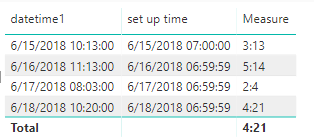
Or, you can create a measure
Measure =
CONCATENATE (
CONCATENATE (
DATEDIFF ( MAX ( [set up time] ), MAX ( [datetime1] ), HOUR ),
":"
),
MOD ( DATEDIFF ( MAX ( [set up time] ), MAX ( [datetime1] ), MINUTE ), 60 )
)
Best Regards
Maggie
Hi @Rigoleto
Let me show you an example
create a calculated column
column =
CONCATENATE (
CONCATENATE ( DATEDIFF ( [set up time], [datetime1], HOUR ), ":" ),
MOD ( DATEDIFF ( [set up time], [datetime1], MINUTE ), 60 )
)
Or, you can create a measure
Measure =
CONCATENATE (
CONCATENATE (
DATEDIFF ( MAX ( [set up time] ), MAX ( [datetime1] ), HOUR ),
":"
),
MOD ( DATEDIFF ( MAX ( [set up time] ), MAX ( [datetime1] ), MINUTE ), 60 )
)
Best Regards
Maggie
So, yes you could create a measure that does this calculation and then use this measure in other measures or column calculations.
Don't miss out on Data Days, June 15 through August 7. Learn Fabric, Power BI, SQL, AI and more.
Check out the May 2026 Power BI update to learn about new features.
| User | Count |
|---|---|
| 23 | |
| 21 | |
| 20 | |
| 19 | |
| 13 |
| User | Count |
|---|---|
| 58 | |
| 50 | |
| 38 | |
| 31 | |
| 27 |