cancel
Showing results for 
Search instead for 
Did you mean: 

Get Fabric Certified for FREE during Fabric Data Days. Don't miss your chance! Request now

Reply
jkay27
Helper I
Helper I

Stacked bar chart - order by type then date, not just by date

Hi,


In the attached file, can anyone tell me if there is a way to make the stacked column chart order by type then date, rather than just date? The graph needs to show a set of "full year" values first - in date order - then show the "Rolling" columns next - in date order. This needs to be in a single graph.


Graph ordering issue


Many thanks for any suggestions.


1 ACCEPTED SOLUTION
TeigeGao
Solution Sage
Solution Sage

Hi @jkay27 ,

According to your description, my understanding is that you want to sort Stacked bar chart by type then date. Based on my test, we can't so it directly in Legend.

As a workaround, we can use the following methods:

First One: Using different measures for each Type, then drag all measures to the value.

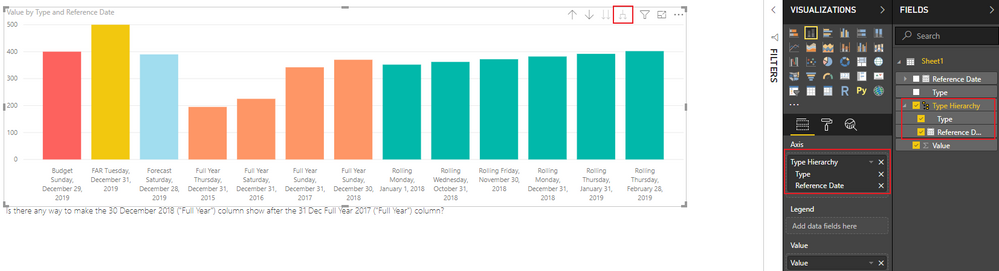
Second one: Create a hierarchy for Type and Reference Date, then drag this hierarchy to Axis, after that we can Expand down all one level in hierarchy.

The result will like below:

Snipaste_2019-04-16_10-22-26.png

Best Regards,

Teige

View solution in original post

3 REPLIES 3
TeigeGao
Solution Sage
Solution Sage

Hi @jkay27 ,

According to your description, my understanding is that you want to sort Stacked bar chart by type then date. Based on my test, we can't so it directly in Legend.

As a workaround, we can use the following methods:

First One: Using different measures for each Type, then drag all measures to the value.

Second one: Create a hierarchy for Type and Reference Date, then drag this hierarchy to Axis, after that we can Expand down all one level in hierarchy.

The result will like below:

Snipaste_2019-04-16_10-22-26.png

Best Regards,

Teige

@TeigeGao thanks for this, but in your example how have you assigned the colours to each column (for the second workaround)? Also, doesn't seem to be a way of ordering these columns except asc/desc.


If you use your second method, there also doesn't seem to be a way to order except for A-Z or Z-A, so "Rolling" is always coming first or last, when in fact it should be in the middle. Do you have any suggestions?


Thanks again


Hi @jkay27 ,


If you use your second method, there also doesn't seem to be a way to order except for A-Z or Z-A, so "Rolling" is always coming first or last, when in fact it should be in the middle. Do you have any suggestions?


In this scenario, we can create a column with the order you want, then sort the column with the order column.

Best Regards,

Teige

Helpful resources

Announcements
November Power BI Update Carousel

Power BI Monthly Update - November 2025

Check out the November 2025 Power BI update to learn about new features.

Fabric Data Days Carousel

Fabric Data Days

Advance your Data & AI career with 50 days of live learning, contests, hands-on challenges, study groups & certifications and more!

FabCon Atlanta 2026 carousel

FabCon Atlanta 2026

Join us at FabCon Atlanta, March 16-20, for the ultimate Fabric, Power BI, AI and SQL community-led event. Save $200 with code FABCOMM.

Top Solution Authors
Top Kudoed Authors