This time we’re going bigger than ever. Fabric, Power BI, SQL, AI and more. We're covering it all. You won't want to miss it.
Learn moreDid you hear? There's a new SQL AI Developer certification (DP-800). Start preparing now and be one of the first to get certified. Register now
Hi, need some help 😉
I have in column A the total price for a product (product type is in column C).
In column B I see how many of the product I sold.
So for example:
So all the lines are a collection of all the sold items.
Now I wish to know what my price per pcs per product is in a pareto (what is the best item to sell).
I want to have the average off all the lines. Note for example that in the first line an apple cost 2€ and in the last line slightly less. So the prices are not always identical.
How can I do this? 🙂
I created a stacked bar chart to try and create a pareto, but it gives me the result of the SUM of all the apples. In this case 2€ + 1.8€ = 3.8€ in the pareto. But I want to divide this number by the amount of times there are apples in my column C.
I hope my request is clear. It looks very logical in my head 😄
Thanks in advance!
Solved! Go to Solution.
hi, @Anonymous
Try this way as below:
Step1:
Add new column for price for each line
Price = 'Table'[Column A]/'Table'[Column B]
Step2:
Use this formula to add a measure
Measure = CALCULATE(SUM('Table'[Price]))/CALCULATE(COUNTA('Table'[Column C]))
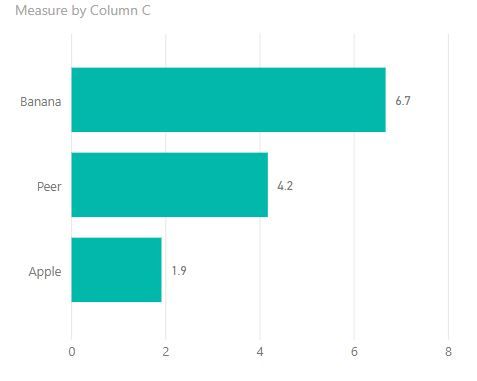
Result:
Best Regards,
Lin
hi, @Anonymous
Try this way as below:
Step1:
Add new column for price for each line
Price = 'Table'[Column A]/'Table'[Column B]
Step2:
Use this formula to add a measure
Measure = CALCULATE(SUM('Table'[Price]))/CALCULATE(COUNTA('Table'[Column C]))
Result:
Best Regards,
Lin
Check out the April 2026 Power BI update to learn about new features.
Sign up to receive a private message when registration opens and key events begin.
If you have recently started exploring Fabric, we'd love to hear how it's going. Your feedback can help with product improvements.
| User | Count |
|---|---|
| 34 | |
| 31 | |
| 30 | |
| 21 | |
| 16 |
| User | Count |
|---|---|
| 65 | |
| 53 | |
| 31 | |
| 23 | |
| 23 |