

cancel
Showing results for 
Search instead for 
Did you mean: 

The Power BI Data Visualization World Championships is back! Get ahead of the game and start preparing now! Learn more

Reply
Anonymous
Not applicable

Stacked Column Chart - swap x-axis and y-axis

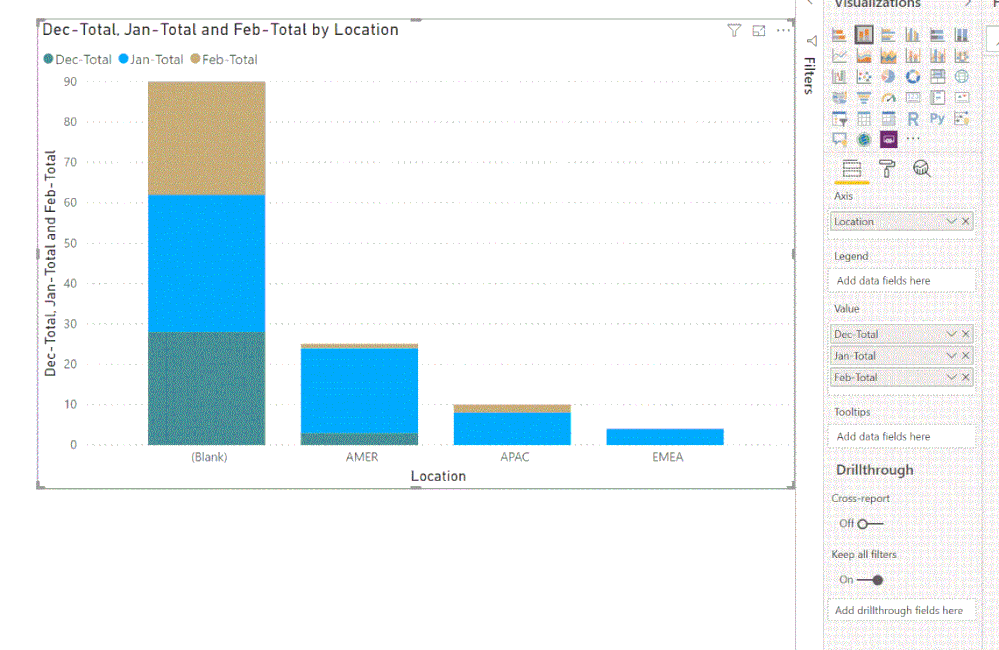
I am trying to recreate a chart from Excel into Power BI, but I am having trouble getting the x-axis and y-axis to be the same as my original chart. The location should be stacked and months run along the x-axis. Anyone no if this is possible?


Data set:

Data SetData Set


Excel:

Excel OriginalExcel Original


Power BI:

Power BIPower BI

1 ACCEPTED SOLUTION
v-lili6-msft
Community Support
Community Support

hi @Anonymous 

From your screenshot, we could know that your data structure is this:

3.JPG

So you need to transform your data structure as below:

Step1:

In edit queries, Selected Dec-Total,Jan-Total,Feb-Total... 

Then click Unpivot columns

https://radacad.com/pivot-and-unpivot-with-power-bi

4.JPG

Step2:

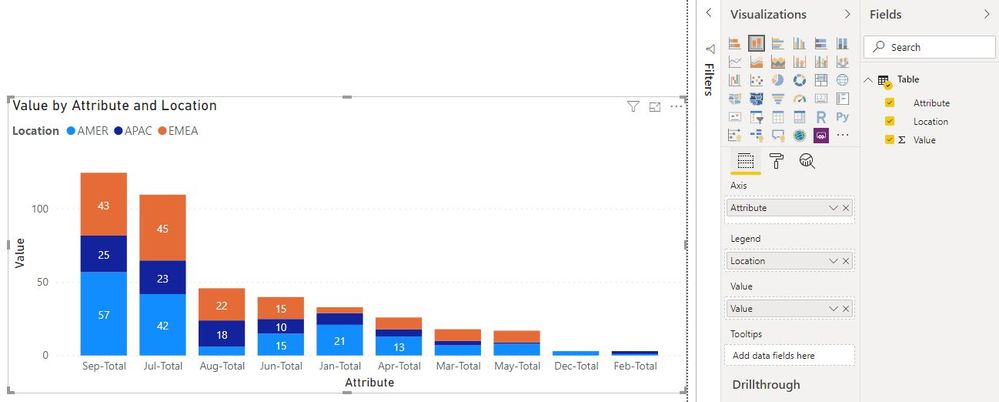
Now create visual, drag Attribute column in X-Axis, Location into Lenged and Value into Value

5.JPG


and here is sample pbix file, please try it.


Regards,

Lin

Community Support Team _ Lin
If this post helps, then please consider Accept it as the solution to help the other members find it more quickly.

View solution in original post

3 REPLIES 3
v-lili6-msft
Community Support
Community Support

hi @Anonymous 

From your screenshot, we could know that your data structure is this:

3.JPG

So you need to transform your data structure as below:

Step1:

In edit queries, Selected Dec-Total,Jan-Total,Feb-Total... 

Then click Unpivot columns

https://radacad.com/pivot-and-unpivot-with-power-bi

4.JPG

Step2:

Now create visual, drag Attribute column in X-Axis, Location into Lenged and Value into Value

5.JPG


and here is sample pbix file, please try it.


Regards,

Lin

Community Support Team _ Lin
If this post helps, then please consider Accept it as the solution to help the other members find it more quickly.
VasTg
Memorable Member
Memorable Member

@Anonymous 


You should move "location" to legend, "month" column(if any - if not create one) to Axis and the single "total" column to Value.


If it helps, mark it as a solution.

Kudos are nice too.

Connect on LinkedIn
Anonymous
Not applicable

@VasTg 


Not sure if I'm following. My month values are already in the value input which is a column.  

Helpful resources

Announcements
November Power BI Update Carousel

Power BI Monthly Update - November 2025

Check out the November 2025 Power BI update to learn about new features.

Fabric Data Days Carousel

Fabric Data Days

Advance your Data & AI career with 50 days of live learning, contests, hands-on challenges, study groups & certifications and more!

FabCon Atlanta 2026 carousel

FabCon Atlanta 2026

Join us at FabCon Atlanta, March 16-20, for the ultimate Fabric, Power BI, AI and SQL community-led event. Save $200 with code FABCOMM.

Top Solution Authors
Top Kudoed Authors