Join us at FabCon Atlanta from March 16 - 20, 2026, for the ultimate Fabric, Power BI, AI and SQL community-led event. Save $200 with code FABCOMM.
Register now!The Power BI Data Visualization World Championships is back! Get ahead of the game and start preparing now! Learn more
Is there a way on a stacked bar chart to have it show multiple stacks with a count for each based on what I have in a single column of data.
In the below instance I have several different membership types sold on each date, but all it does is count the grand total. I need it to count totals for individual membership types sold and stack those.
The way I've done stacked charts in other areas for this is using a measure for each distinct type in a data column (such as calculate(sum(column) , type = type a) ), however the membership types here often change, so I'd rather have this be as dynamic as possible.
Solved! Go to Solution.
Hi @a_fman,
Based on my understanding, you can show the count of each type of items on a stacked bar chart, right?
It is impossible to do this on a stacked bar chart, you can try to use clustered bar chart to achieve your requirement.
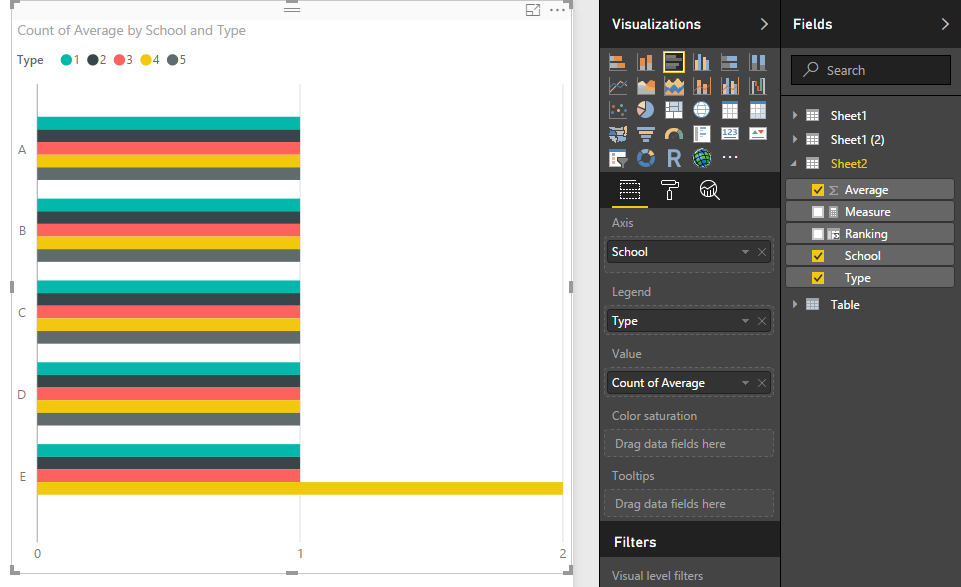
Sample: modify the summary mode to "count", then drag the type to legend.
Regards,
Xiaoxin sheng
Hi @a_fman,
Based on my understanding, you can show the count of each type of items on a stacked bar chart, right?
It is impossible to do this on a stacked bar chart, you can try to use clustered bar chart to achieve your requirement.
Sample: modify the summary mode to "count", then drag the type to legend.
Regards,
Xiaoxin sheng
The Power BI Data Visualization World Championships is back! Get ahead of the game and start preparing now!
| User | Count |
|---|---|
| 39 | |
| 38 | |
| 38 | |
| 28 | |
| 27 |
| User | Count |
|---|---|
| 124 | |
| 88 | |
| 73 | |
| 66 | |
| 65 |