cancel
Showing results for 
Search instead for 
Did you mean: 

Learn from the best! Meet the four finalists headed to the FINALS of the Power BI Dataviz World Championships! Register now

Reply
weilip1803
Frequent Visitor

Sql data interactions

Currently I have 2 graphs and I want the graphs to be interactive. For example if i click on graph 1 column A i want the graph 2 to make this sql query "A" and if i Click on graph 1 column b i want the graph 2 to make sql query "B" 

1 ACCEPTED SOLUTION
Anonymous
Not applicable

Hi weilip1803,

Based on your description, it seems that you want to use drill-down feature in Power BI. Currently, the feature is not available in Power BI but it is under review, please vote it and add your comments in the following idea. In addition, you can consider to create reports in SQL Server Reporting Services and use the drill-down feature.

https://ideas.powerbi.com/forums/282523-bi-in-sql-vnext/suggestions/7052191-drill-through-actions-pa...

Thanks,
Lydia Zhang

View solution in original post

4 REPLIES 4
weilip1803
Frequent Visitor

Thanks for the reply matt. Okay just to be sure let me ask with me sql code.THis was my initial idea.

GRAPH A
------------------------------------------------
SELECT TOP (10)
[Project1].[C3] AS [C1],
[Project1].[ParentTaxonomyName] AS [ParentTaxonomyName],
[Project1].[C2] AS [C2]
FROM ( SELECT
[GroupBy1].[A1] AS [C1],
[GroupBy1].[A2] AS [C2],
[GroupBy1].[K1] AS [ParentTaxonomyName],
1 AS [C3]
FROM ( SELECT
[Extent1].[ParentTaxonomyName] AS [K1],
COUNT(1) AS [A1],
COUNT(1) AS [A2]
FROM [dbo].[VariableOrderTaxonomies] AS [Extent1]
WHERE [Extent1].[IsBestFit] = 1
GROUP BY [Extent1].[ParentTaxonomyName]
) AS [GroupBy1]
) AS [Project1]
ORDER BY [Project1].[C1] DESC


Graph B changes when parent taxonomy name is clicked
---------------------------------------------------
SELECT TOP (5)
[Project1].[C3] AS [C1],
[Project1].[SubTaxonomyName] AS [SubTaxonomyName],
[Project1].[C2] AS [C2]
FROM ( SELECT
[GroupBy1].[A1] AS [C1],
[GroupBy1].[A2] AS [C2],
[GroupBy1].[K1] AS [SubTaxonomyName],
1 AS [C3]
FROM ( SELECT
[Extent1].[SubTaxonomyName] AS [K1],
COUNT(1) AS [A1],
COUNT(1) AS [A2]
FROM [dbo].[VariableOrderTaxonomies] AS [Extent1]
WHERE ([Extent1].[IsBestFit] = 1) AND ([Extent1].[ParentTaxonomyName] = '<ParentTaxnonomyName>')

/* The angular brackets is the unknown that i want to show the relavent parent taxonomyName is clicked on A*/


GROUP BY [Extent1].[SubTaxonomyName]
) AS [GroupBy1]
) AS [Project1]
ORDER BY [Project1].[C1] DESC


So if i want to make it interactive, i would need to fetch both results to the same table correct then Power BI will allow interactions correct?

Anonymous
Not applicable

Hi weilip1803,

Based on your description, it seems that you want to use drill-down feature in Power BI. Currently, the feature is not available in Power BI but it is under review, please vote it and add your comments in the following idea. In addition, you can consider to create reports in SQL Server Reporting Services and use the drill-down feature.

https://ideas.powerbi.com/forums/282523-bi-in-sql-vnext/suggestions/7052191-drill-through-actions-pa...

Thanks,
Lydia Zhang

Anonymous
Not applicable

Hi @weilip1803,

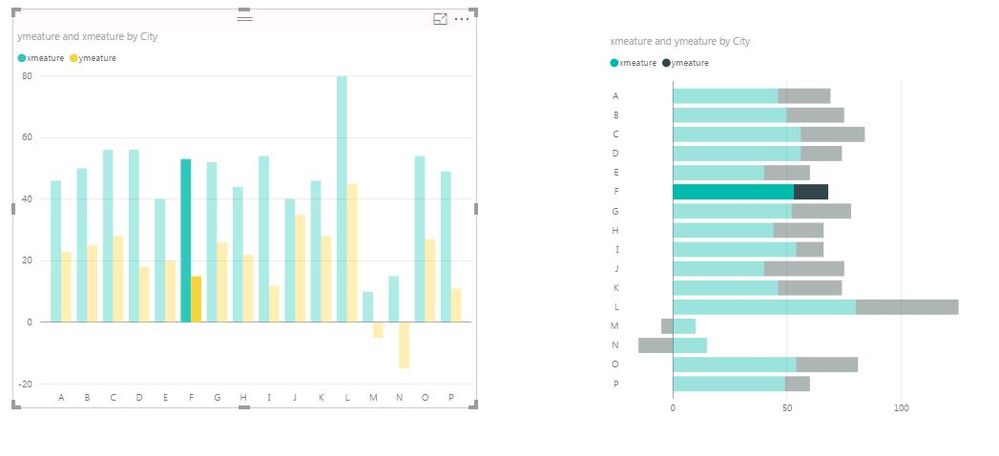
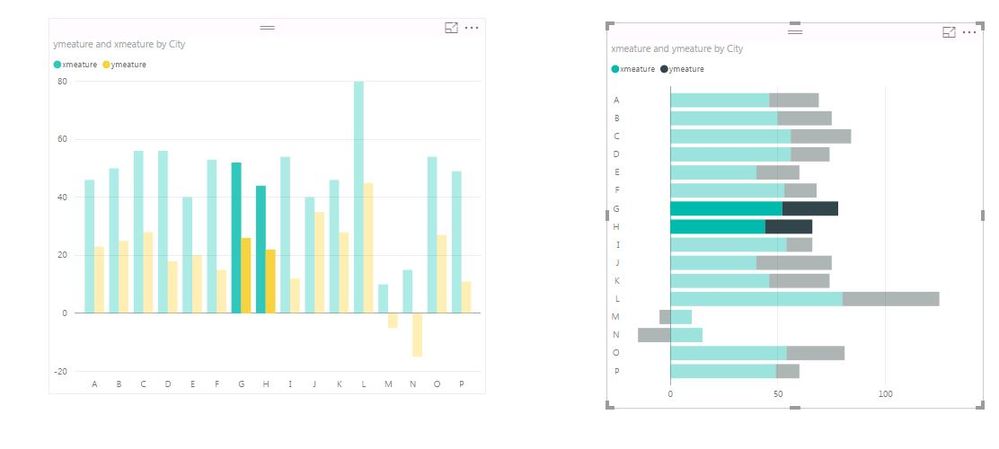
Agree with MattAllington, adding to his post,in Power BI, visualizations on a report page can be interactive by using cross-filter and cross-highlight features. For example, selecting a data range on a clustered column chart highlights the data range on a stacked bar chart, for more details, please check the following screenshots.
Capture.JPGCapture1.JPG


Cross-highlight functionality is available in Power BI Desktop and Power BI Service. Cross-filter feature is available in Power BI Service, for more details about how it works, please review the following article.

https://powerbi.microsoft.com/en-us/documentation/powerbi-service-visual-interactions/

Thanks,
Lydia Zhang

MattAllington
Community Champion
Community Champion

What do you mean "make SQL query"?  Power BI is an encapsulated reporting tool. It will slice and dice across the data it has loaded, but it cannot fetch a new SQL statement based on chart interaction.  You should load the data you want to report on into Power BI, and then slice and dice from there 


* Matt is an 8 times Microsoft MVP (Power BI) and author of the Power BI Book Supercharge Power BI.
I will not give you bad advice, even if you unknowingly ask for it.

Helpful resources

Announcements
Join our Fabric User Panel

Join our Fabric User Panel

Share feedback directly with Fabric product managers, participate in targeted research studies and influence the Fabric roadmap.

March Power BI Update Carousel

Power BI Community Update - March 2026

Check out the March 2026 Power BI update to learn about new features.