cancel
Showing results for 
Search instead for 
Did you mean: 

Try your skills in the Power BI Dataviz World Championship! Round one ends June 26. Join now

Reply
vabiuser1
Regular Visitor

Splitting dates from other Column

Hi Community,


New to Power BI and need your help. 


I have got a requirement to separate the project start and end dates from a project dates column. 


Table Structure:

Project Name Status Dates

Project1CompletedJan 15-21, 2019
Project2CompletedFeb 1-9, 2020

Expected Table Structure:

Project Name Status Start Date End Date

Project1CompletedJan 15, 2019Jan 21, 2019
Project2CompletedFeb 1, 2020Feb 9, 2020


I tried creating a custom column using REPLACE and CONTAINS functions but no luck.


Cheers

2 ACCEPTED SOLUTIONS
az38
Community Champion
Community Champion

Hi @vabiuser1 

How is your Dates field look like if start and end dates in differents monthes?

If you have preiods mandatory from the same month you can try a calculated columns like

Start Date = 
var _y = RIGHT([Dates],4)
var _m = LEFT([Dates],3)
var _delimiterPos = SEARCH("-",[Dates])
var _d = MID([Dates],4,_delimiterPos-4)
RETURN
DATEVALUE(CONCATENATE(_d,CONCATENATE(" ",CONCATENATE(_m,CONCATENATE(" ",_y)))))

and

End Date = 
var _y = RIGHT([Dates],4)
var _m = LEFT([Dates],3)
var _delimiterPos = SEARCH("-",[Dates])
var _d = MID([Dates],_delimiterPos+1,LEN([Dates])-6-_delimiterPos)
RETURN
DATEVALUE(CONCATENATE(_d,CONCATENATE(" ",CONCATENATE(_m,CONCATENATE(" ",_y)))))

do not hesitate to give a kudo to useful posts and mark solutions as solution
LinkedIn

View solution in original post

dax
Community Support
Community Support

Hi @vabiuser1 , 

You also could use M code(Edit Queries) to achieve this goal

let
    Source = Table.FromRows(Json.Document(Binary.Decompress(Binary.FromText("i45WCijKz0pNLjFU0lFyzs8tyEktSU0Bsr0S8xQMTXWNDHUUjAwMLZVideBKjdCUuqUmKRjqWoIUGhkoxcYCAA==", BinaryEncoding.Base64), Compression.Deflate)), let _t = ((type text) meta [Serialized.Text = true]) in type table [#"Project Name" = _t, #"Status " = _t, Dates = _t]),
    #"Changed Type" = Table.TransformColumnTypes(Source,{{"Project Name", type text}, {"Status ", type text}, {"Dates", type text}}),
    #"Split Column by Delimiter" = Table.SplitColumn(#"Changed Type", "Dates", Splitter.SplitTextByDelimiter(" ", QuoteStyle.Csv), {"Dates.1", "Dates.2", "Dates.3"}),
    #"Split Column by Delimiter1" = Table.SplitColumn(#"Split Column by Delimiter", "Dates.2", Splitter.SplitTextByDelimiter("-", QuoteStyle.Csv), {"Dates.2.1", "Dates.2.2"}),
    #"Added Custom" = Table.AddColumn(#"Split Column by Delimiter1", "start", each [Dates.1]& " "&[Dates.2.1]
&", "&[Dates.3]),
    #"Added Custom1" = Table.AddColumn(#"Added Custom", "end", each [Dates.1]& " "&[Dates.2.2]&" "
&[Dates.3]),
    #"Removed Columns1" = Table.RemoveColumns(#"Added Custom1",{"Dates.1", "Dates.2.1", "Dates.2.2", "Dates.3"})
in
    #"Removed Columns1"
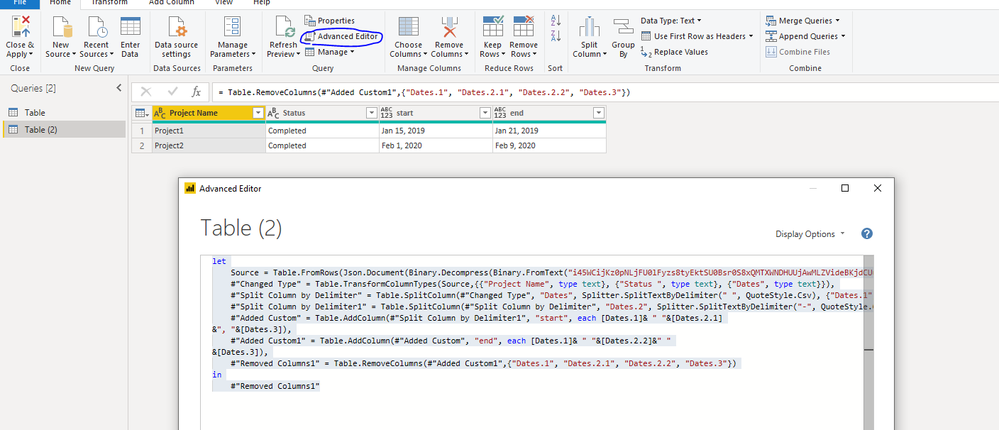
609.PNG

Best Regards,
Zoe Zhi

If this post helps, then please consider Accept it as the solution to help the other members find it more quickly.


View solution in original post

2 REPLIES 2
dax
Community Support
Community Support

Hi @vabiuser1 , 

You also could use M code(Edit Queries) to achieve this goal

let
    Source = Table.FromRows(Json.Document(Binary.Decompress(Binary.FromText("i45WCijKz0pNLjFU0lFyzs8tyEktSU0Bsr0S8xQMTXWNDHUUjAwMLZVideBKjdCUuqUmKRjqWoIUGhkoxcYCAA==", BinaryEncoding.Base64), Compression.Deflate)), let _t = ((type text) meta [Serialized.Text = true]) in type table [#"Project Name" = _t, #"Status " = _t, Dates = _t]),
    #"Changed Type" = Table.TransformColumnTypes(Source,{{"Project Name", type text}, {"Status ", type text}, {"Dates", type text}}),
    #"Split Column by Delimiter" = Table.SplitColumn(#"Changed Type", "Dates", Splitter.SplitTextByDelimiter(" ", QuoteStyle.Csv), {"Dates.1", "Dates.2", "Dates.3"}),
    #"Split Column by Delimiter1" = Table.SplitColumn(#"Split Column by Delimiter", "Dates.2", Splitter.SplitTextByDelimiter("-", QuoteStyle.Csv), {"Dates.2.1", "Dates.2.2"}),
    #"Added Custom" = Table.AddColumn(#"Split Column by Delimiter1", "start", each [Dates.1]& " "&[Dates.2.1]
&", "&[Dates.3]),
    #"Added Custom1" = Table.AddColumn(#"Added Custom", "end", each [Dates.1]& " "&[Dates.2.2]&" "
&[Dates.3]),
    #"Removed Columns1" = Table.RemoveColumns(#"Added Custom1",{"Dates.1", "Dates.2.1", "Dates.2.2", "Dates.3"})
in
    #"Removed Columns1"

609.PNG

Best Regards,
Zoe Zhi

If this post helps, then please consider Accept it as the solution to help the other members find it more quickly.


az38
Community Champion
Community Champion

Hi @vabiuser1 

How is your Dates field look like if start and end dates in differents monthes?

If you have preiods mandatory from the same month you can try a calculated columns like

Start Date = 
var _y = RIGHT([Dates],4)
var _m = LEFT([Dates],3)
var _delimiterPos = SEARCH("-",[Dates])
var _d = MID([Dates],4,_delimiterPos-4)
RETURN
DATEVALUE(CONCATENATE(_d,CONCATENATE(" ",CONCATENATE(_m,CONCATENATE(" ",_y)))))

and

End Date = 
var _y = RIGHT([Dates],4)
var _m = LEFT([Dates],3)
var _delimiterPos = SEARCH("-",[Dates])
var _d = MID([Dates],_delimiterPos+1,LEN([Dates])-6-_delimiterPos)
RETURN
DATEVALUE(CONCATENATE(_d,CONCATENATE(" ",CONCATENATE(_m,CONCATENATE(" ",_y)))))

do not hesitate to give a kudo to useful posts and mark solutions as solution
LinkedIn

Helpful resources

Announcements
Fabric Data Days is here Carousel

Fabric Data Days 2026

Don't miss out on Data Days, June 15 through August 7. Learn Fabric, Power BI, SQL, AI and more.

Power BI DataViz World Championships carousel

Power BI DataViz World Championships - June 2026

A new Power BI DataViz World Championship is coming this June! Don't miss out on submitting your entry.