This time we’re going bigger than ever. Fabric, Power BI, SQL, AI and more. We're covering it all. You won't want to miss it.
Learn moreLevel up your Power BI skills this month - build one visual each week and tell better stories with data! Get started
Hello,
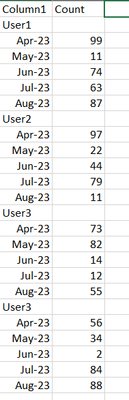
I have some data i am currently working with that has the user and date combined together in one column the dates and user ids will change was wondering if there is a way to dyanmically extract some of this data. If not if i set it up to pick up the month and year is there a way to dynamically pick up the user.
The below is some dummy data that is similar to the original data im using, thanks.
Solved! Go to Solution.
Create a calc column, if(Text.StartsWith([Column1], "User") then [Column1] else null
Then use fill down to fill the null values:
Fill values in a column - Power Query | Microsoft Learn
Then delete the rows with null counts.
Hello,
I actually found a way to do it similar as you put above but using contains then doing a few or options for the the year upto 2026 to make it more dynamic with the user id side as that was a demo and it wont always be user but a client name that can change. I then used downfill down on the client name left and filter blank rows out.
Example steps for anyone else attempting:
#"Added Conditional Column" = Table.AddColumn(#"Removed Top Rows1", "Custom", each if Text.Contains([Column1], "2022") or Text.Contains([Column1], "2023") or Text.Contains([Column1], "2024") or Text.Contains([Column1], "2025") or Text.Contains([Column1], "2026") then null else [Column1]),
#"Filled Down" = Table.FillDown(#"Added Conditional Column",{"Custom"}),
Create a calc column, if(Text.StartsWith([Column1], "User") then [Column1] else null
Then use fill down to fill the null values:
Fill values in a column - Power Query | Microsoft Learn
Then delete the rows with null counts.
Check out the April 2026 Power BI update to learn about new features.
Sign up to receive a private message when registration opens and key events begin.
If you have recently started exploring Fabric, we'd love to hear how it's going. Your feedback can help with product improvements.
| User | Count |
|---|---|
| 30 | |
| 24 | |
| 23 | |
| 17 | |
| 16 |
| User | Count |
|---|---|
| 61 | |
| 35 | |
| 30 | |
| 23 | |
| 22 |