Get certified for free when you join Fabric Data Days 2026 and dive into Fabric, Power BI, SQL, AI, and other essential data skills.
Join nowData Days is here! Join us now for 60+ days of learning, challenges, and connection. Learn more
I have a data from an API, that I don't know how to transform correctly. I'm still a bit new to Power BI, so I hope it's not a stupid question.
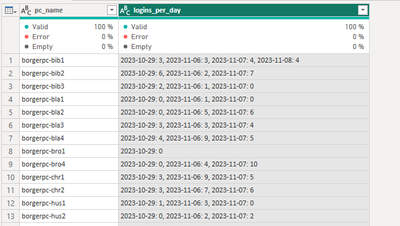
The data describes amount of logins per day on different computers. First column is the computer, and the second is both the date and amount of logins that day. As you can see on the screenshot below, the second column contains several data + logins.
I would like to have a table like this:
(id) | date | pc-name | amount of logins
1 | date1 | pc-nam1A | 3
2 | date1 | pc-nameB | 6
...
I know how to split up the column so I get date and logins in different columns, but I don't know how to stack the different dates on top of each other. There's also consistantly coming in new data, so I don't think I can just copy the table and merch.
Any ideas are welcome 🙂
Solved! Go to Solution.
FYI: I finally found a way myself. Under Split Column there's an Advanced Options where I could choose rows instead of columns. So I split the second column up in rows by each comma, and then split the same column up by colon in to columns, to get date and amount of logins separated.
With this way data also updates correctly. 🙂
FYI: I finally found a way myself. Under Split Column there's an Advanced Options where I could choose rows instead of columns. So I split the second column up in rows by each comma, and then split the same column up by colon in to columns, to get date and amount of logins separated.
With this way data also updates correctly. 🙂
Don't miss out on Data Days, June 15 through August 7. Learn Fabric, Power BI, SQL, AI and more.
Check out the May 2026 Power BI update to learn about new features.
| User | Count |
|---|---|
| 23 | |
| 23 | |
| 21 | |
| 17 | |
| 13 |
| User | Count |
|---|---|
| 58 | |
| 50 | |
| 37 | |
| 29 | |
| 24 |