Don't miss your chance to take the Fabric Data Engineer (DP-600) exam for FREE! Find out how by attending the DP-600 session on April 23rd (pacific time), live or on-demand.
Learn moreNext up in the FabCon + SQLCon recap series: The roadmap for Microsoft SQL and Maximizing Developer experiences in Fabric. All sessions are available on-demand after the live show. Register now
In M Query, my dataset contains a column holding file names.
The file name can have any number of words in it, but the last words are always the month and year. The month however can be truncated, or full e.g. Jan or January
So, I want to split the column by delimiter, from the right, but I want to ignore the first space. Which in theory, means I should have the month and year irrespective of the number of characters, in a new column and rest of the file name in the other.
I can't find a way to do this.
Solved! Go to Solution.
Hi @Anonymous ,
Try this:
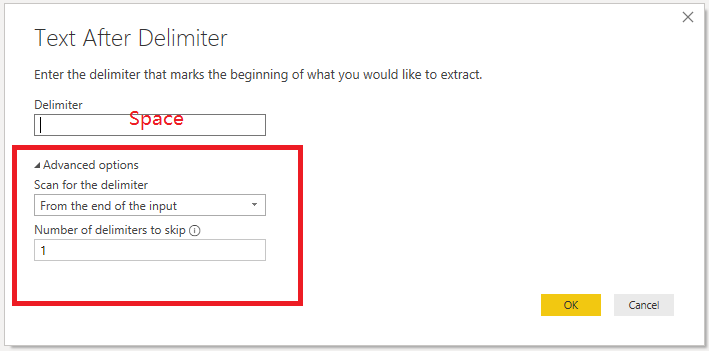
1. Duplicate column.
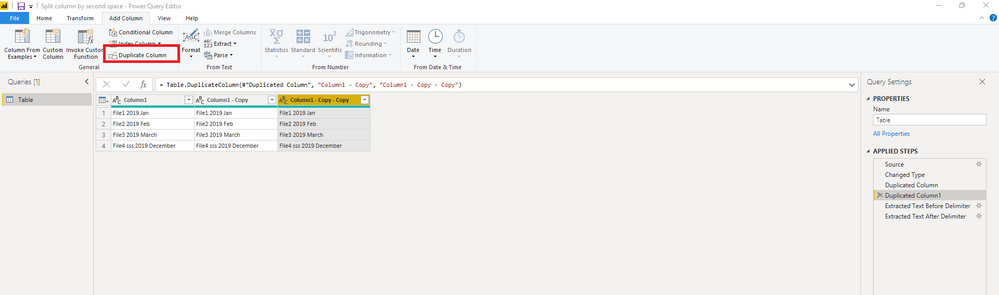
2. Extracted Text Before Delimiter.
3. Extracted Text After Delimiter.
Then, change column names.
Attach the complete code.
let
Source = Table.FromRows(Json.Document(Binary.Decompress(Binary.FromText("i45WcsvMSTVUMDIwtFTwSsxTitWBCBlBhNxSk+BCxhAh38Si5Ay4oIlCcXExRMIlNTk1Nym1SCk2FgA=", BinaryEncoding.Base64), Compression.Deflate)), let _t = ((type text) meta [Serialized.Text = true]) in type table [Column1 = _t]),
#"Changed Type" = Table.TransformColumnTypes(Source,{{"Column1", type text}}),
#"Duplicated Column" = Table.DuplicateColumn(#"Changed Type", "Column1", "Column1 - Copy"),
#"Duplicated Column1" = Table.DuplicateColumn(#"Duplicated Column", "Column1 - Copy", "Column1 - Copy - Copy"),
#"Extracted Text Before Delimiter" = Table.TransformColumns(#"Duplicated Column1", {{"Column1 - Copy", each Text.BeforeDelimiter(_, " ", {1, RelativePosition.FromEnd}), type text}}),
#"Extracted Text After Delimiter" = Table.TransformColumns(#"Extracted Text Before Delimiter", {{"Column1 - Copy - Copy", each Text.AfterDelimiter(_, " ", {1, RelativePosition.FromEnd}), type text}}),
#"Renamed Columns" = Table.RenameColumns(#"Extracted Text After Delimiter",{{"Column1 - Copy", "File"}, {"Column1 - Copy - Copy", "Year Month"}})
in
#"Renamed Columns"
Best Regards,
Icey
If this post helps, then please consider Accept it as the solution to help the other members find it more quickly.
Hi @Anonymous ,
Try this:
1. Duplicate column.
2. Extracted Text Before Delimiter.
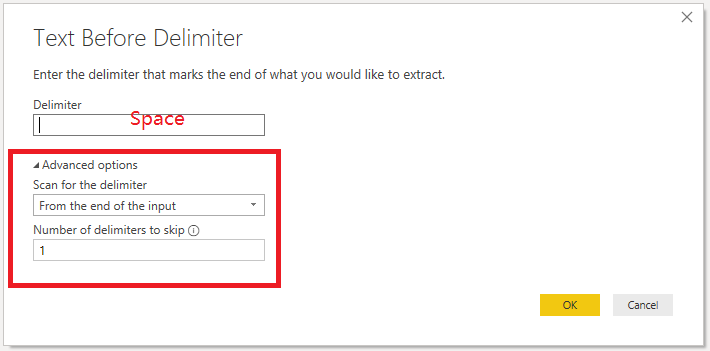
3. Extracted Text After Delimiter.
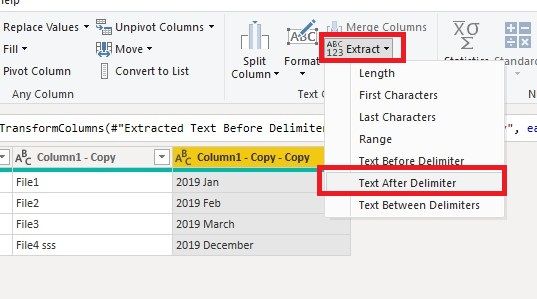
Then, change column names.
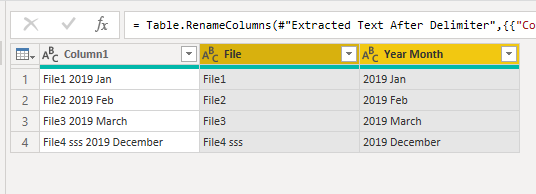
Attach the complete code.
let
Source = Table.FromRows(Json.Document(Binary.Decompress(Binary.FromText("i45WcsvMSTVUMDIwtFTwSsxTitWBCBlBhNxSk+BCxhAh38Si5Ay4oIlCcXExRMIlNTk1Nym1SCk2FgA=", BinaryEncoding.Base64), Compression.Deflate)), let _t = ((type text) meta [Serialized.Text = true]) in type table [Column1 = _t]),
#"Changed Type" = Table.TransformColumnTypes(Source,{{"Column1", type text}}),
#"Duplicated Column" = Table.DuplicateColumn(#"Changed Type", "Column1", "Column1 - Copy"),
#"Duplicated Column1" = Table.DuplicateColumn(#"Duplicated Column", "Column1 - Copy", "Column1 - Copy - Copy"),
#"Extracted Text Before Delimiter" = Table.TransformColumns(#"Duplicated Column1", {{"Column1 - Copy", each Text.BeforeDelimiter(_, " ", {1, RelativePosition.FromEnd}), type text}}),
#"Extracted Text After Delimiter" = Table.TransformColumns(#"Extracted Text Before Delimiter", {{"Column1 - Copy - Copy", each Text.AfterDelimiter(_, " ", {1, RelativePosition.FromEnd}), type text}}),
#"Renamed Columns" = Table.RenameColumns(#"Extracted Text After Delimiter",{{"Column1 - Copy", "File"}, {"Column1 - Copy - Copy", "Year Month"}})
in
#"Renamed Columns"
Best Regards,
Icey
If this post helps, then please consider Accept it as the solution to help the other members find it more quickly.
Hi @Anonymous ,
Try this:
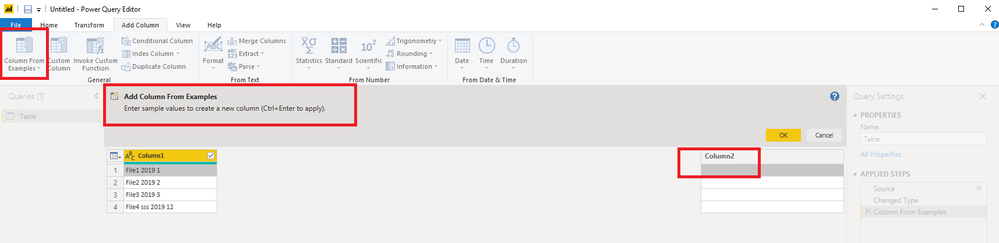
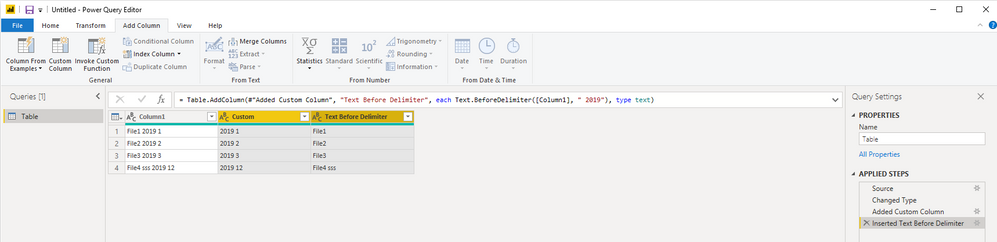
1. Add Column → Column From Examples.
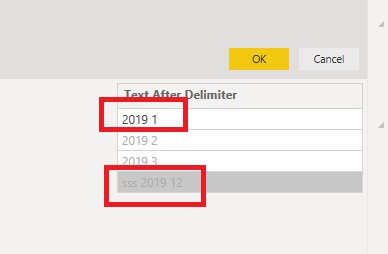
2. Enter sample value.
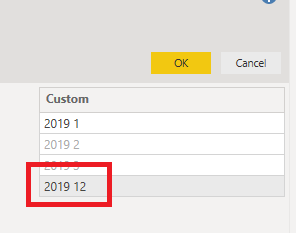
3. Modify the value that does not match.
4. OK.
Best Regards,
Icey
If this post helps, then please consider Accept it as the solution to help the other members find it more quickly.
Thanks Icy,
But I was really hoping not to have to add a column but to split the column because I also need the text before the date as well - as that is the Vendor name.
Also, I tried your method but poor Power BI couldn't figure out that the last part of the text string was a date.
I am able to extract the date using 'Add Column' > Split by delimeter which successfully extracts just the date by using the below code, but I am still left with the original column [Claims Vendor] where I need to do all sorts of crap to get the entire name, because again, it's either a single word, or two words.
If I could perform the below with a transform.column instead of a add.column it would be perfect but it doesn't allow it!!
= Table.AddColumn(PreviousStep, "Invoice Period", each Text.AfterDelimiter([Claims Vendor], " ", {1, RelativePosition.FromEnd}), type date)
If you have recently started exploring Fabric, we'd love to hear how it's going. Your feedback can help with product improvements.
A new Power BI DataViz World Championship is coming this June! Don't miss out on submitting your entry.
Experience the highlights from FabCon & SQLCon, available live and on-demand starting April 14th.
| User | Count |
|---|---|
| 47 | |
| 44 | |
| 40 | |
| 20 | |
| 15 |
| User | Count |
|---|---|
| 70 | |
| 67 | |
| 32 | |
| 27 | |
| 25 |