cancel
Showing results for 
Search instead for 
Did you mean: 

The FabCon + SQLCon recap series starts April 14th at 8am Pacific. If you’re tracking where AI is going inside Fabric, this first session is a can't miss. Register now

Reply
Anonymous
Not applicable

Split and rearrange resulting columns

Hi guys, 

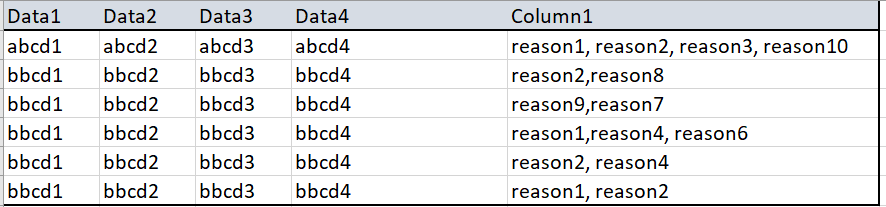
I have a data set like this one and I'd like to split the column containing reasons based on the "," delimitor and then rearrange the resulting columns so that "reasonx" event will always appear only under the columnx. 

ReasonQuery.PNG


And I want to get to something like this: 

ReasonQuery2.PNG


I load and split the columns in my query but after that I don't know how to propery sort the columns as above 


Thank you,

Mihnea 

1 ACCEPTED SOLUTION
dearwatson
Continued Contributor

Hi Mikyi_ro


basically, you need to unpivot the reason column then duplicate it and re-pivot it. I did it with the following query:

let
    Source = Table.FromRows(Json.Document(Binary.Decompress(Binary.FromText("fY8xDsIwDEXv4jkDqVso12CNOjhx7A0GS5wfJwSkqojlW85//nZSAiKCAHFyIWNrza2SPe4xvCuOGk+whQQ5Z0dwdpGnGH/5aXDzni+lNH7k04+BtXPMzUF0URbTwx1Lx2qt7ixnl30adltE/GW9uGSVfAj5HHfttGpbE1uW/P339gI=", BinaryEncoding.Base64), Compression.Deflate)), let _t = ((type text) meta [Serialized.Text = true]) in type table [Data = _t, Data.1 = _t, Data.2 = _t, ReasonMerged = _t]),
    #"Changed Type" = Table.TransformColumnTypes(Source,{{"Data", type text}, {"ReasonMerged", type text}}),
    #"Renamed Columns" = Table.RenameColumns(#"Changed Type",{{"ReasonMerged", "Reason"}}),
    #"Split Column by Delimiter" = Table.SplitColumn(#"Renamed Columns", "Reason", Splitter.SplitTextByDelimiter(",", QuoteStyle.Csv), {"Reason.1", "Reason.2", "Reason.3"}),
    #"Changed Type1" = Table.TransformColumnTypes(#"Split Column by Delimiter",{{"Data.1", type text}, {"Data.2", type text}, {"Reason.1", type text}, {"Reason.2", type text}, {"Reason.3", type text}}),
    #"Unpivoted Other Columns" = Table.UnpivotOtherColumns(#"Changed Type1", {"Data", "Data.1", "Data.2"}, "Attribute", "Value"),
    #"Removed Columns" = Table.RemoveColumns(#"Unpivoted Other Columns",{"Attribute"}),
    #"Duplicated Column" = Table.DuplicateColumn(#"Removed Columns", "Value", "Value - Copy"),
    #"Pivoted Column" = Table.Pivot(#"Duplicated Column", List.Distinct(#"Duplicated Column"[#"Value - Copy"]), "Value - Copy", "Value", List.Max)
in
    #"Pivoted Column"

Original Data:
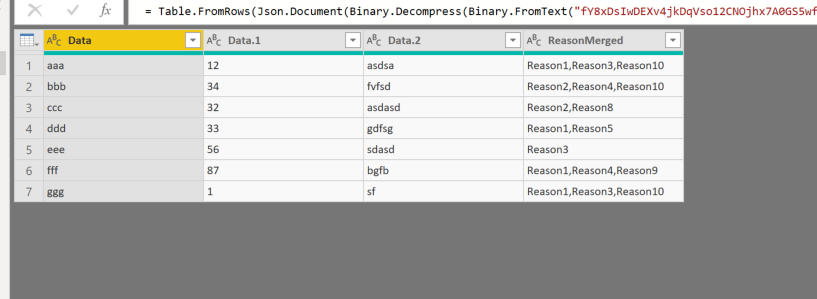
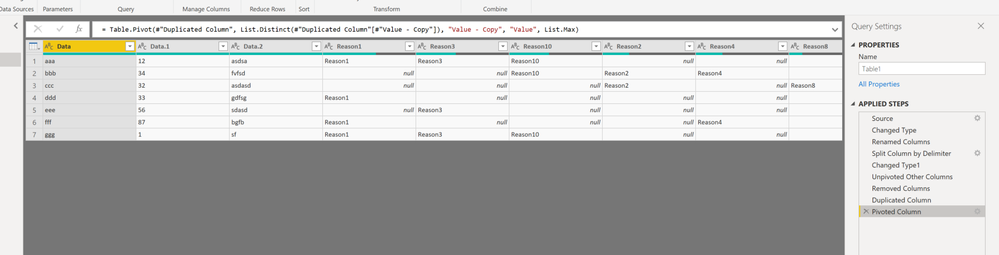
originaloriginalresultresult

View solution in original post

2 REPLIES 2
dearwatson
Continued Contributor

Hi Mikyi_ro


basically, you need to unpivot the reason column then duplicate it and re-pivot it. I did it with the following query:

let
    Source = Table.FromRows(Json.Document(Binary.Decompress(Binary.FromText("fY8xDsIwDEXv4jkDqVso12CNOjhx7A0GS5wfJwSkqojlW85//nZSAiKCAHFyIWNrza2SPe4xvCuOGk+whQQ5Z0dwdpGnGH/5aXDzni+lNH7k04+BtXPMzUF0URbTwx1Lx2qt7ixnl30adltE/GW9uGSVfAj5HHfttGpbE1uW/P339gI=", BinaryEncoding.Base64), Compression.Deflate)), let _t = ((type text) meta [Serialized.Text = true]) in type table [Data = _t, Data.1 = _t, Data.2 = _t, ReasonMerged = _t]),
    #"Changed Type" = Table.TransformColumnTypes(Source,{{"Data", type text}, {"ReasonMerged", type text}}),
    #"Renamed Columns" = Table.RenameColumns(#"Changed Type",{{"ReasonMerged", "Reason"}}),
    #"Split Column by Delimiter" = Table.SplitColumn(#"Renamed Columns", "Reason", Splitter.SplitTextByDelimiter(",", QuoteStyle.Csv), {"Reason.1", "Reason.2", "Reason.3"}),
    #"Changed Type1" = Table.TransformColumnTypes(#"Split Column by Delimiter",{{"Data.1", type text}, {"Data.2", type text}, {"Reason.1", type text}, {"Reason.2", type text}, {"Reason.3", type text}}),
    #"Unpivoted Other Columns" = Table.UnpivotOtherColumns(#"Changed Type1", {"Data", "Data.1", "Data.2"}, "Attribute", "Value"),
    #"Removed Columns" = Table.RemoveColumns(#"Unpivoted Other Columns",{"Attribute"}),
    #"Duplicated Column" = Table.DuplicateColumn(#"Removed Columns", "Value", "Value - Copy"),
    #"Pivoted Column" = Table.Pivot(#"Duplicated Column", List.Distinct(#"Duplicated Column"[#"Value - Copy"]), "Value - Copy", "Value", List.Max)
in
    #"Pivoted Column"

Original Data:

originaloriginalresultresult

Anonymous
Not applicable

Thank you very much!

It's what I needed .

My Table.Pivot statement had List.Count at the end, I changed it to .Max as in yours, but assume it's the same in this case. 

Thanks again


Helpful resources

Announcements
New to Fabric survey Carousel

New to Fabric Survey

If you have recently started exploring Fabric, we'd love to hear how it's going. Your feedback can help with product improvements.

Power BI DataViz World Championships carousel

Power BI DataViz World Championships - June 2026

A new Power BI DataViz World Championship is coming this June! Don't miss out on submitting your entry.

Join our Fabric User Panel

Join our Fabric User Panel

Share feedback directly with Fabric product managers, participate in targeted research studies and influence the Fabric roadmap.

March Power BI Update Carousel

Power BI Community Update - March 2026

Check out the March 2026 Power BI update to learn about new features.