cancel
Showing results for 
Search instead for 
Did you mean: 

Learn from the best! Meet the four finalists headed to the FINALS of the Power BI Dataviz World Championships! Register now

Reply
inbal
Regular Visitor

Split Query for Tables

Hey,

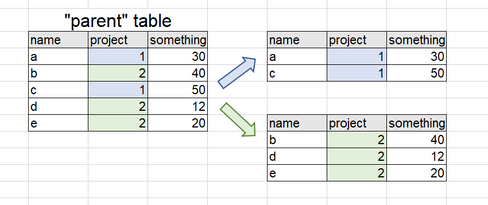
I wanted to ask if there is a query that allows a dynamic distribution of two tables?

Similar to the "append" query.


I am aware of the option of "duplicate a table" and then making a suitable "filter", but the idea is that the tables will automatically update from the "parent" table.

I add a small sample in the picture below.


Capture.PNG


Thanks,

Inbal

1 ACCEPTED SOLUTION
Anonymous
Not applicable

You can try this in DAX as well.


In Modelling -> New Table


Child_TableA= FILTER ( Parent_table, Parent_Table[Project] = 1)


Child_TableB= FILTER ( Parent_table, Parent_Table[Project] = 2)


In this way, you will have 2 dynamic child tables .


Hope this helps.


Thanks
Raj

View solution in original post

4 REPLIES 4
Anonymous
Not applicable

You can try this in DAX as well.


In Modelling -> New Table


Child_TableA= FILTER ( Parent_table, Parent_Table[Project] = 1)


Child_TableB= FILTER ( Parent_table, Parent_Table[Project] = 2)


In this way, you will have 2 dynamic child tables .


Hope this helps.


Thanks
Raj

Anonymous
Not applicable

I am new to Power BI, although I have been working with Power Query in Excel for some time. I realize that rajendran's post was from several months ago, but I do appreciate the simplicity of his proposed solution. In response to similar questions posted elsewhere, I have typically read suggestions to duplicate the query and apply different criteria for each copy of the query. For small datasets, this might be workable. But for large datasets, duplicating that data pull repeatedly is very inefficient. rajendran's solution requires only a single data pull, which to me seems the most-efficient way to perform this kind of task. And I learned something new, which is also a plus! Smiley Happy

@Anonymous Totally agree - @Anonymous's solution was much better than mine, and I learned something new too. This is why getting involved with the forum is a good thing - sometimes you find the way you do things is good; sometimes someone shows you how to do it better.

Gazzer
Resolver II
Resolver II

You seem to already have the answer you need.


You could either dupliacate parent and filter one for project 1 and the other for project 2 (essentially, exactly what you said you are already aware of!).


Otherwise, you could reference the parent table twice, and do the same filtering on both referencing queries.


I'm struggling to see why these are not suitable options - perhaps more information is needed?

Helpful resources

Announcements
New to Fabric survey Carousel

New to Fabric Survey

If you have recently started exploring Fabric, we'd love to hear how it's going. Your feedback can help with product improvements.

Power BI DataViz World Championships carousel

Power BI DataViz World Championships - June 2026

A new Power BI DataViz World Championship is coming this June! Don't miss out on submitting your entry.

Join our Fabric User Panel

Join our Fabric User Panel

Share feedback directly with Fabric product managers, participate in targeted research studies and influence the Fabric roadmap.

March Power BI Update Carousel

Power BI Community Update - March 2026

Check out the March 2026 Power BI update to learn about new features.