cancel
Showing results for 
Search instead for 
Did you mean: 

Join the FabCon + SQLCon recap series. Up next: Power BI, Real-Time Intelligence, IQ and AI, and Data Factory take center stage. All sessions are available on-demand after the live show. Register now

Reply
Anonymous
Not applicable

Split? Merge?? Find??? Trim????

Morning all,
I've never done this before, and it is just confusing.  I have two columns, One for the Operating System and one for the version.

What I need to do is Trim bits from both columns and make one combined column, as such...

Column 1                           Column 2             Column 3
Windows 10 Enterprise      10.0 (16299)         Windows 10 (16299)
Windows 7 Professional      6.1 (7601)            Windows 7 (7601)
Mac OS X                             10.13.6                Mac OS X (10.13.6)
Windows 8.1 Enterprise       6.3 (9600)            Windows 8.1 (9600)

I would be grateful if anyone could point me in the right direction.

Paul


1 ACCEPTED SOLUTION
FrankAT
Community Champion
Community Champion

Hi @Noblelox,

Follow these steps:

// Table
let
    Source = Table.FromRows(Json.Document(Binary.Decompress(Binary.FromText("i45WCs/MS8kvL1YwNFBwzStJLSooyixOVdJRMjTQM1DQMDQzsrTUVIrVQSg0Vwgoyk9LLS7OzM9LzAGqNNMzVNAwNzMwhKjzTUxW8A9WiICYYWisZ4ai3QKoGsUiMz1jBQ1LMwMDoPZYAA==", BinaryEncoding.Base64), Compression.Deflate)), let _t = ((type text) meta [Serialized.Text = true]) in type table [#"Column 1" = _t, #"Column 2" = _t]),
    #"Changed Type" = Table.TransformColumnTypes(Source,{{"Column 1", type text}, {"Column 2", type text}}),
    #"Replaced Value1" = Table.ReplaceValue(#"Changed Type","Enterprise","",Replacer.ReplaceText,{"Column 1"}),
    #"Replaced Value2" = Table.ReplaceValue(#"Replaced Value1","Professional","",Replacer.ReplaceText,{"Column 1"}),
    #"Added Prefix" = Table.TransformColumns(#"Replaced Value2", {{"Column 2", each "(" & _, type text}}),
    #"Added Suffix" = Table.TransformColumns(#"Added Prefix", {{"Column 2", each _ & ")", type text}}),
    #"Replaced Value" = Table.ReplaceValue(#"Added Suffix","))",")",Replacer.ReplaceText,{"Column 2"}),
    #"Split Column by Delimiter1" = Table.SplitColumn(#"Replaced Value", "Column 2", Splitter.SplitTextByEachDelimiter({"("}, QuoteStyle.Csv, true), {"Column 2.1", "Column 2.2"}),
    #"Added Prefix1" = Table.TransformColumns(#"Split Column by Delimiter1", {{"Column 2.2", each "(" & _, type text}}),
    #"Removed Columns" = Table.RemoveColumns(#"Added Prefix1",{"Column 2.1"}),
    #"Inserted Merged Column" = Table.AddColumn(#"Removed Columns", "Column 3", each Text.Combine({[Column 1], [Column 2.2]}, ""), type text),
    #"Renamed Columns" = Table.RenameColumns(#"Inserted Merged Column",{{"Column 2.2", "Column 2"}})
in
    #"Renamed Columns"

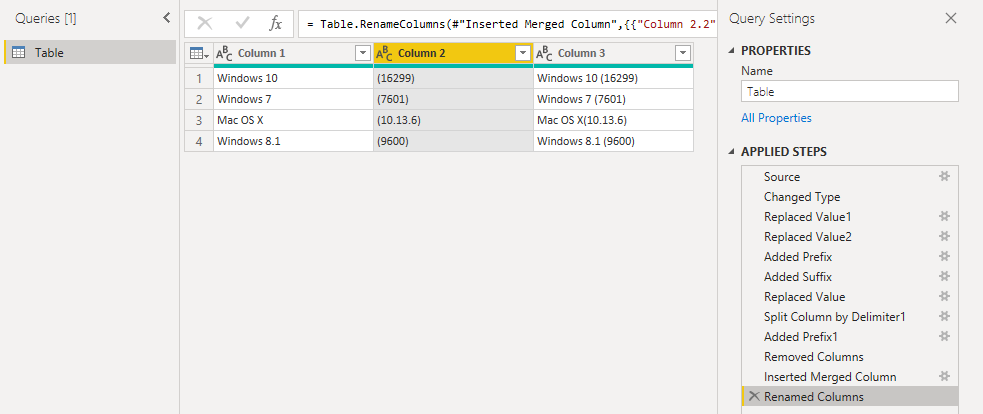
Figure: Start
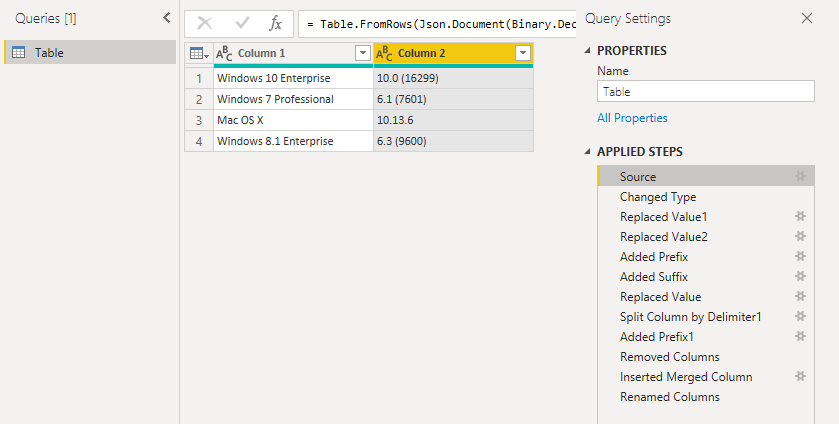
12-03-_2020_12-42-59.png

Figure: End

12-03-_2020_12-43-37.png

Greetings FrankAT

View solution in original post

3 REPLIES 3
FrankAT
Community Champion
Community Champion

Hi @Noblelox,

Follow these steps:

// Table
let
    Source = Table.FromRows(Json.Document(Binary.Decompress(Binary.FromText("i45WCs/MS8kvL1YwNFBwzStJLSooyixOVdJRMjTQM1DQMDQzsrTUVIrVQSg0Vwgoyk9LLS7OzM9LzAGqNNMzVNAwNzMwhKjzTUxW8A9WiICYYWisZ4ai3QKoGsUiMz1jBQ1LMwMDoPZYAA==", BinaryEncoding.Base64), Compression.Deflate)), let _t = ((type text) meta [Serialized.Text = true]) in type table [#"Column 1" = _t, #"Column 2" = _t]),
    #"Changed Type" = Table.TransformColumnTypes(Source,{{"Column 1", type text}, {"Column 2", type text}}),
    #"Replaced Value1" = Table.ReplaceValue(#"Changed Type","Enterprise","",Replacer.ReplaceText,{"Column 1"}),
    #"Replaced Value2" = Table.ReplaceValue(#"Replaced Value1","Professional","",Replacer.ReplaceText,{"Column 1"}),
    #"Added Prefix" = Table.TransformColumns(#"Replaced Value2", {{"Column 2", each "(" & _, type text}}),
    #"Added Suffix" = Table.TransformColumns(#"Added Prefix", {{"Column 2", each _ & ")", type text}}),
    #"Replaced Value" = Table.ReplaceValue(#"Added Suffix","))",")",Replacer.ReplaceText,{"Column 2"}),
    #"Split Column by Delimiter1" = Table.SplitColumn(#"Replaced Value", "Column 2", Splitter.SplitTextByEachDelimiter({"("}, QuoteStyle.Csv, true), {"Column 2.1", "Column 2.2"}),
    #"Added Prefix1" = Table.TransformColumns(#"Split Column by Delimiter1", {{"Column 2.2", each "(" & _, type text}}),
    #"Removed Columns" = Table.RemoveColumns(#"Added Prefix1",{"Column 2.1"}),
    #"Inserted Merged Column" = Table.AddColumn(#"Removed Columns", "Column 3", each Text.Combine({[Column 1], [Column 2.2]}, ""), type text),
    #"Renamed Columns" = Table.RenameColumns(#"Inserted Merged Column",{{"Column 2.2", "Column 2"}})
in
    #"Renamed Columns"

Figure: Start

12-03-_2020_12-42-59.png

Figure: End

12-03-_2020_12-43-37.png

Greetings FrankAT

Anonymous
Not applicable

Spot on FrankAT!

vanessafvg
Community Champion
Community Champion

something like this?  see attached.


If I took the time to answer your question and I came up with a solution, please mark my post as a solution and /or give kudos freely for the effort 🙂 Thank you!

Proud to be a Super User!


Helpful resources

Announcements
April Power BI Update Carousel

Power BI Monthly Update - April 2026

Check out the April 2026 Power BI update to learn about new features.

New to Fabric survey Carousel

New to Fabric Survey

If you have recently started exploring Fabric, we'd love to hear how it's going. Your feedback can help with product improvements.

Power BI DataViz World Championships carousel

Power BI DataViz World Championships - June 2026

A new Power BI DataViz World Championship is coming this June! Don't miss out on submitting your entry.

FabCon and SQLCon Highlights Carousel

FabCon &SQLCon Highlights

Experience the highlights from FabCon & SQLCon, available live and on-demand starting April 14th.