Hi Team,
I am looking to split my cumulitive sum and get day wise hours spent on a work item id.
Please ntoe that, for each wokr item - date column would be be continuos and we need to split cumulative by each day
Here is the raw data;
| Work Item Id | Date | Assigned to_Users | State | Completed Work |
| 8117 | 7/22/2021 | User1 | In Progress | 4 |
| 8117 | 7/23/2021 | User1 | In Progress | 5 |
| 8117 | 7/24/2021 | User1 | In Progress | 6 |
| 8117 | 7/25/2021 | User1 | In Progress | 7 |
| 8117 | 7/26/2021 | User1 | In Progress | 8 |
| 8117 | 7/27/2021 | User1 | In Progress | 8 |
| 8117 | 7/28/2021 | User1 | Code Review | 10 |
| 8117 | 7/29/2021 | User1 | Code Review | 11 |
| 8117 | 7/30/2021 | User2 | Code Review | 11 |
| 8117 | 7/31/2021 | User2 | Code Review | 12 |
| 8117 | 8/1/2021 | User2 | Code Review | 13 |
| 8117 | 8/2/2021 | User3 | Testing | 13 |
| 8117 | 8/3/2021 | User3 | Testing | 13 |
| 8118 | 7/22/2021 | User1 | In Progress | 1 |
| 8118 | 7/23/2021 | User1 | In Progress | 3 |
| 8118 | 7/24/2021 | User1 | In Progress | 8 |
| 8118 | 7/25/2021 | User1 | In Progress | 8 |
| 8118 | 7/26/2021 | User1 | In Progress | 11 |
| 8118 | 7/27/2021 | User1 | In Progress | 11 |
| 8118 | 7/28/2021 | User1 | Code Review | 14 |
| 8118 | 7/29/2021 | User1 | Code Review | 14 |
| 8118 | 7/30/2021 | User2 | Code Review | 15 |
| 8118 | 7/31/2021 | User2 | Code Review | 15 |
| 8118 | 8/1/2021 | User2 | Code Review | 15 |
| 8118 | 8/2/2021 | User3 | Testing | 18 |
| 8118 | 8/3/2021 | User3 | Testing | 19 |
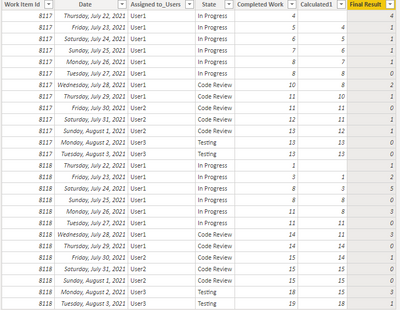
Expected Result with two additional calculated cloumns:
| Work Item Id | Date | Assigned to_Users | State | Completed Work | Calculated1 | Final Result |
| 8117 | 7/22/2021 | User1 | In Progress | 4 | 0 | 4 |
| 8117 | 7/23/2021 | User1 | In Progress | 5 | 4 | 1 |
| 8117 | 7/24/2021 | User1 | In Progress | 6 | 5 | 1 |
| 8117 | 7/25/2021 | User1 | In Progress | 7 | 6 | 1 |
| 8117 | 7/26/2021 | User1 | In Progress | 8 | 7 | 1 |
| 8117 | 7/27/2021 | User1 | In Progress | 8 | 8 | 0 |
| 8117 | 7/28/2021 | User1 | Code Review | 10 | 8 | 2 |
| 8117 | 7/29/2021 | User1 | Code Review | 11 | 10 | 1 |
| 8117 | 7/30/2021 | User2 | Code Review | 11 | 11 | 0 |
| 8117 | 7/31/2021 | User2 | Code Review | 12 | 11 | 1 |
| 8117 | 8/1/2021 | User2 | Code Review | 13 | 12 | 1 |
| 8117 | 8/2/2021 | User3 | Testing | 13 | 13 | 0 |
| 8117 | 8/3/2021 | User3 | Testing | 13 | 13 | 0 |
| 8118 | 7/22/2021 | User1 | In Progress | 1 | 0 | 1 |
| 8118 | 7/23/2021 | User1 | In Progress | 3 | 1 | 2 |
| 8118 | 7/24/2021 | User1 | In Progress | 8 | 3 | 5 |
| 8118 | 7/25/2021 | User1 | In Progress | 8 | 8 | 0 |
| 8118 | 7/26/2021 | User1 | In Progress | 11 | 8 | 3 |
| 8118 | 7/27/2021 | User1 | In Progress | 11 | 11 | 0 |
| 8118 | 7/28/2021 | User1 | Code Review | 14 | 11 | 3 |
| 8118 | 7/29/2021 | User1 | Code Review | 14 | 14 | 0 |
| 8118 | 7/30/2021 | User2 | Code Review | 15 | 14 | 1 |
| 8118 | 7/31/2021 | User2 | Code Review | 15 | 15 | 0 |
| 8118 | 8/1/2021 | User2 | Code Review | 15 | 15 | 0 |
| 8118 | 8/2/2021 | User3 | Testing | 18 | 15 | 3 |
| 8118 | 8/3/2021 | User3 | Testing | 19 | 18 | 1 |
Testing:
1. Cumulative sum of the completed hours for work item id 8117 is 13 [As per the COMLETED WORK column] - same we will get from FINAL RESULT column when we sum the values
2. Cumulative sum of the completed hours for work item id 8118 is 19 [As per the COMLETED WORK column] - same we will get from FINAL RESULT column when we sum the values
Please help as soon as possble.
-Ram