cancel
Showing results for 
Search instead for 
Did you mean: 

We've captured the moments from FabCon & SQLCon that everyone is talking about, and we are bringing them to the community, live and on-demand. Starts on April 14th. Register now

Reply
jbenedict2
Frequent Visitor

Split Column Into 2 Columns Based on Key Column

Hi!


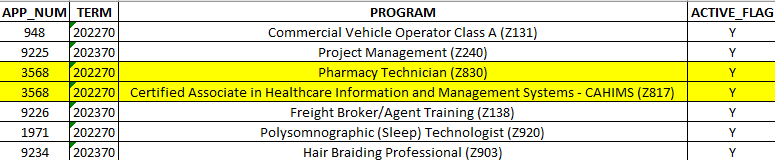
I am trying to manipulate the following table such that for every APP_NUM there is only one row.  Currently, the table is structured such that for every PROGRAM an APP_NUM is assigned, there is one row, resulting in the possibility of there being more than one row per APP_NUM. 


Please see the following for the current structure (I've marked the sample rows where there's a repeat of an APP_NUM because there's more than one PROGRAM):


jbenedict2_0-1668701036127.png


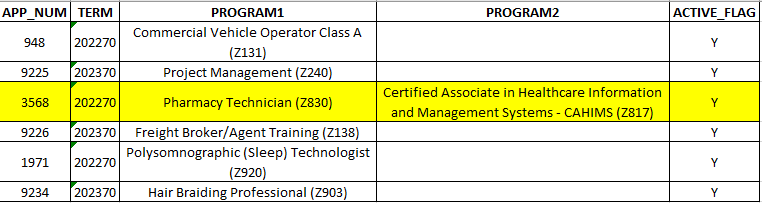
I'd like the output to look like this (I've marked the APP_NUM that previously had 2 rows and is now combined into one row):


jbenedict2_1-1668701069835.png


The result adds a column for Program2.


I've tried pivoting and grouping, but am not getting anywhere (probably due to my lack of proficiency in M). 


Any help is greatly appreciated!

1 ACCEPTED SOLUTION
Greg_Deckler
Community Champion
Community Champion

@jbenedict2 Try this:

let
    Source = Table.FromRows(Json.Document(Binary.Decompress(Binary.FromText("i45WsjSxUNJRMjIwMjI3ADJKUitKDIF0pFKsDlDSyMgUXdYILmtsaoah1xivrAmyyWbosqYQ2VgA", BinaryEncoding.Base64), Compression.Deflate)), let _t = ((type nullable text) meta [Serialized.Text = true]) in type table [APP_NUM = _t, TERM = _t, PROGRAM = _t, ACTIVE_FLAG = _t]),
    #"Changed Type" = Table.TransformColumnTypes(Source,{{"APP_NUM", Int64.Type}, {"TERM", Int64.Type}, {"PROGRAM", type text}, {"ACTIVE_FLAG", type text}}),
    #"Grouped Rows" = Table.Group(#"Changed Type", {"APP_NUM"}, {{"TERM", each List.Max([TERM]), type nullable number}, {"ACTIVE_FLAG", each List.Max([ACTIVE_FLAG]), type nullable text}, {"PROGRAM", each _, type table [APP_NUM=nullable number, TERM=nullable number, PROGRAM=nullable text, ACTIVE_FLAG=nullable text]}}),
    #"Added Custom" = Table.AddColumn(#"Grouped Rows", "Custom", each Table.ToList(Table.SelectColumns([PROGRAM],"PROGRAM"))),
    #"Extracted Values" = Table.TransformColumns(#"Added Custom", {"Custom", each Text.Combine(List.Transform(_, Text.From), ","), type text}),
    #"Split Column by Delimiter" = Table.SplitColumn(#"Extracted Values", "Custom", Splitter.SplitTextByDelimiter(",", QuoteStyle.Csv), {"Custom.1", "Custom.2"}),
    #"Changed Type1" = Table.TransformColumnTypes(#"Split Column by Delimiter",{{"Custom.1", type text}, {"Custom.2", type text}}),
    #"Removed Columns" = Table.RemoveColumns(#"Changed Type1",{"PROGRAM"})
in
    #"Removed Columns"

Follow on LinkedIn
@ me in replies or I'll lose your thread!!!
Instead of a Kudo, please vote for this idea
Become an expert!: Enterprise DNA
External Tools: MSHGQM
YouTube Channel!: Microsoft Hates Greg
Latest book!:
DAX For Humans

DAX is easy, CALCULATE makes DAX hard...

View solution in original post

2 REPLIES 2
Greg_Deckler
Community Champion
Community Champion

@jbenedict2 Try this:

let
    Source = Table.FromRows(Json.Document(Binary.Decompress(Binary.FromText("i45WsjSxUNJRMjIwMjI3ADJKUitKDIF0pFKsDlDSyMgUXdYILmtsaoah1xivrAmyyWbosqYQ2VgA", BinaryEncoding.Base64), Compression.Deflate)), let _t = ((type nullable text) meta [Serialized.Text = true]) in type table [APP_NUM = _t, TERM = _t, PROGRAM = _t, ACTIVE_FLAG = _t]),
    #"Changed Type" = Table.TransformColumnTypes(Source,{{"APP_NUM", Int64.Type}, {"TERM", Int64.Type}, {"PROGRAM", type text}, {"ACTIVE_FLAG", type text}}),
    #"Grouped Rows" = Table.Group(#"Changed Type", {"APP_NUM"}, {{"TERM", each List.Max([TERM]), type nullable number}, {"ACTIVE_FLAG", each List.Max([ACTIVE_FLAG]), type nullable text}, {"PROGRAM", each _, type table [APP_NUM=nullable number, TERM=nullable number, PROGRAM=nullable text, ACTIVE_FLAG=nullable text]}}),
    #"Added Custom" = Table.AddColumn(#"Grouped Rows", "Custom", each Table.ToList(Table.SelectColumns([PROGRAM],"PROGRAM"))),
    #"Extracted Values" = Table.TransformColumns(#"Added Custom", {"Custom", each Text.Combine(List.Transform(_, Text.From), ","), type text}),
    #"Split Column by Delimiter" = Table.SplitColumn(#"Extracted Values", "Custom", Splitter.SplitTextByDelimiter(",", QuoteStyle.Csv), {"Custom.1", "Custom.2"}),
    #"Changed Type1" = Table.TransformColumnTypes(#"Split Column by Delimiter",{{"Custom.1", type text}, {"Custom.2", type text}}),
    #"Removed Columns" = Table.RemoveColumns(#"Changed Type1",{"PROGRAM"})
in
    #"Removed Columns"


Follow on LinkedIn
@ me in replies or I'll lose your thread!!!
Instead of a Kudo, please vote for this idea
Become an expert!: Enterprise DNA
External Tools: MSHGQM
YouTube Channel!: Microsoft Hates Greg
Latest book!:
DAX For Humans

DAX is easy, CALCULATE makes DAX hard...

@Greg_Deckler  Thank you for the super-fast response! 


I was able to merge the code that you provided with my existing code in the Advanced Editor, and it is now working.


I really appreciate the help!


Jess

Helpful resources

Announcements
New to Fabric survey Carousel

New to Fabric Survey

If you have recently started exploring Fabric, we'd love to hear how it's going. Your feedback can help with product improvements.

Power BI DataViz World Championships carousel

Power BI DataViz World Championships - June 2026

A new Power BI DataViz World Championship is coming this June! Don't miss out on submitting your entry.

Join our Fabric User Panel

Join our Fabric User Panel

Share feedback directly with Fabric product managers, participate in targeted research studies and influence the Fabric roadmap.

March Power BI Update Carousel

Power BI Community Update - March 2026

Check out the March 2026 Power BI update to learn about new features.