Join us at FabCon Atlanta from March 16 - 20, 2026, for the ultimate Fabric, Power BI, AI and SQL community-led event. Save $200 with code FABCOMM.
Register now!Get Fabric Certified for FREE during Fabric Data Days. Don't miss your chance! Request now
I have a large data set to process through over a long time span. Although this measure works great, it is slow to render. Do you have any tips to speed this up?
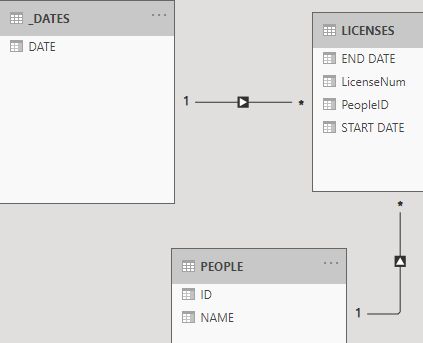
Data structure is something like COMPANY = The company PEOPLE belong to. PEOPLE = unique people with a company ID. LICENSES = License number, people ID, a person can have multiple licenses over a period of time with some or all expired. Hence I have to do the distinct count of people
LICENSE =
CALCULATE(
DISTINCTCOUNTNOBLANK('PEOPLE'[NAME]),
GENERATE(
VALUES(_DATES[DATE]),
FILTER(
CALCULATETABLE('LICENSES',ALL(_DATES)),
CONTAINS(
DATESBETWEEN(
_DATES[DATE],
'LICENSES'[START DATE],
IF(ISBLANK('LICENSES'[END DATE]),TODAY(),'LICENSES'[END DATE])
),
[DATE],_DATES[DATE]
)
)
),
CROSSFILTER(_DATES[DATE],'LICENSE'[END DATE],None)
)
Hi @NickTT ,
Does your problem have been solved?
If the problem is still not resolved, please provide detailed error information or the expected result you expect. Let me know immediately, looking forward to your reply.
Best Regards,
Winniz
Hi @NickTT ,
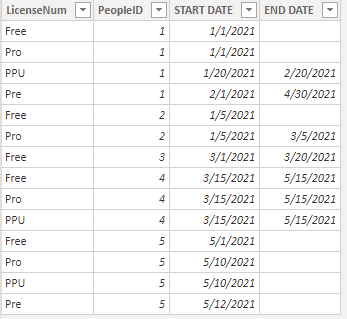
I create the following sample data and model.
If you want to count the number of users with valid licenses, please try the following formula:
User_Num_Have_ActiveLicense =
CALCULATE(
DISTINCTCOUNT(LICENSES[PeopleID]),
FILTER(
LICENSES,
ISBLANK( LICENSES[END DATE] )
|| LICENSES[END DATE] > TODAY()
)
)
If you want to count the number of valid licenses each user has, please try the following formula:
ActiveLicenses_PerUser =
CALCULATE(
DISTINCTCOUNT(LICENSES[LicenseNum]),
FILTER(
LICENSES,
ISBLANK( LICENSES[END DATE] )
|| LICENSES[END DATE] > TODAY()
)
)
If the problem is still not resolved, please provide detailed error information or the expected result you expect. Let me know immediately, looking forward to your reply.
Best Regards,
Winniz
If this post helps, then please consider Accept it as the solution to help the other members find it more quickly.
I don't think this will show you active over a period of time. For instance, May 2020 we had 5, May 2021 we had 10.
Check out the November 2025 Power BI update to learn about new features.
Advance your Data & AI career with 50 days of live learning, contests, hands-on challenges, study groups & certifications and more!