cancel
Showing results for 
Search instead for 
Did you mean: 

Try your skills in the Power BI Dataviz World Championship! Round one ends June 26. Join now

Reply
kevhav
Continued Contributor

Specify one path, when USERELATIONSHIP creates ambiguous paths?

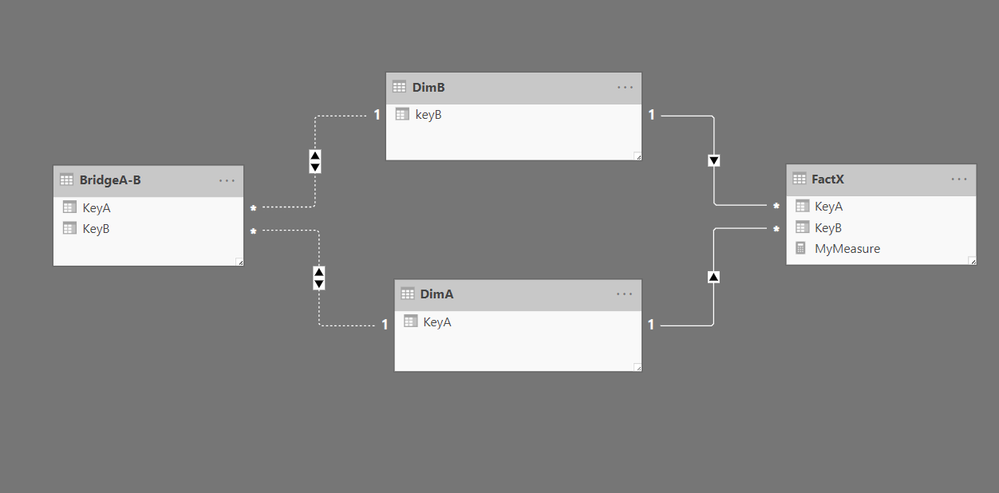
Consider this model...Capture.PNG
 

I want to write a measure such that setting a filter on DimA will filter FactX by using the DimA -> BridgeA-B -> DimB -> FactX path, instead of the direct DimA -> FactX path.


I read about USERELATIONSHIP that "Even if the relationship is inactive, it will be used and overrides any other active relationships that might be present in the model but not mentioned in the function arguments." So I tried "activating" the inactive relationships, hoping this would "override" the direct relationship DimA -> FactX, like this...


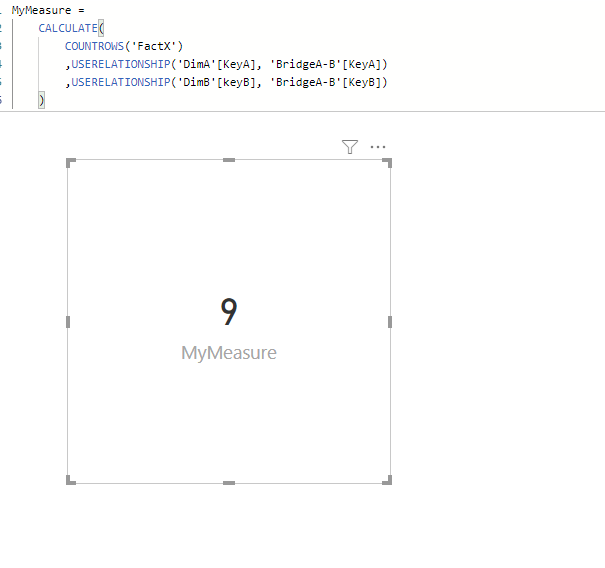
MyMeasure = 
    CALCULATE(
        COUNTROWS('FactX')
        ,USERELATIONSHIP('DimA'[KeyA], 'BridgeA-B'[KeyA])
        ,USERELATIONSHIP('BridgeA-B'[KeyB], 'DimB'[KeyB])
    )


...However, I got an error like: There are ambiguous paths between 'FactX' and 'BridgeA-B'


Then, I even tried this...

MyMeasure = 
    CALCULATE(
        COUNTROWS('FactX')
        ,USERELATIONSHIP('DimA'[KeyA], 'BridgeA-B'[KeyA])
        ,USERELATIONSHIP('BridgeA-B'[KeyB], 'DimB'[KeyB])
 ,USERELATIONSHIP('DimB'[KeyB], 'FactX'[KeyB]) )

...Just hoping that if I specified the path between FactX and BridgeA-B that the measure should use, then maybe Power BI would "get it." Because even though there are multiple paths, I am telling it exactly which path to use! So, there should be no ambiguity! But no luck; I still got the same ambiguous paths error.


Then, I found articles like this and this and this. Which seem to indicate there is no solution. 


But, is there any solution? It feels like there should be. Anything I am missing?

2 ACCEPTED SOLUTIONS
v-yuta-msft
Community Support
Community Support

@kevhav ,


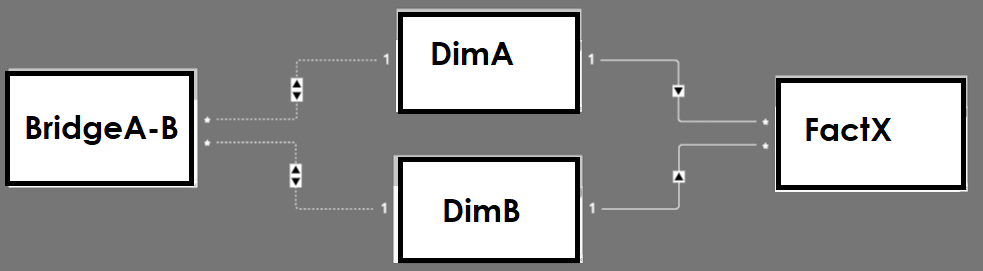
I have make a test but couldn't reproduce your issue, the USERELATIONSHIP() function works well on my side. This issue should be related with your original data. So if possible, could you please share some sample data? The relationship in my demo is as below:

1.PNG 2.PNG 


Community Support Team _ Jimmy Tao

If this post helps, then please consider Accept it as the solution to help the other members find it more quickly.

View solution in original post

kevhav
Continued Contributor

Interesting! Thanks for this reply, @v-yuta-msft ... I cannot share my data as it is now, but I will do some more testing, and see if I can come up with a sample dataset that I can share. 

View solution in original post

2 REPLIES 2
v-yuta-msft
Community Support
Community Support

@kevhav ,


I have make a test but couldn't reproduce your issue, the USERELATIONSHIP() function works well on my side. This issue should be related with your original data. So if possible, could you please share some sample data? The relationship in my demo is as below:

1.PNG 2.PNG 


Community Support Team _ Jimmy Tao

If this post helps, then please consider Accept it as the solution to help the other members find it more quickly.

kevhav
Continued Contributor

Interesting! Thanks for this reply, @v-yuta-msft ... I cannot share my data as it is now, but I will do some more testing, and see if I can come up with a sample dataset that I can share. 

Helpful resources

Announcements
Fabric Data Days is here Carousel

Fabric Data Days 2026

Don't miss out on Data Days, June 15 through August 7. Learn Fabric, Power BI, SQL, AI and more.

May Power BI Update Carousel

Power BI Monthly Update - May 2026

Check out the May 2026 Power BI update to learn about new features.

Power BI DataViz World Championships carousel

Power BI DataViz World Championships - June 2026

A new Power BI DataViz World Championship is coming this June! Don't miss out on submitting your entry.