Join us at FabCon Atlanta from March 16 - 20, 2026, for the ultimate Fabric, Power BI, AI and SQL community-led event. Save $200 with code FABCOMM.
Register now!Get Fabric certified for FREE! Don't miss your chance! Learn more
Hello everyone!
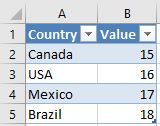
Any help here is appreciated! Considering the following table example:
The current report is running the VALUE column with a standard SUM formula and is filtered by the COUNTRY column with a filter visualization.
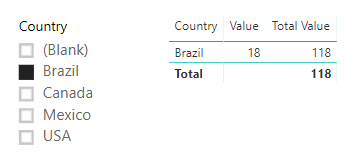
I'd like to know if it's possible (and how to) to add on the formula the following context: if the filter equals "Brasil" then add 100.
Thx in advance,
Diego
Solved! Go to Solution.
Hi @Tulio_DL,
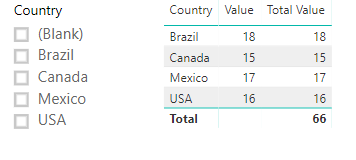
Please new a measure:
Total Value =
IF (
CALCULATE ( ISFILTERED ( Table1[Country] ), ALLSELECTED ( Table1 ) ),
IF (
SELECTEDVALUE ( Table1[Country] ) = "Brazil",
SUM ( Table1[Value] ) + 100,
SUM ( Table1[Value] )
),
SUM ( Table1[Value] )
)
Best regards,
Yuliana Gu
Hi @Tulio_DL,
Please new a measure:
Total Value =
IF (
CALCULATE ( ISFILTERED ( Table1[Country] ), ALLSELECTED ( Table1 ) ),
IF (
SELECTEDVALUE ( Table1[Country] ) = "Brazil",
SUM ( Table1[Value] ) + 100,
SUM ( Table1[Value] )
),
SUM ( Table1[Value] )
)
Best regards,
Yuliana Gu
Hello Shantanu!
Thank you for participating man, what you've said is a way to do the trick.... But I still need to know if there's a way to do what I've pointed out on the original post because my data table is a lot more complex than this example.
Share feedback directly with Fabric product managers, participate in targeted research studies and influence the Fabric roadmap.
Check out the January 2026 Power BI update to learn about new features.
| User | Count |
|---|---|
| 68 | |
| 59 | |
| 44 | |
| 20 | |
| 15 |
| User | Count |
|---|---|
| 104 | |
| 102 | |
| 37 | |
| 26 | |
| 26 |