cancel
Showing results for 
Search instead for 
Did you mean: 

The Power BI Data Visualization World Championships is back! It's time to submit your entry. Live now!

Reply
lvanam
Frequent Visitor

Source SQL query change

Hello Experts,

How can I change the SQL query behind the dashboard if I want to add a new column? Looks like SQL statement window is grayed out and I cannot edit it.
This is the source behind my dashboard.

SQLsource.png

1 ACCEPTED SOLUTION
ankitpatira
Community Champion
Community Champion

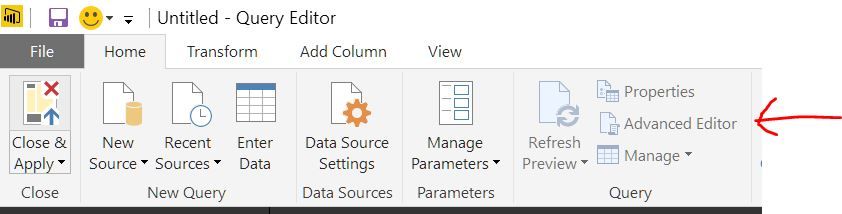
@lvanam Not seen that before but instead of that if you click on Advaned Editor you will see the query code embedded within will be your SQL query that you can edit.

Capture.JPG


View solution in original post

1 REPLY 1
ankitpatira
Community Champion
Community Champion

@lvanam Not seen that before but instead of that if you click on Advaned Editor you will see the query code embedded within will be your SQL query that you can edit.

Capture.JPG


Helpful resources

Announcements
Power BI DataViz World Championships

Power BI Dataviz World Championships

The Power BI Data Visualization World Championships is back! It's time to submit your entry.

FabCon Atlanta 2026 carousel

FabCon Atlanta 2026

Join us at FabCon Atlanta, March 16-20, for the ultimate Fabric, Power BI, AI and SQL community-led event. Save $200 with code FABCOMM.