cancel
Showing results for 
Search instead for 
Did you mean: 

July 7 - July 17 | Round 2 of the Power BI Dataviz World Championships. Don't miss your chance! Learn more

Reply
SabaM
Advocate I
Advocate I

Sorting visuals

I have problems with sorting 

I'm using bookmarks to make visible various visuals via hyperlink buttons  

I sorted visuals by values but when I used abovementioned buttons lost all sorting logic.

can anyone advise how it can be solved? 


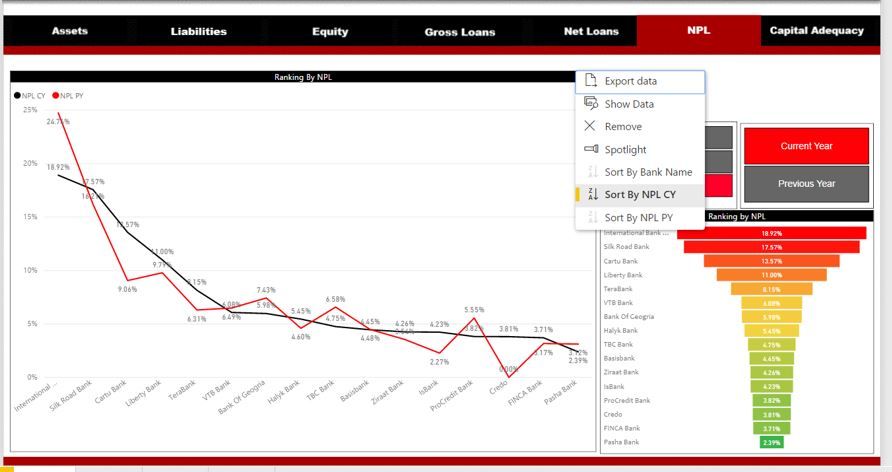
Here I want to present line chart  by values from high to low  and sorting visual by CY values 

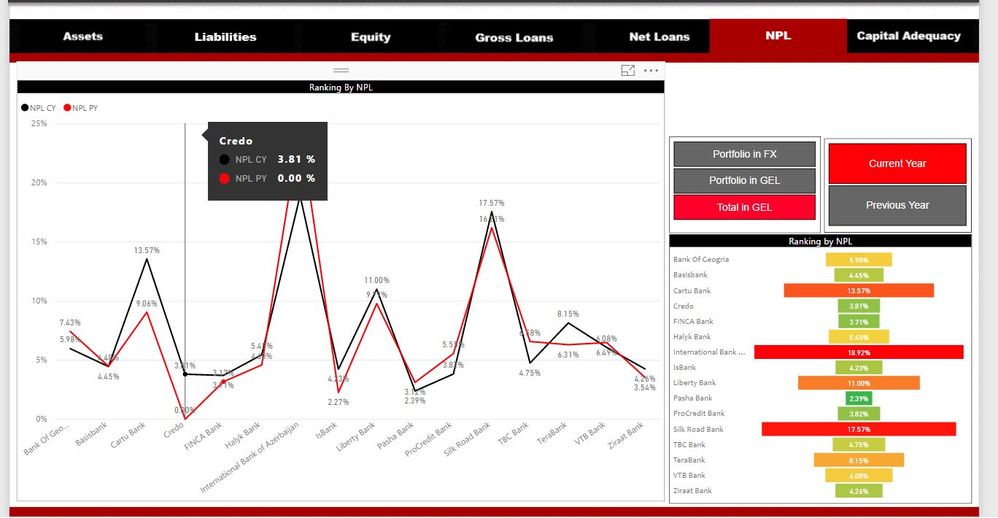
Sorted by Current Year valuesSorted by Current Year valuesVisual  lost sorting logic due to hyperlink button usageVisual lost sorting logic due to hyperlink button usage

1 ACCEPTED SOLUTION
Anonymous
Not applicable

Hi @SabaM,


I think this issue more related to bookmark feature. It seems like you haven't update success for the stored bookmark contents.

If you click on bookmark, it will restore that contents to style when you create the bookmark.(include filler effect, sorting effect...)


Please refer to below link to know more about this feature and limitations:

Use bookmarks to share insights and build stories in Power BI (Preview)

Limitations and considerations

In this preview release of the bookmarks, there are a few limitations and considerations to keep in mind.

  • Custom visuals do not work with bookmarking if they are the source of the filter. If you're using custom visuals to filter elements on a page (for example, the chiclet slicer) and return to that page using a bookmark, the page may be filtered but the custom visual won't be updated to show how the page is being filtered.
  • Cross-highlighting status for a report pane is not saved when you create a bookmark.
  • If you add a visual on a report page after creating a bookmark, the visual will be displayed in its default state. This also means that if you introduce a slicer into a page where you previously created bookmarks, the slicer will behave in its default state.
  • Moving around visuals after a bookmark has been created will be reflected in the bookmark.
  • You must have at least one bookmark in your report, when you publish it to the Power BI service, in order for bookmarks to be available in the service. This is a requirement for each report you publish.
  • Since bookmarks are currently a Preview feature, they're not yet available in Power BI Desktop for Report Server.


For your scenario, please update stored bookmark contents or remove to rebuild a new one with new contents you wanted.


Regards.

Xiaoxin Sheng

View solution in original post

2 REPLIES 2
Anonymous
Not applicable

Hi @SabaM,


I think this issue more related to bookmark feature. It seems like you haven't update success for the stored bookmark contents.

If you click on bookmark, it will restore that contents to style when you create the bookmark.(include filler effect, sorting effect...)


Please refer to below link to know more about this feature and limitations:

Use bookmarks to share insights and build stories in Power BI (Preview)

Limitations and considerations

In this preview release of the bookmarks, there are a few limitations and considerations to keep in mind.

  • Custom visuals do not work with bookmarking if they are the source of the filter. If you're using custom visuals to filter elements on a page (for example, the chiclet slicer) and return to that page using a bookmark, the page may be filtered but the custom visual won't be updated to show how the page is being filtered.
  • Cross-highlighting status for a report pane is not saved when you create a bookmark.
  • If you add a visual on a report page after creating a bookmark, the visual will be displayed in its default state. This also means that if you introduce a slicer into a page where you previously created bookmarks, the slicer will behave in its default state.
  • Moving around visuals after a bookmark has been created will be reflected in the bookmark.
  • You must have at least one bookmark in your report, when you publish it to the Power BI service, in order for bookmarks to be available in the service. This is a requirement for each report you publish.
  • Since bookmarks are currently a Preview feature, they're not yet available in Power BI Desktop for Report Server.


For your scenario, please update stored bookmark contents or remove to rebuild a new one with new contents you wanted.


Regards.

Xiaoxin Sheng

Thank you very much

Helpful resources

Announcements
FabCon and SQLCon Barcelona 2026

FabCon & SQLCon – Barcelona 2026

Join us in Barcelona for FabCon and SQLCon, the Fabric, Power BI, SQL, and AI community event. Save €200 with code FABCMTY200.

60 days of Data Days Carousel

Data Days 2026

Join Data Days 2026: 60 days of free live/on-demand sessions, challenges, study groups, and certification opportunities.

Power BI DataViz World Championships carousel

Power BI DataViz World Championships - June 2026

A new Power BI DataViz World Championship is coming this June! Don't miss out on submitting your entry.

Top Solution Authors