Learn from the best! Meet the four finalists headed to the FINALS of the Power BI Dataviz World Championships! Register now
Hi, I have a table with many columns, and I want to sort the table visualization by using the column names security number, year and month, is it possible to sort the table using these 3 columns?
I tried the solution https://community.powerbi.com/t5/Desktop/Sorting-a-table-using-multiple-columns/m-p/447941#M207285
= Table.Sort(#"Changed Type",{{"security number", Order.Ascending}, {"year", Order.Ascending}, {"month", Order.Ascending}})but it doesn't work on the table visualization.
Solved! Go to Solution.
Hi Samrawit21,
Although you use sort to sort column, in powerbi , it will still sort by single column. Sp workaround is that could try to add a column in table like below
Column = RANKX(sort,sort[securitynumber],,ASC)+
RANKX ( FILTER (sort, sort[securitynumber] = EARLIER (sort[securitynumber] )), sort[year],, ASC )
+ RANKX (
FILTER (sort, sort[securitynumber] = EARLIER (sort[securitynumber] )&& sort[year] = EARLIER ( sort[year])),
sort[month],
,
ASC
)
- 2
Then set id column sort by this new column, then when you add this in table, it will sort by your requirement.
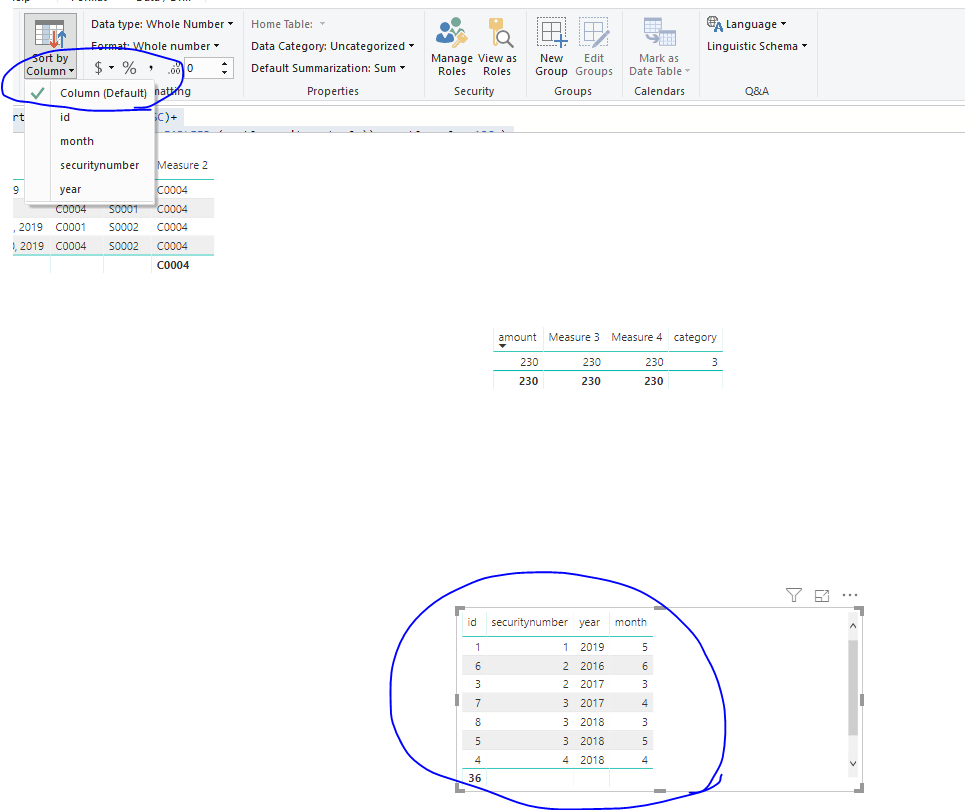
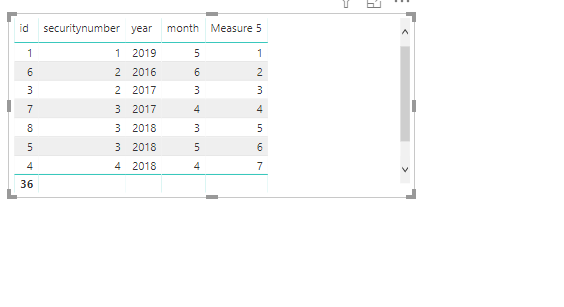
Or you also could create a measure to rank result instead of creating a column, you could try below measure
Measure 5 =
VAR t =
SUMMARIZE (
ALLSELECTED ( sort),
sort[id],
sort[securitynumber],sort[year],sort[month]
)
RETURN
COUNTROWS (
FILTER (
t,
ISONORAFTER (
sort[securitynumber], SELECTEDVALUE ( sort[securitynumber] ), DESC,
sort[year], SELECTEDVALUE ( sort[year] ), DESC,
sort[month], SELECTEDVALUE ( sort[month] ), DESC
)
)
)
Best Regards,
Zoe Zhi
If this post helps, then please consider Accept it as the solution to help the other members find it more quickly.
Hi Samrawit21,
Although you use sort to sort column, in powerbi , it will still sort by single column. Sp workaround is that could try to add a column in table like below
Column = RANKX(sort,sort[securitynumber],,ASC)+
RANKX ( FILTER (sort, sort[securitynumber] = EARLIER (sort[securitynumber] )), sort[year],, ASC )
+ RANKX (
FILTER (sort, sort[securitynumber] = EARLIER (sort[securitynumber] )&& sort[year] = EARLIER ( sort[year])),
sort[month],
,
ASC
)
- 2
Then set id column sort by this new column, then when you add this in table, it will sort by your requirement.
Or you also could create a measure to rank result instead of creating a column, you could try below measure
Measure 5 =
VAR t =
SUMMARIZE (
ALLSELECTED ( sort),
sort[id],
sort[securitynumber],sort[year],sort[month]
)
RETURN
COUNTROWS (
FILTER (
t,
ISONORAFTER (
sort[securitynumber], SELECTEDVALUE ( sort[securitynumber] ), DESC,
sort[year], SELECTEDVALUE ( sort[year] ), DESC,
sort[month], SELECTEDVALUE ( sort[month] ), DESC
)
)
)
Best Regards,
Zoe Zhi
If this post helps, then please consider Accept it as the solution to help the other members find it more quickly.
A new Power BI DataViz World Championship is coming this June! Don't miss out on submitting your entry.
Share feedback directly with Fabric product managers, participate in targeted research studies and influence the Fabric roadmap.
| User | Count |
|---|---|
| 52 | |
| 34 | |
| 32 | |
| 17 | |
| 17 |
| User | Count |
|---|---|
| 61 | |
| 60 | |
| 39 | |
| 26 | |
| 24 |