cancel
Showing results for 
Search instead for 
Did you mean: 

Join the FabCon + SQLCon recap series. Up next: Power BI, Real-Time Intelligence, IQ and AI, and Data Factory take center stage. All sessions are available on-demand after the live show. Register now

Reply
Anonymous
Not applicable

Sorting by Month

Hi all,


I'm having a bit of a headache when trying to sort a graph by month. Normally it's no problem but this time my months are located in different years (some in 2017 and some in 2018). When I have the graph at year level I have no issues, but when I drill down in every year at the same time, the months are sorted wrong.


Does anyone know how to fix this? I have a regular database from excel and can change data type and create extra columns.


Thanks in advance!

5 REPLIES 5
Anonymous
Not applicable

You could create a column where you concatenate both year and month like January 2017, February 2017, and so on. Then put an index column. From there you can sort your Month by the index column, which is basically the sequence of the concatenated column of Month and Year. Or you could create a parameter table of months from January to December with index 1 to 12, then connect the months in your data to that table, which is sorted by the index. You could then use the months in the parameter table in your chart. 

Anonymous
Not applicable

Hi @Anonymous


This won't work for me, as I have dublicates in my date column and Power BI will not allow me to sort by index, as there are multiple index values for the same date.. 

But thanks for the input!

Create a column for a month name using something like "FORMAT([Date],"mmm")" to get the month name. Create another one column that is MONTH([Date]). Now sort the month name field by the month number field. Use the month name field in your visual.


That being said, if you are working with a real Date or Date/Time field and using the built-in hierarchy, it should sort the months correctly.


Follow on LinkedIn
@ me in replies or I'll lose your thread!!!
Instead of a Kudo, please vote for this idea
Become an expert!: Enterprise DNA
External Tools: MSHGQM
YouTube Channel!: Microsoft Hates Greg
Latest book!:
DAX For Humans

DAX is easy, CALCULATE makes DAX hard...
Greg_Deckler
Community Champion
Community Champion

Sample data would help to recreate and it would also help to know how the months are being sorted, alphabetically? Generally if they are being sorted alphabetically you need to create a numeric month field and set your Sort By field to this numeric month column.


Follow on LinkedIn
@ me in replies or I'll lose your thread!!!
Instead of a Kudo, please vote for this idea
Become an expert!: Enterprise DNA
External Tools: MSHGQM
YouTube Channel!: Microsoft Hates Greg
Latest book!:
DAX For Humans

DAX is easy, CALCULATE makes DAX hard...
Anonymous
Not applicable

year.pngmonths.png


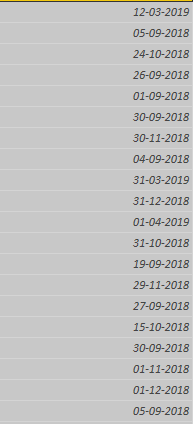
Hi Greg - my graphs look like this, where the second one is where I drill into both years at the same time (January, March, April is 2019, rest is 2018). So it seems that the months are being sorted as if all the data were in the same year.


A sample of the date data is below:


Dates.png


Hope you can help 🙂 

Helpful resources

Announcements
April Power BI Update Carousel

Power BI Monthly Update - April 2026

Check out the April 2026 Power BI update to learn about new features.

New to Fabric survey Carousel

New to Fabric Survey

If you have recently started exploring Fabric, we'd love to hear how it's going. Your feedback can help with product improvements.

Power BI DataViz World Championships carousel

Power BI DataViz World Championships - June 2026

A new Power BI DataViz World Championship is coming this June! Don't miss out on submitting your entry.

FabCon and SQLCon Highlights Carousel

FabCon &SQLCon Highlights

Experience the highlights from FabCon & SQLCon, available live and on-demand starting April 14th.