FabCon is coming to Atlanta
Join us at FabCon Atlanta from March 16 - 20, 2026, for the ultimate Fabric, Power BI, AI and SQL community-led event. Save $200 with code FABCOMM.
Register now!- Power BI forums
- Get Help with Power BI
- Desktop
- Service
- Report Server
- Power Query
- Mobile Apps
- Developer
- DAX Commands and Tips
- Custom Visuals Development Discussion
- Health and Life Sciences
- Power BI Spanish forums
- Translated Spanish Desktop
- Training and Consulting
- Instructor Led Training
- Dashboard in a Day for Women, by Women
- Galleries
- Data Stories Gallery
- Themes Gallery
- Contests Gallery
- QuickViz Gallery
- Quick Measures Gallery
- Visual Calculations Gallery
- Notebook Gallery
- Translytical Task Flow Gallery
- TMDL Gallery
- R Script Showcase
- Webinars and Video Gallery
- Ideas
- Custom Visuals Ideas (read-only)
- Issues
- Issues
- Events
- Upcoming Events
Get Fabric Certified for FREE during Fabric Data Days. Don't miss your chance! Request now
- Power BI forums
- Forums
- Get Help with Power BI
- Desktop
- Re: Sorting by Fiscal Month
- Subscribe to RSS Feed
- Mark Topic as New
- Mark Topic as Read
- Float this Topic for Current User
- Bookmark
- Subscribe
- Printer Friendly Page


- Mark as New
- Bookmark
- Subscribe
- Mute
- Subscribe to RSS Feed
- Permalink
- Report Inappropriate Content
Sorting by Fiscal Month
Dear Community,
I'm trying to report using a fiscal calendar (7/1 - 6/30) and sort it by month. However month is being sorted alphabetically by default. My month field is calculated using the formula DateTime.ToText([Date],"MMM"))
Is it possible to resort the graph so that Jul is first?
Thank you

Solved! Go to Solution.
- Mark as New
- Bookmark
- Subscribe
- Mute
- Subscribe to RSS Feed
- Permalink
- Report Inappropriate Content
I figured it out. Maybe it's clunky, but it solved what I was looking for.
I created another column using the formula below. And then I sorted my [Month] variable in the modeling tab by my new column:
if [Month] = "Jan" then 7
else if [Month] = "Feb" then 8
else if [Month] = "Mar" then 9
else if [Month] = "Apr" then 10
else if [Month] = "May" then 11
else if [Month] = "Jun" then 12
else if [Month] = "Jul" then 1
else if [Month] = "Aug" then 2
else if [Month] = "Sep" then 3
else if [Month] = "Oct" then 4
else if [Month] = "Nov" then 5
else if [Month] = "Dec" then 6
else 0
- Mark as New
- Bookmark
- Subscribe
- Mute
- Subscribe to RSS Feed
- Permalink
- Report Inappropriate Content
Actually the above code doesn't work. Power BI sorts 1, 10, 11, 12, 2, ....
I changed it to alphabets
if [Month] = "Jan" then "G"
else if [Month] = "Feb" then "H"
else if [Month] = "Mar" then "I"
else if [Month] = "Apr" then "J"
else if [Month] = "May" then "K"
else if [Month] = "Jun" then "L"
else if [Month] = "Jul" then "A"
else if [Month] = "Aug" then "B"
else if [Month] = "Sep" then "C"
else if [Month] = "Oct" then "D"
else if [Month] = "Nov" then "E"
else if [Month] = "Dec" then "F"
else 0

- Mark as New
- Bookmark
- Subscribe
- Mute
- Subscribe to RSS Feed
- Permalink
- Report Inappropriate Content
Here is a much simpler solution. Learned this from my C++ days.
I also added an additional column:

The following is the equation:

The basic equation for any month start is:
FY Month Order = MOD(MONTH([Date]) + a , 12 ) + 1
%% Where "a" is how much you need to add to your month start to make it equal 12 ( ie. For November, a = 1 )
4 Steps to this function:
1. Month(), Capture month numerical value
2. add "a" to month numerical value
3. Find the "month + a" modulus of 12
4. Add 1 to slide numbers in the right order.
Below is how each step occurs if you're curious:

Cheers!

- Mark as New
- Bookmark
- Subscribe
- Mute
- Subscribe to RSS Feed
- Permalink
- Report Inappropriate Content
This is how i solved this issue.
My Fiscal Year is Apr to March.
1. Click on Transform Data
2. Choose your Date Table
3. Next i created a new Column
a. In your Table, choose the column that has the Date
b. Click on Add Column on the top of the ribbon
c. Extract Month Name from Date Column - See Below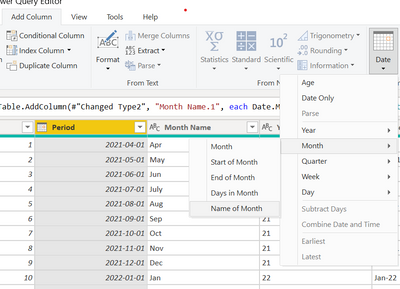
Note: Power Bi adds a new Month Name column
4. Duplicate the Month name column,
5. Rename the duplicated fiscal Month No.
6. Next i replaced this month with the numbers
a. since the start of my fiscal month is april
april = 1
may = 2
June = 3 etc
7. Convert the Data type of the fiscal month number to whole Number - VERY IMPORTANT !!!!
8. Close and apply the changes
9. In the Data view, choose the Month Column and Sort that month column by the Fiscal Month No. Column you just create.
Good Luck Data Nerds
- Mark as New
- Bookmark
- Subscribe
- Mute
- Subscribe to RSS Feed
- Permalink
- Report Inappropriate Content
I figured it out. Maybe it's clunky, but it solved what I was looking for.
I created another column using the formula below. And then I sorted my [Month] variable in the modeling tab by my new column:
if [Month] = "Jan" then 7
else if [Month] = "Feb" then 8
else if [Month] = "Mar" then 9
else if [Month] = "Apr" then 10
else if [Month] = "May" then 11
else if [Month] = "Jun" then 12
else if [Month] = "Jul" then 1
else if [Month] = "Aug" then 2
else if [Month] = "Sep" then 3
else if [Month] = "Oct" then 4
else if [Month] = "Nov" then 5
else if [Month] = "Dec" then 6
else 0
- Mark as New
- Bookmark
- Subscribe
- Mute
- Subscribe to RSS Feed
- Permalink
- Report Inappropriate Content
Actually the above code doesn't work. Power BI sorts 1, 10, 11, 12, 2, ....
I changed it to alphabets
if [Month] = "Jan" then "G"
else if [Month] = "Feb" then "H"
else if [Month] = "Mar" then "I"
else if [Month] = "Apr" then "J"
else if [Month] = "May" then "K"
else if [Month] = "Jun" then "L"
else if [Month] = "Jul" then "A"
else if [Month] = "Aug" then "B"
else if [Month] = "Sep" then "C"
else if [Month] = "Oct" then "D"
else if [Month] = "Nov" then "E"
else if [Month] = "Dec" then "F"
else 0
- Mark as New
- Bookmark
- Subscribe
- Mute
- Subscribe to RSS Feed
- Permalink
- Report Inappropriate Content
@FrugalEconomist wrote:Actually the above code doesn't work. Power BI sorts 1, 10, 11, 12, 2, ....
I changed it to alphabets
if [Month] = "Jan" then "G"
else if [Month] = "Feb" then "H"
else if [Month] = "Mar" then "I"
else if [Month] = "Apr" then "J"
else if [Month] = "May" then "K"
else if [Month] = "Jun" then "L"
else if [Month] = "Jul" then "A"
else if [Month] = "Aug" then "B"
else if [Month] = "Sep" then "C"
else if [Month] = "Oct" then "D"
else if [Month] = "Nov" then "E"
else if [Month] = "Dec" then "F"
else 0
I have the same problem, with the month, a letter didn't see good. The solution is make the numbers in text.
For example 1 to 01, in the dashboard look better.
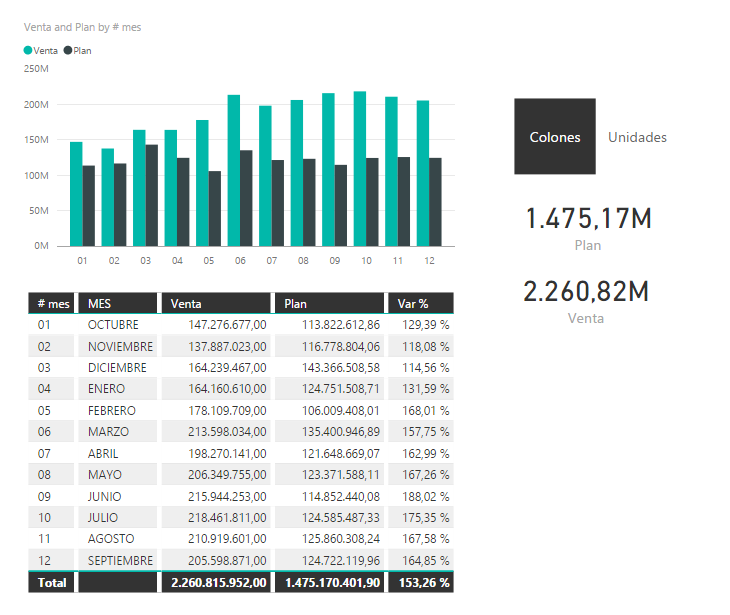
Regards.
PST: My skill language is Spanish ;-), I am learning English.
- Mark as New
- Bookmark
- Subscribe
- Mute
- Subscribe to RSS Feed
- Permalink
- Report Inappropriate Content
Hi, I am having a similar issue but I do not want 01, 02 etc. displayed on the graph, my client wants the full name of each month. Do you know how I could do this?
- Mark as New
- Bookmark
- Subscribe
- Mute
- Subscribe to RSS Feed
- Permalink
- Report Inappropriate Content
I created a column like advised from A to L and sort the table by this column, this helps to display sales from A to L, however when I put onthe x-axis the fiscal month, it goes back to the orignal alphabetic month sort. Please advise.

- Mark as New
- Bookmark
- Subscribe
- Mute
- Subscribe to RSS Feed
- Permalink
- Report Inappropriate Content
Im having the same problem, but im' not using a custom "month" field. I'm using the inbult Power BI date heirachy and it's refusing to sort by my fiscal month column. Basically each row in my dataset has a column for "Fiscal Month" that orders it by 01, 02 etc based upon the fiscal year, but sorting it via the column sort does nothing when my visual is using the month heirarchy attribute.
Any ideas?


- Mark as New
- Bookmark
- Subscribe
- Mute
- Subscribe to RSS Feed
- Permalink
- Report Inappropriate Content
I have the same problem here. I use a date table with calendar and fiscal months. When I sort the month name by the calendar month, it's ok but when I sort the month name by the fiscal month, the month appear in a strange order in my visualization.

- Mark as New
- Bookmark
- Subscribe
- Mute
- Subscribe to RSS Feed
- Permalink
- Report Inappropriate Content
do you have a Month Number ( Integer ) field
if so , you can sort the month using Month Number coumn
Helpful resources

Power BI Monthly Update - November 2025
Check out the November 2025 Power BI update to learn about new features.

Fabric Data Days
Advance your Data & AI career with 50 days of live learning, contests, hands-on challenges, study groups & certifications and more!

FabCon Atlanta 2026
Join us at FabCon Atlanta, March 16-20, for the ultimate Fabric, Power BI, AI and SQL community-led event. Save $200 with code FABCOMM.


