This time we’re going bigger than ever. Fabric, Power BI, SQL, AI and more. We're covering it all. You won't want to miss it.
Learn moreLevel up your Power BI skills this month - build one visual each week and tell better stories with data! Get started
Hey Folks,
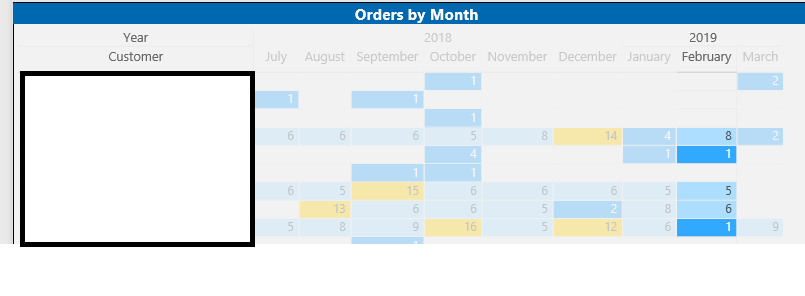
Hopefully a simple question, but is it possible for users to sort individual columns in a matrix? In this use case we would like to sort by the most orders per row for February, but we are only able to sort by the all-up total for the months in time period. Clicking the column only selects it and does not offer sorting options.
Solved! Go to Solution.
Hi @KPerrySHI ,
You do need an custom column to order your columns, but with AS, you could not add any data for your report, the only solution is add the column in AS before you connect it with Power BI or I am afraid you could not custom sort your columns.
Regards,
Daniel He
Hi @KPerrySHI ,
Based on my research, you may refer to below link to custom sort matrix header:
https://community.powerbi.com/t5/Desktop/Matrix-Column-Head-Order/td-p/71572
Regards,
Daniel He
Sadly, we connect to an Analysis Service which limits our abilities to manipulate the source data, and we can't access the Sort by Column options in the ribbon.
Was hoping there would be additional options in the visual, but I appreciate the help.
Hi @KPerrySHI ,
Could you please tell me if your problem has been solved? If it is, could you please mark the helpful replies as Answered to close this topic?
Regards,
Daniel He
Hi @KPerrySHI ,
You do need an custom column to order your columns, but with AS, you could not add any data for your report, the only solution is add the column in AS before you connect it with Power BI or I am afraid you could not custom sort your columns.
Regards,
Daniel He
Check out the April 2026 Power BI update to learn about new features.
Sign up to receive a private message when registration opens and key events begin.
If you have recently started exploring Fabric, we'd love to hear how it's going. Your feedback can help with product improvements.
| User | Count |
|---|---|
| 30 | |
| 24 | |
| 23 | |
| 17 | |
| 17 |
| User | Count |
|---|---|
| 61 | |
| 35 | |
| 30 | |
| 23 | |
| 22 |