cancel
Showing results for 
Search instead for 
Did you mean: 

Next up in the FabCon + SQLCon recap series: The roadmap for Microsoft SQL and Maximizing Developer experiences in Fabric. All sessions are available on-demand after the live show. Register now

Reply
Christianvs
Helper II
Helper II

Sorting and adding columns

Hi


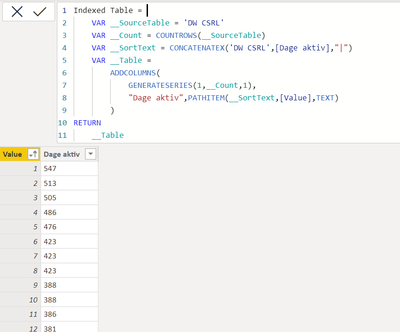
I am trying to add and index/rank row to a table and in order to not get duplicate index numbers I used the DAX writte by Greg_Deckler in this post https://community.powerbi.com/t5/Quick-Measures-Gallery/The-Mythical-DAX-Index/m-p/1093214#M528.


It works perfectly, but I have three questions that I hope someone can help me with. First:

Is there a way to ensure that the column the sorting is based on ([Dage aktiv] in my particular case) is ordered in a descending order?


And the second question:

Can I change the name of the new index row within the function so that it is something else than [Value]?


And the last question:

Can I add another row from an already existing table in the function? I tried to add another within the ADDCOLUMN function by adding ,"Number",'DW CSRL'[Number], but that do not work.


Christianvs_0-1665082607713.png


Thanks

1 ACCEPTED SOLUTION
HoangHugo
Solution Specialist
Solution Specialist

Hi

Q1: GENERATESERIES will always return index column in Ascending (1 to ...), so you can create new column to RANKX your [Value] in descending.

Q2: yes, you can change column name in your function like ADDCOLUMNS("your expected name",GENERATESERIES(..))
Q3: Yes, you can. Can you show me detail of error?

View solution in original post

3 REPLIES 3
Anonymous
Not applicable

Hi @Christianvs ,


//I am trying to add and index/rank row to a table and in order to not get duplicate index numbers
Greg's method addresses the index issue for calculated tables. Is the table you need to get the index column for a calculated table? If not, you can easily create this index column in Power Query Editor.
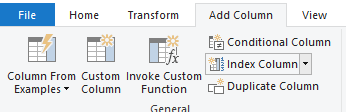
vcgaomsft_1-1665125235756.png


1. As per the above, the way I can think of is to create another calculated column, similar to:

Index = CALCULATE(COUNTROWS('Indexed Table'),FILTER(ALL('Indexed Table'),'Indexed Table'[Value]>=EARLIER('Indexed Table'[Value])))

2. You can rename the field [Value] after the new table is completed.

vcgaomsft_0-1665124987636.png

3. This requires that each line return a scalar or unique value. If satisfied, you can use RELATED (with entity relationship) or LOOKUPVALUE (without relationship) to get the value.


Best Regards,
Gao

Community Support Team


If there is any post helps, then please consider Accept it as the solution  to help the other members find it more quickly. If I misunderstand your needs or you still have problems on it, please feel free to let us know. Thanks a lot!

How to get your questions answered quickly -- How to provide sample data

HoangHugo
Solution Specialist
Solution Specialist

Hi

Q1: GENERATESERIES will always return index column in Ascending (1 to ...), so you can create new column to RANKX your [Value] in descending.

Q2: yes, you can change column name in your function like ADDCOLUMNS("your expected name",GENERATESERIES(..))
Q3: Yes, you can. Can you show me detail of error?

Thanks for your replies HoangHugo and v-cgao-msft.


I got it working now 🙂

Helpful resources

Announcements
New to Fabric survey Carousel

New to Fabric Survey

If you have recently started exploring Fabric, we'd love to hear how it's going. Your feedback can help with product improvements.

Power BI DataViz World Championships carousel

Power BI DataViz World Championships - June 2026

A new Power BI DataViz World Championship is coming this June! Don't miss out on submitting your entry.

Join our Fabric User Panel

Join our Fabric User Panel

Share feedback directly with Fabric product managers, participate in targeted research studies and influence the Fabric roadmap.

March Power BI Update Carousel

Power BI Community Update - March 2026

Check out the March 2026 Power BI update to learn about new features.