cancel
Showing results for 
Search instead for 
Did you mean: 

The Power BI Data Visualization World Championships is back! Get ahead of the game and start preparing now! Learn more

Reply
Alirezam
Helper V
Helper V

Sorting a bar chart

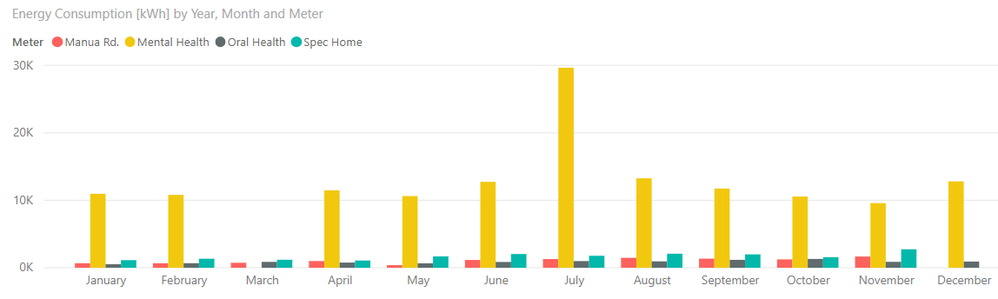
I am trying to sort a bar chart on its legend (Yellow to be on the left to Red on the right). When I choose "sort by column" it sorts the legend alphabeticalley as appeared below that I don't want.

Also, If I use the ascending/descending option from the top right corner of the chart, the months order craps !

Thank you for your time.

Capture.PNG


1 ACCEPTED SOLUTION
Ashish_Mathur
Super User
Super User

Hi,

Create a 2 column Table with Meter types in column A and numbers denoting desired sort order of meter type in column B.  So against Mental health, there should be 1 and agsinst Manua Rd. should be a 4.  Create a relationship from the Meter Type column of your Table to the Meter Type column of this new Table.  In your Data Table. write this calculated column formula to bring over the order from the new Table

Order = RELATED('Meter Type'[Order])

In your Table, click on any cell in the Meter Type column and go to Sort By Column > Order.

To your visual, drag Meter Type from your Table.

Does this work?  If not, then share the link from where i can download your PBI file.


Regards,
Ashish Mathur
http://www.ashishmathur.com
https://www.linkedin.com/in/excelenthusiasts/

View solution in original post

1 REPLY 1
Ashish_Mathur
Super User
Super User

Hi,

Create a 2 column Table with Meter types in column A and numbers denoting desired sort order of meter type in column B.  So against Mental health, there should be 1 and agsinst Manua Rd. should be a 4.  Create a relationship from the Meter Type column of your Table to the Meter Type column of this new Table.  In your Data Table. write this calculated column formula to bring over the order from the new Table

Order = RELATED('Meter Type'[Order])

In your Table, click on any cell in the Meter Type column and go to Sort By Column > Order.

To your visual, drag Meter Type from your Table.

Does this work?  If not, then share the link from where i can download your PBI file.


Regards,
Ashish Mathur
http://www.ashishmathur.com
https://www.linkedin.com/in/excelenthusiasts/

Helpful resources

Announcements
Power BI DataViz World Championships

Power BI Dataviz World Championships

The Power BI Data Visualization World Championships is back! Get ahead of the game and start preparing now!

December 2025 Power BI Update Carousel

Power BI Monthly Update - December 2025

Check out the December 2025 Power BI Holiday Recap!

FabCon Atlanta 2026 carousel

FabCon Atlanta 2026

Join us at FabCon Atlanta, March 16-20, for the ultimate Fabric, Power BI, AI and SQL community-led event. Save $200 with code FABCOMM.