Don't miss your chance to take the Fabric Data Engineer (DP-700) exam on us!
Learn moreWe've captured the moments from FabCon & SQLCon that everyone is talking about, and we are bringing them to the community, live and on-demand. Starts on April 14th. Register now
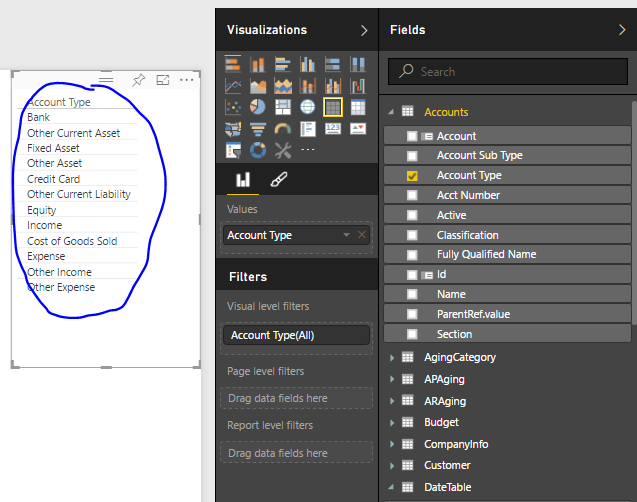
In Matix visual, how can keep "Account Type" sorted not alphabeticly, but based on GL account #?
I tried sorting based on column, but no luck.
In the example below is Quickbooksonline out of the box model, I just selected "Account Type".
Solved! Go to Solution.
You can use the "Sort By Column" functionality to accomplish this. Click on the Data tab, highlight the row, select the Modeling tab, then "Sort By Column". This will allow you to sort by a different column, such as Account Number.
Thanks,
Sam Lester (MSFT)
You can use the "Sort By Column" functionality to accomplish this. Click on the Data tab, highlight the row, select the Modeling tab, then "Sort By Column". This will allow you to sort by a different column, such as Account Number.
Thanks,
Sam Lester (MSFT)
Shouldn't the instructions read " ... Click on the Data tab, highlight the row column ..."?
hello!
is there a way to have a 2-step sorting scheme?
I have a table and the first filter has to be on a measure I created, then considering that many of that is 100%, I would like to sort the table according to another variable, which is not a measure.
Thanks in advance for helping.
Regards,
Andrea
If you have recently started exploring Fabric, we'd love to hear how it's going. Your feedback can help with product improvements.
A new Power BI DataViz World Championship is coming this June! Don't miss out on submitting your entry.
Share feedback directly with Fabric product managers, participate in targeted research studies and influence the Fabric roadmap.
| User | Count |
|---|---|
| 51 | |
| 37 | |
| 35 | |
| 19 | |
| 17 |
| User | Count |
|---|---|
| 72 | |
| 70 | |
| 39 | |
| 34 | |
| 23 |