Join us at FabCon Atlanta from March 16 - 20, 2026, for the ultimate Fabric, Power BI, AI and SQL community-led event. Save $200 with code FABCOMM.
Register now!The Power BI Data Visualization World Championships is back! It's time to submit your entry. Live now!
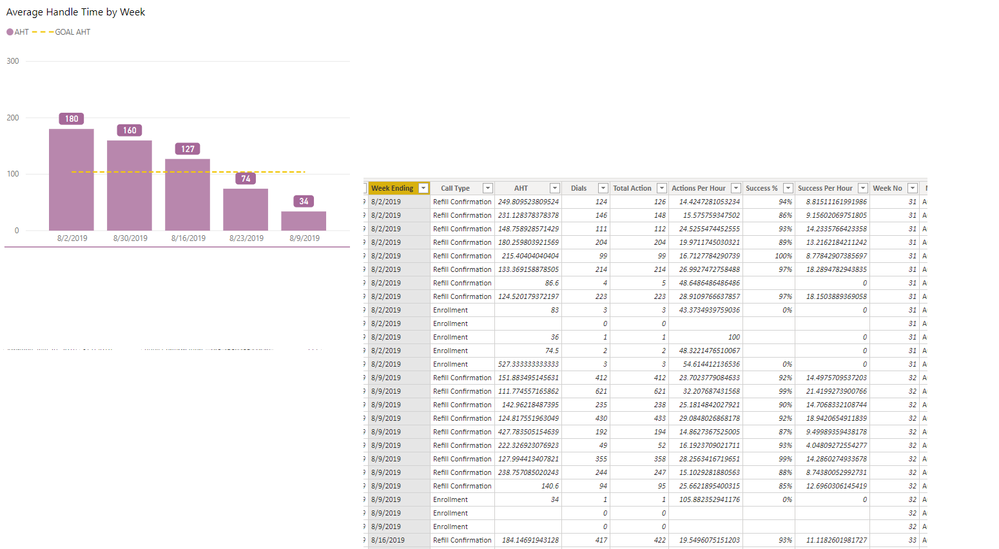
In picture I have my query data where I have AHT (the KPI) and I want to display it in sequential order of week ending date. I have a week NO column, and I clicked on my Week ENDING column, I click on sort column by Week No, which on the query looks to be correct, but not reflecting in my visual. Any ideas?
Solved! Go to Solution.
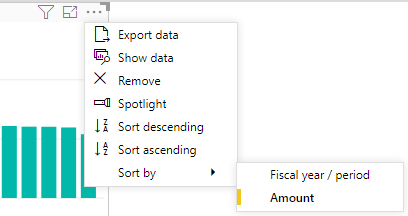
Make sure "Week Ending" is a date and in the upper corner of the visual switch the sort by to "Week Ending":
The Power BI Data Visualization World Championships is back! It's time to submit your entry.
Check out the January 2026 Power BI update to learn about new features.
| User | Count |
|---|---|
| 60 | |
| 49 | |
| 30 | |
| 25 | |
| 23 |
| User | Count |
|---|---|
| 132 | |
| 102 | |
| 59 | |
| 39 | |
| 31 |