Don't miss your chance to take the Fabric Data Engineer (DP-700) exam on us!
Learn moreNext up in the FabCon + SQLCon recap series: The roadmap for Microsoft SQL and Maximizing Developer experiences in Fabric. All sessions are available on-demand after the live show. Register now
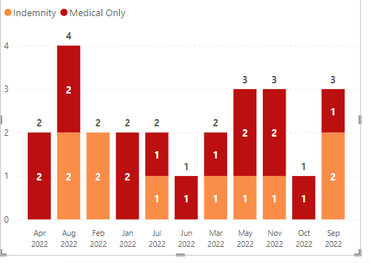
I created a Custom Column to show the following
Now what do I need to do to sort this column so it is date order like
Jan 2022, Feb 2022, Mar 2022, Apr 2022, May 2022, etc. ?
Solved! Go to Solution.
Hi @bdehning ,
According to your description, here are my steps you can follow as a solution.
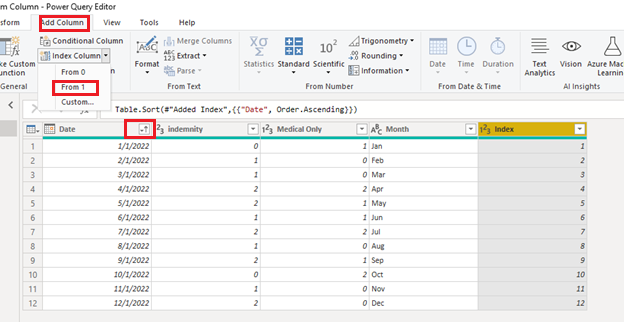
(1)Click "Transform Data" to enter the Power Query editor, sort the dates in ascending order, and click Add Index Column from 1.
(2)Click "Close and Apply", go back to desktop, switch to "Data" view, click to sort columns, and select index columns.
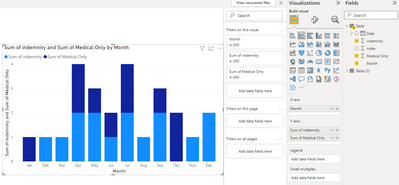
(3)Then the result is as follows.
Best Regards,
Neeko Tang
If this post helps, then please consider Accept it as the solution to help the other members find it more quickly.
Hi @bdehning ,
According to your description, here are my steps you can follow as a solution.
(1)Click "Transform Data" to enter the Power Query editor, sort the dates in ascending order, and click Add Index Column from 1.
(2)Click "Close and Apply", go back to desktop, switch to "Data" view, click to sort columns, and select index columns.
(3)Then the result is as follows.
Best Regards,
Neeko Tang
If this post helps, then please consider Accept it as the solution to help the other members find it more quickly.
Hi @bdehning ,
Quick solution: create a measure with max of your date column then use it in tooltip and sort by measure in visual.
Best Solution: create another calculated column like below
Sort = Year(date)*100+Month(date)
And sort your month and year column which is used in X axis with Sort column which we have created
For Reference: https://learn.microsoft.com/en-us/power-bi/create-reports/desktop-sort-by-column?tabs=powerbi-deskto...
If this post helps, then please consider Accept it as the solution, Appreciate your Kudos!!
If you have recently started exploring Fabric, we'd love to hear how it's going. Your feedback can help with product improvements.
A new Power BI DataViz World Championship is coming this June! Don't miss out on submitting your entry.
Share feedback directly with Fabric product managers, participate in targeted research studies and influence the Fabric roadmap.
| User | Count |
|---|---|
| 48 | |
| 44 | |
| 40 | |
| 18 | |
| 18 |
| User | Count |
|---|---|
| 69 | |
| 69 | |
| 32 | |
| 32 | |
| 32 |