Join us at FabCon Atlanta from March 16 - 20, 2026, for the ultimate Fabric, Power BI, AI and SQL community-led event. Save $200 with code FABCOMM.
Register now!Vote for your favorite vizzies from the Power BI Dataviz World Championship submissions. Vote now!
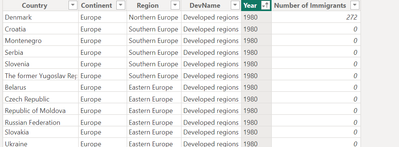
I'm working on a dataset that has a country and a year columns. After doing the transformations in Power Query and loading to Power BI the sorting of the dataset in Data view is messed up. I would like to sort the data by country and then by year.
But for some reasons I cannot sort by two columns.
Is there anything I can do?
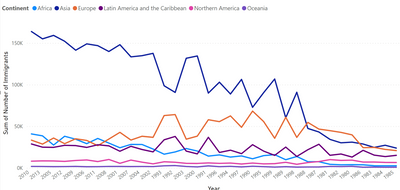
Is sorting the table in Dataview affects the visuals? Because when I make the line chart the years are not in chronological order
Please help.
Solved! Go to Solution.
Hi @AlphaTau
In PowerQuery, you can sort by multiple columns and create an index based on that sort.
Try this in PowerQuery:
1. Select the Country column and sort accordingly
2. Right-click the next column (Year) and sort accordingly.
At the far right of the column headers next to the down arrow to select/sort, you should see a tiny "1" or "2" next to Country and Year respectively.
3. Add a new Index column.
4. After you are done in PowerQuery, the Index should be available to sort by.
I hope this helps.
Hi @AlphaTau
In PowerQuery, you can sort by multiple columns and create an index based on that sort.
Try this in PowerQuery:
1. Select the Country column and sort accordingly
2. Right-click the next column (Year) and sort accordingly.
At the far right of the column headers next to the down arrow to select/sort, you should see a tiny "1" or "2" next to Country and Year respectively.
3. Add a new Index column.
4. After you are done in PowerQuery, the Index should be available to sort by.
I hope this helps.
Vote for your favorite vizzies from the Power BI World Championship submissions!
If you love stickers, then you will definitely want to check out our Community Sticker Challenge!
Check out the January 2026 Power BI update to learn about new features.
| User | Count |
|---|---|
| 64 | |
| 53 | |
| 42 | |
| 19 | |
| 17 |
| User | Count |
|---|---|
| 122 | |
| 106 | |
| 47 | |
| 30 | |
| 24 |