cancel
Showing results for 
Search instead for 
Did you mean: 

The Power BI Data Visualization World Championships is back! Get ahead of the game and start preparing now! Learn more

Reply
Ryanc2258
Helper I
Helper I

Sort the x axis in stack bar chart

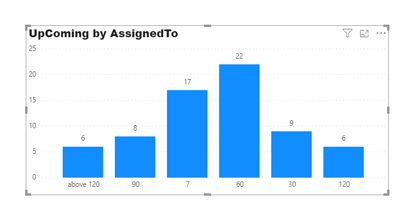
Hi, I have a stacked bar chart, the X axis shows the upcoming tasks base on upcoming dates (1, 7, 15, 30, 60, 90, 120 and above 120). Current, the bar chart shows in a ramdon order. I would like to have it show in the order of upcoming date range (1, 7, 15, 30, 60, etc). Pls help

Ryanc2258_0-1595618596770.png


2 ACCEPTED SOLUTIONS
Pragati11
Super User
Super User

Hi @Ryanc2258 ,


Check this link to create a custom order for your x-axis:

http://www.excelnaccess.com/custom-sorting-in-power-bi/


Thanks,

Pragati

Best Regards,

Pragati Jain


MVP logo


LinkedIn | Twitter | Blog YouTube 

Did I answer your question? Mark my post as a solution! This will help others on the forum!

Appreciate your Kudos!!

Proud to be a Super User!!

View solution in original post

Thank you very much. 


Question solved. 

View solution in original post

2 REPLIES 2
Pragati11
Super User
Super User

Hi @Ryanc2258 ,


Check this link to create a custom order for your x-axis:

http://www.excelnaccess.com/custom-sorting-in-power-bi/


Thanks,

Pragati

Best Regards,

Pragati Jain


MVP logo


LinkedIn | Twitter | Blog YouTube 

Did I answer your question? Mark my post as a solution! This will help others on the forum!

Appreciate your Kudos!!

Proud to be a Super User!!

Thank you very much. 


Question solved. 

Helpful resources

Announcements
Power BI DataViz World Championships

Power BI Dataviz World Championships

The Power BI Data Visualization World Championships is back! Get ahead of the game and start preparing now!

December 2025 Power BI Update Carousel

Power BI Monthly Update - December 2025

Check out the December 2025 Power BI Holiday Recap!

FabCon Atlanta 2026 carousel

FabCon Atlanta 2026

Join us at FabCon Atlanta, March 16-20, for the ultimate Fabric, Power BI, AI and SQL community-led event. Save $200 with code FABCOMM.