cancel
Showing results for 
Search instead for 
Did you mean: 

Learn from the best! Meet the four finalists headed to the FINALS of the Power BI Dataviz World Championships! Register now

Reply
ThorenSvea
New Member

Sort problems text values, swedish characters

Hi!


Having a problem sorting text values in a matrix visual.

I'm listing cities and sales and whish to sort the list by city.

The column is sorted but swedish characters (åäö) are not sorted in alphabetical swedish correct order.


I have Swedish as regional setting under Options > Currect File > Locale, doesn't help.


Anyone have a solution?


Thank you!

Thomas

4 REPLIES 4
JargerBiirli
Frequent Visitor

Now, five years down the line, I’m running into the same issue. Is it still not possible to make Power BI respect locale settings in alphabetical ordering? Recreating the report is not an option for me.

ThorenSvea
New Member

Super, thanks!

@ThorenSvea


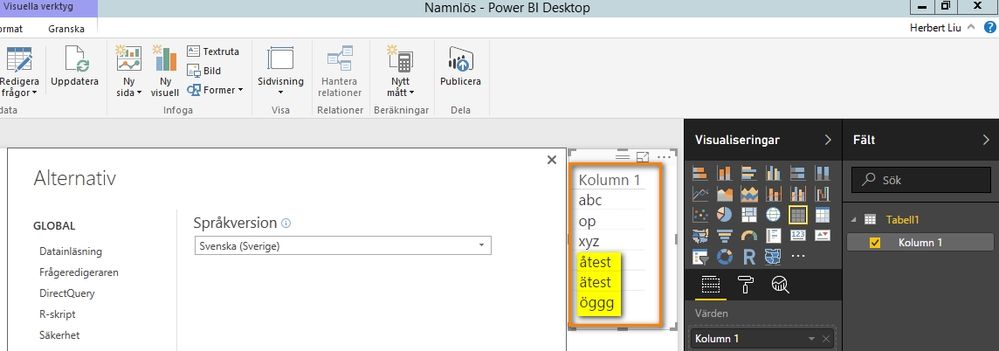
I’ve got response from PBI team for it. To build the model with correct culture/language model settings, the user should install the appropriate version of the PBI-Desktop. So you need to install the Swedish(sv-SE) version of the PBI Desktop here. Please also note that the model/pbix file would likely need to be recreated as well.

https://www.microsoft.com/sv-SE/download/details.aspx?id=45331


Sort problems text values, swedish characters_1.jpg 


Best Regards,

Herbert

v-ljerr-msft
Microsoft Employee
Microsoft Employee

@ThorenSvea


I have reproduced this issue. We will report it internally and post the updates.


Regards

Helpful resources

Announcements
Join our Fabric User Panel

Join our Fabric User Panel

Share feedback directly with Fabric product managers, participate in targeted research studies and influence the Fabric roadmap.

March Power BI Update Carousel

Power BI Community Update - March 2026

Check out the March 2026 Power BI update to learn about new features.